Passwordstate integration issues since RDM 2026.2.x

Hello,
We are having some issues with the latest versions of RDM, in that a password entry pointing to a Passwordstate server (still version 9.x) is misbehaving.
We used to set a user specific login/password at the root of a connections tree (with inheritance enabled), and this login/password combo is normally collected from an entry in one of the Passwordstate lists. The Passwordstate password entry, located in the user vault, is configured so that it is not pointing directly to a given Passwordstate list. However, what normally occurred is that the user set in the root of connections tree a particular entry from a Passwordstate list (that is, he/she browse the Passwordstate entries until he/she gets to the desired credential), and this selection lasted from then on.
Now, instead, whenever a connection is open, in which the resulting credential is coming from Passwordstate, the following dialog is presented, and not just once, but on every time a connection is to be made to the Passwordstate server: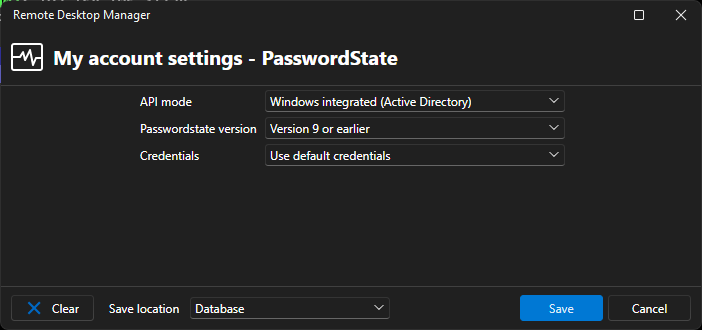
We have always confirmed the data shown with the Save button, using as the save location Database (or Default (Database) combo selection, which is the same), but eventually the configuration is never saved properly, and the dialog reappears at the next iteration. BTW, by confirming the data in the dialog, the correct credential entry is finally retrieved from Passwordstate and injected in the opening session.
We are asking if there is some log we could check for potential issues, or other suitable known workarounds.
Thanks.
rdm_passwordstate.png
All Comments (1)
Hello,
Thank you for the detailed report.
The "My account settings Passwordstate" dialog reopening on every connection after the 2026.2 upgrade is a pattern we have seen from other customers running Passwordstate V9.
It is under active investigation on our side.
Before we dig deeper into your specific setup, could you first update your RDM client to the current latest Windows build, 2026.2.14.0 (released 2026-07-15)?
Several User-Specific Settings persistence fixes landed in 2026.2.13.0 and 2026.2.14.0.
A retest on the newest build is the fastest way to know if any of them cover your case.
You can pull the installer from https://devolutions.net/remote-desktop-manager/home/download/.
If the popup still appears after the upgrade, please share the items below so we can correlate your report with the open investigation:
- The exact Passwordstate 9.x build (Passwordstate → System Settings → About).
- The RDM data source type your users connect through (SQLite, SQL Server, DVLS, or Devolutions Cloud).
- One fresh screenshot of the "My account settings — Passwordstate" dialog with the Save location dropdown visible.
- The most recent RDM log from %APPDATA%\Devolutions\RemoteDesktopManager\Logs\ captured during one full cycle: open RDM, open one Passwordstate-backed session, click Save on the dialog, then close RDM.
For reference, the supported Passwordstate integration modes are documented here:
https://docs.devolutions.net/rdm/concepts/intermediate-concepts.md/external-password-managers-integration/
Please share the requested items and we will pair your findings with the ongoing investigation.
Best regards,
Carl Marien