BUG: RoboForm Integration failing at 2FA (BadMultiFactorException) on latest RDM 2026.2.13.0
BUG: RoboForm Integration failing at 2FA (BadMultiFactorException) on latest RDM 2026.2.13.0

Hello,
We are experiencing a broken integration with RoboForm in the latest version of RDM. Our administrators are unable to open the RoboForm Vault within RDM because the 2FA (OTP via email) authentication fails completely. The OTP emails are never generated or sent by RoboForm when requested via RDM.
Environment:
- RDM Version: 2026.2.13.0 64-bit (JIT)
- RoboForm Version: 9.9.4.6 (Latest)
Troubleshooting done so far: We opened a ticket with RoboForm Support regarding the missing OTP emails. Their response points directly to an outdated protocol being used by the application initiating the request (RDM):
"It appears that the RoboForm application on the device you are remoting into is very old and the 2FA is being rejected due to its out of date 2FA protocol."
Since our local RoboForm client is fully up to date, it indicates that the PasswordManagerAccess library built into RDM is using a deprecated API call (ScramSequence) that RoboForm servers now actively reject at the OTP validation step.
Error Log from RDM:
Plaintext
PasswordManagerAccess.Common.BadMultiFactorException: Invalid second factor code
at PasswordManagerAccess.RoboForm.Client.Step2(Credentials credentials, OtpOptions otp, AuthInfo authInfo, RestClient rest)
at PasswordManagerAccess.RoboForm.Client.PerformScramSequence(Credentials credentials, OtpOptions otp, RestClient rest)
at PasswordManagerAccess.RoboForm.Client.Login(Credentials credentials, Ui ui, RestClient rest)
at PasswordManagerAccess.RoboForm.Client.Login(ClientInfo clientInfo, Ui ui, RestClient rest)
at PasswordManagerAccess.RoboForm.Client.OpenVault(ClientInfo clientInfo, Ui ui, IRestTransport transport)
Could your engineering team verify if the RoboForm integration module needs an update to support their current 2FA implementation? Currently, our only workaround is to disable 2FA on the RoboForm account, which is a major security compromise for our infrastructure.
Thank you in advance for your help.
Recommended Answer
Hello,
I can confirm that the fix we implemented indeed made it to the 2026.2.17. We've been unable to replicate your current problem (MFA seemingly failing silently). I've just added a more complete "flow log" to the RoboForm process. We would need you to send us the logs that result from it, so we can help pinpoint the issue.
For this, you would have to go into File - Settings - Advanced, and then click on the menu next to Debug level, and ensure Debug is checked. (Screenshot A)
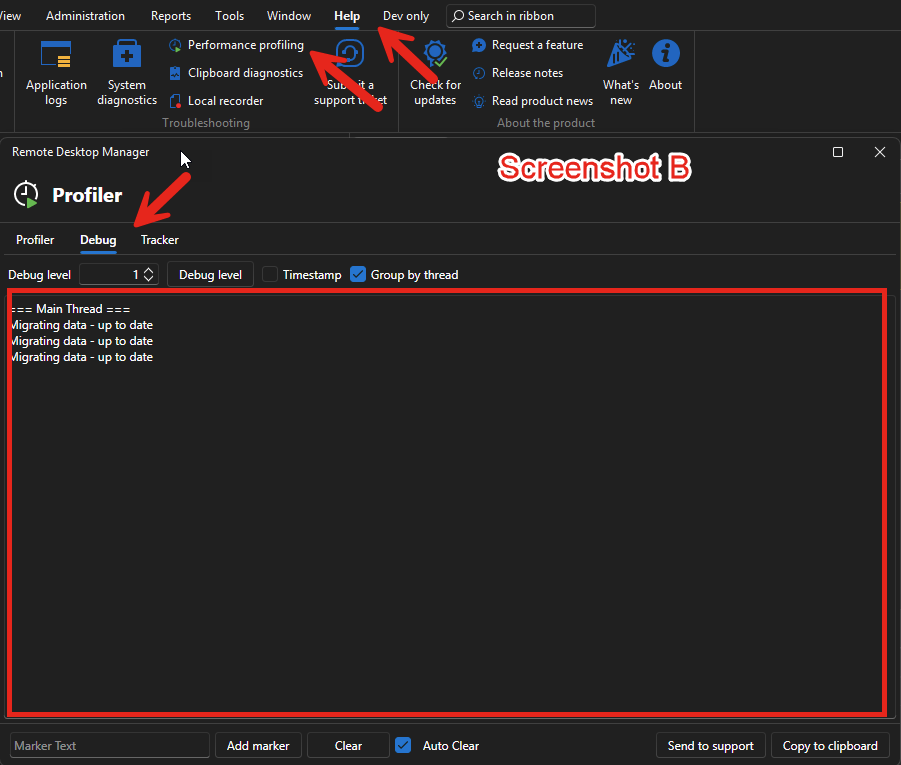
Then, in the Help section of the Ribbon, open the Performance profiling, and go to the Debug tab. (Screenshot B) You can leave this open as you do your usual things.
From there, simply attempt to use RoboForms are you normally would, until the MFA prompt issue happens. This should log information right in the Debug window, you can then send to me via direct messaging.
Note that you can't do this "yet", we first need to release the 2026.2.18 version, and you need to update to it, the RoboForm "flow logs" isn't in the currently released version. This release should happen fairly soon.
Regards,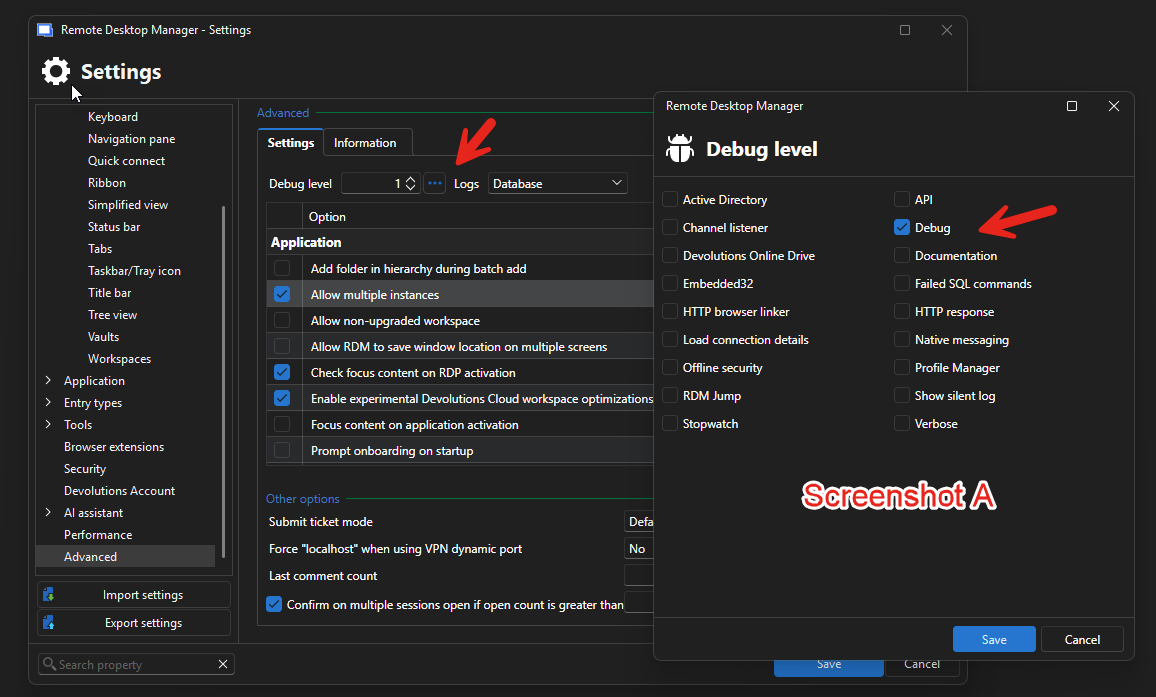
Jafran Majeau
3a35147d-ac47-47d7-8fc6-1de647ef21dd.png
4f412d18-eb51-4f52-abb3-20e5abb9568f.png
All Comments (4)
Hello,
We've received another report of this issue. We have a ticket opened and will contact the developer in charge of the library we use.
Regards,
Hubert Mireault
Hello,
We've updated our integration after the latests changes RoboForm applied to their APIs. The issue should be fixed, and you can expect this with the upcoming 2026.2.17 version.
Regards,
Jafran Majeau
Hello,
Unfortunately, the issue is not resolved in Remote Desktop Manager 2026.2.17.0.
We installed version 2026.2.17.0, restarted RDM and tested the RoboForm integration again. RDM opens the second-factor authentication window, but no OTP email is received from RoboForm. Since no code is available, we eventually have to cancel the authentication window manually.
Consequently, the log from version 2026.2.17.0 contains:
PasswordManagerAccess.Common.CanceledMultiFactorException: Second factor step was canceled by the user
This exception is only the consequence of manually closing the OTP window. It is not the root cause of the problem. The actual problem remains that no OTP email is generated or delivered when the RoboForm authentication request is initiated through RDM.
The log entry is explicitly marked as originating from RDM 2026.2.17.0 – 64-bit, so the test was performed with the version in which the updated RoboForm integration was expected to be included.
Could you please verify whether the updated RoboForm integration and the correct version of PasswordManagerAccess.dll were included in the published 2026.2.17.0 build?
Please also let us know whether we can enable more detailed logging that would show the request sent to RoboForm when the OTP email is triggered.
Hello,
I can confirm that the fix we implemented indeed made it to the 2026.2.17. We've been unable to replicate your current problem (MFA seemingly failing silently). I've just added a more complete "flow log" to the RoboForm process. We would need you to send us the logs that result from it, so we can help pinpoint the issue.
For this, you would have to go into File - Settings - Advanced, and then click on the menu next to Debug level, and ensure Debug is checked. (Screenshot A)
Then, in the Help section of the Ribbon, open the Performance profiling, and go to the Debug tab. (Screenshot B) You can leave this open as you do your usual things.
From there, simply attempt to use RoboForms are you normally would, until the MFA prompt issue happens. This should log information right in the Debug window, you can then send to me via direct messaging.
Note that you can't do this "yet", we first need to release the 2026.2.18 version, and you need to update to it, the RoboForm "flow logs" isn't in the currently released version. This release should happen fairly soon.
Regards,
Jafran Majeau
3a35147d-ac47-47d7-8fc6-1de647ef21dd.png
4f412d18-eb51-4f52-abb3-20e5abb9568f.png