Copy / Paste - Not keeping trailing spaces

Pasting text into an SSH terminal session strips trailing whitespace only. Leading and internal spaces paste correctly. Reproducible from any clipboard source (Notepad, other apps, and copying from within the SSH terminal itself). Clipboard copy method: Legacy. Bracketed paste: tested both Default and No, no change.
Example: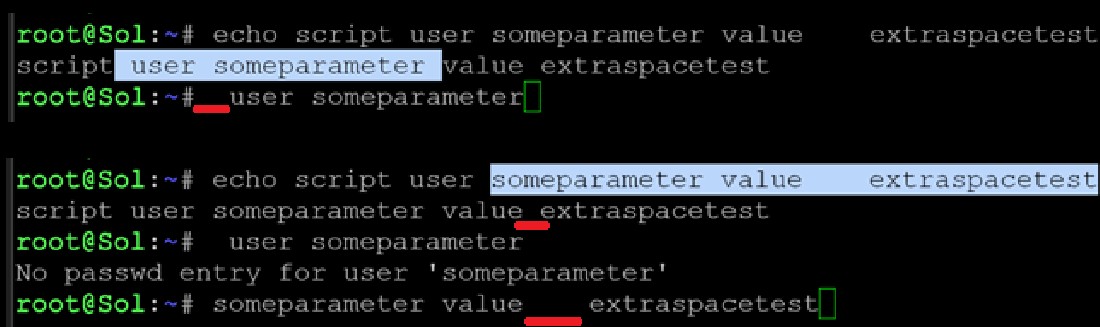
I also noticed that the terminal seems to trim extra spaces between words - not sure if thats related.
Google mentioned half a dozen places to check including clipboard options, terminal types, bracketed paste mode, autocomplete, ctrl+shift+v but I either cant find the setting or it doesnt work. Any suggestions?
Thanks!
paste2.jpg
All Comments (1)
Hello,
Thank you for reaching out about this matter.
I was able to reproduce the trailing-space issue, and there does not appear to be a setting to change this behavior. I also tested externally in PuTTY, where trailing spaces worked as expected.
I will report this bug to the development team so they can begin working on a fix. I will follow up with you as soon as a fix is deployed in a future update.
Regarding the extra spaces between words, this appears to be expected behavior based on my research into Bash terminals. I tested the same scenario in PuTTY using the echo command, and the behavior was the same. However, I only tested with echo, so please let me know whether you are seeing issues with other commands due to space trimming.
I look forward to your reply.
Best regards,
Jacob Lafrenière