VMware synchronizer not importing hostname

I've been using RDM for years now, but I decided to try the VMware sync today for the first time. It seems to import everything correctly except for the hostname, which it just inserts the vCenter server's FQDN instead.
The only option that I've found that seems as if it would affect the import of the field is the Hostname/Host type option under the General > Fields tab, but the only options I have besides "Default" are IPv4 and IPv6. I would be fine with using the IPv4 address instead of Hostname, or possibly the DNS name, but it still just inserts the vCenter server's FQDN using that option, as well.
I'm not sure if I'm missing an option somewhere or not, but any help figuring out what I need to do to have it import something usable into that field (or maybe a link to a guide) would be greatly appreciated.
All Comments (3)
Hi,
Thanks for the detailed report. To help track this down, could you share a few details?
Product and platform: Remote Desktop Manager for Windows, is that correct?
Version: what's your exact RDM version?
Workspace: are you using a Devolutions Server (DVLS) workspace, an SQL data source, or Devolutions Cloud?
Connection type/template: what connection type does your VMware sync template use (RDP, SSH, or another)?
It would also help to see a screenshot of the Hostname/Host type option you mentioned (General > Fields tab), along with the resulting entry showing the incorrect Host value. That way we can confirm we're looking at the exact same behavior.
Thanks in advance, looking forward to your reply.
Best regards,
Alexis Geller Peiro
Product and platform: RDM free on Windows Server 2022
Version: 2026.2.9.0 64-bit (PreJIT)
Workspace: SQL data source
Connection type/template: RDP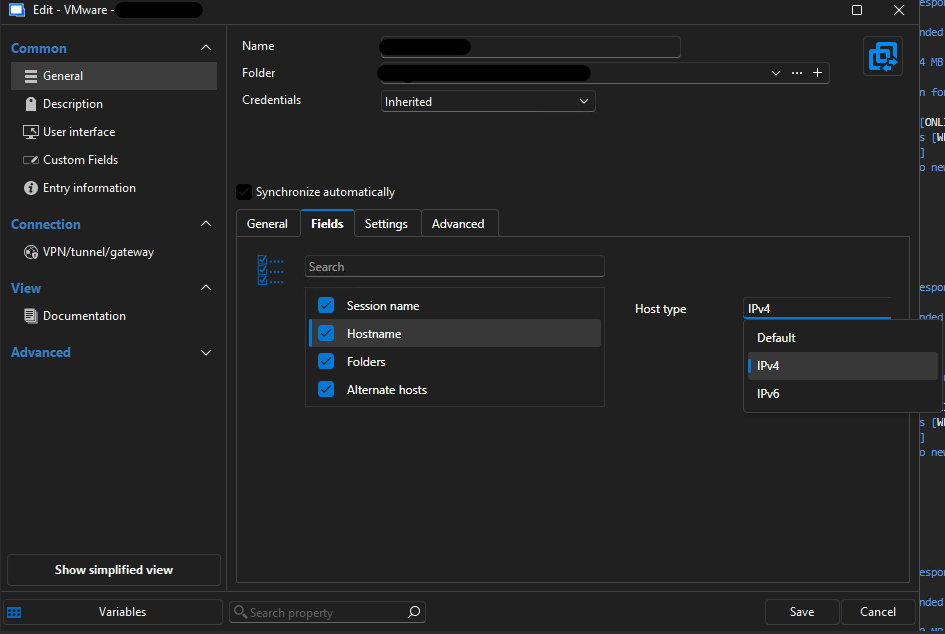
I'm unable to share the VMware/vCenter host that I'm connecting to but, the FQDN (vcenterserver.domain.name) in the "Host" field in the VMware synchronizer entry, under the Common>General>General tab, is the same address that is populating the "Host" field under all RDP session objects that are created by the sync mechanism.
Screenshot 2026-07-09 155003.png
Hi @estew627,
Thanks for confirming those details, that's very helpful.
We've been able to identify the cause: this is a known issue affecting the Host type setting for VMware synchronizer entries when the RDP connection type is used. In your version (2026.2.9.0), that setting doesn't show all the options it should, which results in the vCenter server's FQDN being used for the Host field, both on the synchronizer entry and on the RDP sessions it creates.
A fix has already been made on our end and is planned for an upcoming release. We don't have a confirmed release date yet, but we'll follow up here as soon as it's available.
In the meantime, we don't have a clean workaround that survives future syncs, since any manual edit to the Host field would get overwritten on the next synchronization. If you need a correct Host value in the short term, one option is to temporarily disable automatic synchronization on the entry and set the Host manually until the fix is released.
Thanks again for your patience, we'll keep you posted here.
Best regards,
Alexis Geller Peiro