Global Search Across Multiple .db files to run a session
Global Search Across Multiple .db files to run a session
1 vote

I have created multiple .db files ( out of necessity ) and currently click on the drop down and switch to the .db file I need to use. I often switch throughout the day, what I am asking for is a way to search globally across all opened .db files to open a session.
Example:
App1.db is my currently focused .db and instead of switching to App3.db to run Session9, I would click on the search while still in App1.db and it would find Session9 and allow me to click on it to launch it.
App1.db
Session1
Session2
Session3
App2.db
Session4
Session5
Session6
App3.db
Session7
Session8
Session9
All Comments (2)
Hello,
I assume you are working with RDM free on a XML or SQLite workspace type.
From what I understand of your setup, you are trying to do something we already support in our Devolutions Cloud, Devolutions Server and SQL Server workspace types.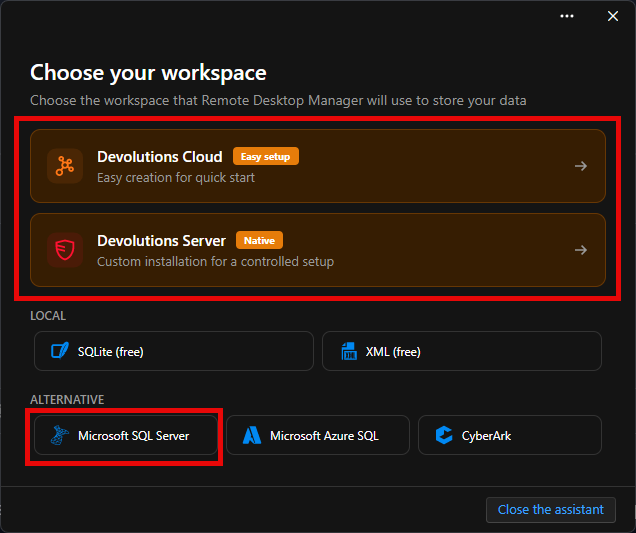
These workspaces support having multiple "vaults" and are generally intended to work well when used with a team rather than a single user.
However, they can be used by a single user and our "Devolutions Cloud" workspace can be used for free for a single user.
I would encourage you to give it a try. Here is what you need to do :
- Ensure you are using the latest version of RDM and go in File -> Workspaces
- Add a new workspace
- Select Devolutions Cloud
- Enter your email and hit the "..." to browse hosts. This will either take you to the Devolutions Account creation or the Devolutions Cloud workspace creation
- Create your account if needed
- In the "..." prompt, you can seleect "Create a new Devolutions Cloud"
- Choose a name for your workspace and select the most appropriate region.
- Create the workspace and connect to it
- Once here you can go in "Administration -> Vaults" and click on the "+" to add vaults. You will then see a new dropdown appear in the navigation pane where you can select your active vault.
- Export all entries from each of your different db and import them in their respective vaults you just created for each of them
- You now have a single workspace that contains all your entries and they are still separated accross multiple vaults
We also have very basic multi-vault search capabilities included in "View -> Search -> Advanced search (F11)".
You can also use the Devolutions Server or SQL Server workspaces if you want but they require a bit more setup to work.
As for a multi-datasource/workspace search, it is not in our plans to do and there are some technical difficulties that need to be addressed before it is possible.
Please let us know if this works for you.
Best Regards,
Michaël Beaudin
ad886828-5ccd-4aff-8b4e-8b738e2d2e22.png
Thank you for the detailed response, I will test the options, much appreciated.