Website entry reverting to localhost when using Edge

Hello.
I'm configuring a Website entry that connects through an SSH tunnel to reach its final destination.
When I configure the entry to use Chrome, everything works without any issues.
However, when I configure the entry to use Edge, it reverts to localhost.
For example:
https://abdc.xv reverts to https://localhost
Since Chrome is marked as Deprecated, how can I resolve this issue with Edge?
Our data source is Devolutions Server.
RDM version: 2025.3.32
This problem occurs for all RDM users.
Thank you for your help.
All Comments (3)
Hello,
Thank you for the detailed report and version information.
This is a known issue on our end. When a Website entry is used through an SSH tunnel and opened in Edge, the browser can end up showing localhost in the address bar instead of resolving to the actual destination, while Chrome does not exhibit this. Our team is actively investigating this behavior, since Chrome is deprecated and being phased out.
To help narrow this down on our end, could you confirm how your SSH tunnel is configured:
Is it set to Local (a static port forward to a specific destination) or Dynamic (a SOCKS5 proxy)?
Is the Website entry linked to the tunnel through the VPN/Tunnel/Gateway section, or are you pointing the Website entry URL directly at the forwarded local address (for example https://127.0.0.1:{port})?
Knowing which mode you are using will let us confirm whether this matches the exact scenario already under investigation or if there is a different cause specific to your setup.
Best regards,
Carl Marien
Hello.
--> Is it set to Local (a static port forward to a specific destination) or Dynamic (a SOCKS5 proxy)?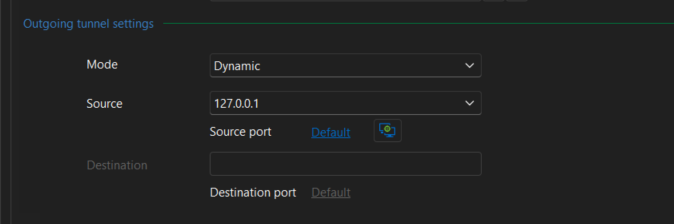
--> Is the Website entry linked to the tunnel through the VPN/Tunnel/Gateway section, or are you pointing the Website entry URL directly at the forwarded local address (for example https://127.0.0.1:{port})?
It´s connected through the VPN/Tunnel/Gateway section.
This is the configuration in that field.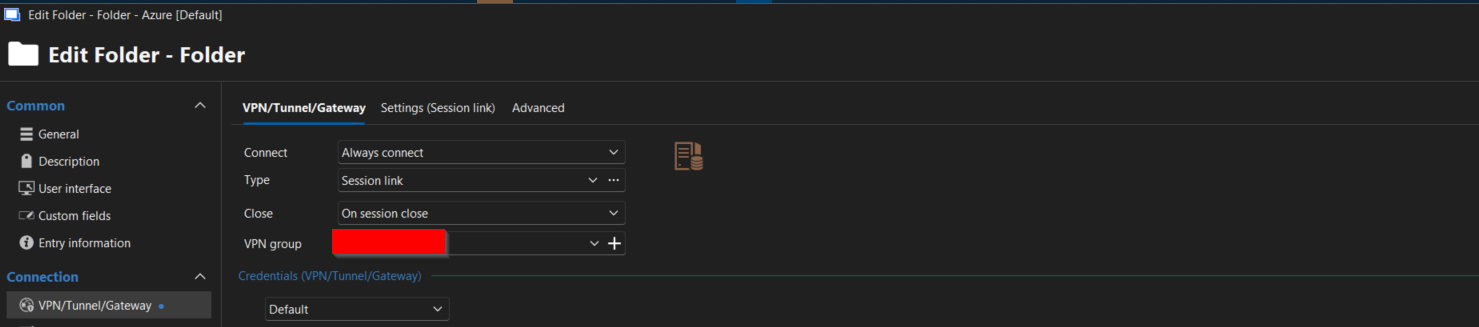
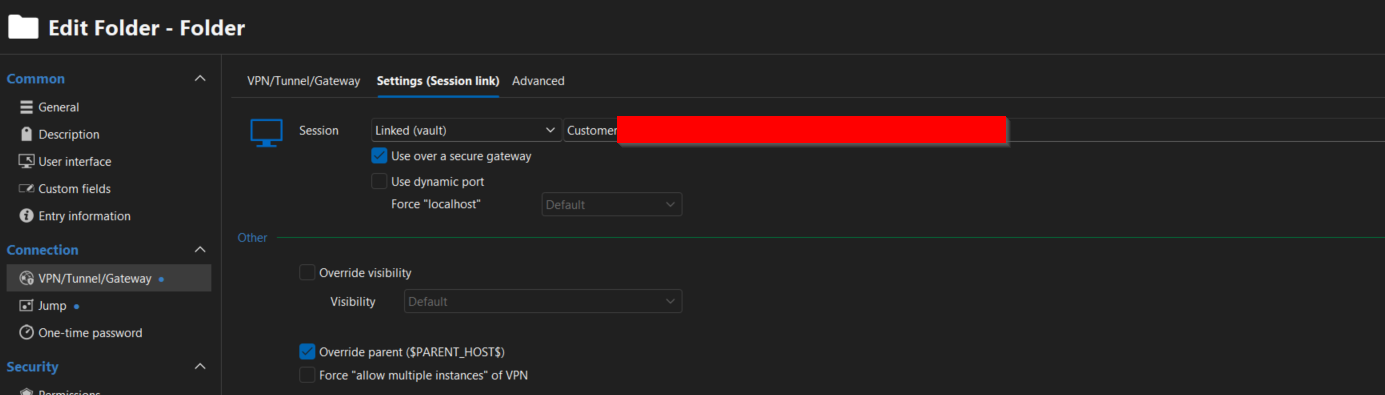
Regards
Ricardo Neves
afaa7dc3-8e7b-4cd8-85ec-b5ada8a25355.png
57129535-128c-424a-b1ca-457f356a2b72.png
9e36313d-9951-4584-9f7e-29cfb41a45cb.png
Hello,
Thank you for providing the additional information.
Based on your configuration, your setup matches a known issue we are currently tracking internally. Specifically, it occurs when a Website entry is configured to use an SSH tunnel through the VPN/Tunnel/Gateway section and is opened using the Embedded Edge browser, causing the destination URL to be rewritten to localhost.
At this time, our development team is investigating the issue. Since the legacy Chrome web entry has been deprecated, we understand the impact this has on your environment and have forwarded your report to help prioritize the investigation.
Unfortunately, I do not have a workaround to offer at the moment. I will keep your case associated with the internal investigation and will update you as soon as I receive any news from our development team.
Thank you for your patience and understanding.
Best regards,
Carl Marien