First RDP launch sometimes does not establish the SSH tunnel connection, second launch works
First RDP launch sometimes does not establish the SSH tunnel connection, second launch works

Hi,
I'm experiencing an issue when using an SSH Tunnel configured as the VPN for an RDP session.
The VPN (SSH tunnel) is configured on the folder and inherited by the RDP entry.
Sometimes the first attempt to open the RDP session does not establish a connection. The RDP client stays in the initialization phase and eventually times out. If I close both the RDP session and the SSH tunnel, then launch the exact same RDP entry again (which recreates the SSH tunnel automatically), it connects successfully.
Here are my observations:
- I can confirm that the SSH tunnel itself is fully established before the RDP client is launched.
- The RDP client definitely attempts to connect to a localhost port, as expected when using the SSH tunnel.
- However, when the first attempt does not succeed, I can see in the SSH logs that the connection request for the destination host is never initiated. In other words, the SSH server never receives the request to open the forwarded connection for the RDP destination.
- On the second attempt, the SSH tunnel behaves as expected: the forwarded connection request is triggered, the SSH server opens the connection to the destination host, and the RDP session connects successfully.
- The SSH Tunnel VPN settings are configured with Use over a secure gateway, and Use dynamic port.
From what I can see, this doesn't appear to be an issue with the SSH tunnel failing to establish. Instead, it looks as though the first RDP launch sometimes doesn't trigger the forwarded connection through the existing tunnel, even though the RDP client is connecting to the local forwarded port.
Has anyone experienced something similar, or is this a known issue? Are there any additional RDM logs that would help determine why the first RDP launch doesn't appear to initiate the forwarded connection through the SSH tunnel?
Thanks!
All Comments (12)
Hello,
Thank you for the detailed explanation. Based on what you've described, it sounds like the SSH tunnel is being established successfully, but the RDP session may be attempting to use it before everything is fully ready.
Could you try the following?
- Open the VPN settings for your SSH Tunnel entry.
- In the SSH settings, enable or increase the Delay before reconnecting option.
- Then go to Advanced and increase the Delay after execution to around 10 seconds.
This will give the SSH tunnel additional time to become fully available before the RDP client attempts to connect.
Please let us know if increasing the delay resolves the issue or if the behavior remains the same. If it still occurs, we can investigate further with additional logging.
Best regard
Carl Marien
Hello,
thanks for your reply.
The "Delay before reconnecting" is already set to 30 seconds.
The "Delay after execution" is already set to 3 seconds but I see clearly in the log the the SSH Tunnel is established and ready in the 1 second.
Hello,
Thanks for the extra detail the fact that the SSH server never receives the forwarded connection request on the first attempt (but does on the second) is very useful, and rules out the tunnel-establishment delay.
Could you try the following, in this order, and let us know which one changes the behavior?
- Switch off "Use dynamic port" on the SSH Tunnel VPN and set a fixed local port instead. Dynamic port assignment adds a small readiness window between the local listener being bound and the forwarder being wired to the SSH channel — using a fixed port eliminates that race entirely.
- Change the VPN connection mode on the folder from Open at folder level to Open before session / Close after session (or vice-versa, whichever you are not currently using). This changes when the tunnel is created relative to the RDP launch.
- Enable RDM advanced diagnostic logs: Help → Diagnostic → Advanced Logs → Enable, reproduce the failing first launch and the working second launch, then send us:
- the RDM diagnostic log,
- the SSH Tunnel log (found under the same Diagnostic menu),
- and the corresponding time-window from your SSH server log.
- The timestamps between "listener bound" in the RDM tunnel log and the first direct-tcpip request on the SSH server side are what we need to confirm the race.
- Confirm the SSH engine used by the tunnel (Devolutions SSH vs. PuTTY/plink vs. OpenSSH) in the VPN's advanced tab. If it's currently Devolutions SSH, please retest once with PuTTY or OpenSSH to see if the behavior changes.
The step that's most likely to resolve it outright is #1 (fixed port). Steps #3 and #4 will let us pinpoint the root cause if #1 and #2 don't fix it.
Best regards,
Carl Marien
Hello,
thanks for the troubleshooting steps.
It is not possible for me to go with option 1 since the RDP entries in the folder inherit the VPN config from the folder and I need to be able to open multiple RDP connections in the folder simultaneously.
Option 2 and 3 I can not find them in RDM
I can't find "VPN connection mode" in the VPN options of the folder.
Also I don't have Diagnostic in the Help Tab in the ribbon
Best regards,
Tim
Hello,
Thanks for the follow-up and for clarifying your setup.
You're right—the fixed-port suggestion isn't suitable since you need multiple RDP sessions running in parallel through the same SSH tunnel.
A workaround that has helped in similar cases is to move the SSH Tunnel link from the folder to each individual RDP entry.
For each RDP entry:
- In VPN/Tunnel/Gateway, set Type to Session link.
- Select your existing SSH Tunnel entry.
- Set Connect to Always connect.
- Set Close to On session close.
This keeps dynamic ports while avoiding potential conflicts caused by folder-level inheritance.
If you'd prefer to keep the tunnel at the folder level, could you try setting:
- Connect: Always connect
- Close: Never
This keeps the tunnel open between launches and may avoid the issue.
Could you also send us a screenshot of Help > About in RDM? That will confirm your exact version and edition so we can provide the correct logging instructions.
Best regards,
Carl Marien
Hello,
I would prefer to keep the tunnel at the folder level.
The settings was already at Always connect for the connect setting.
For the Close setting in don't have "Never" but "Manually later"
I can try it but it likely wont help since the problem sometimes happens also on the first connection of the day.
If I know were to activate the logs we hopefully can find better insights on the problem.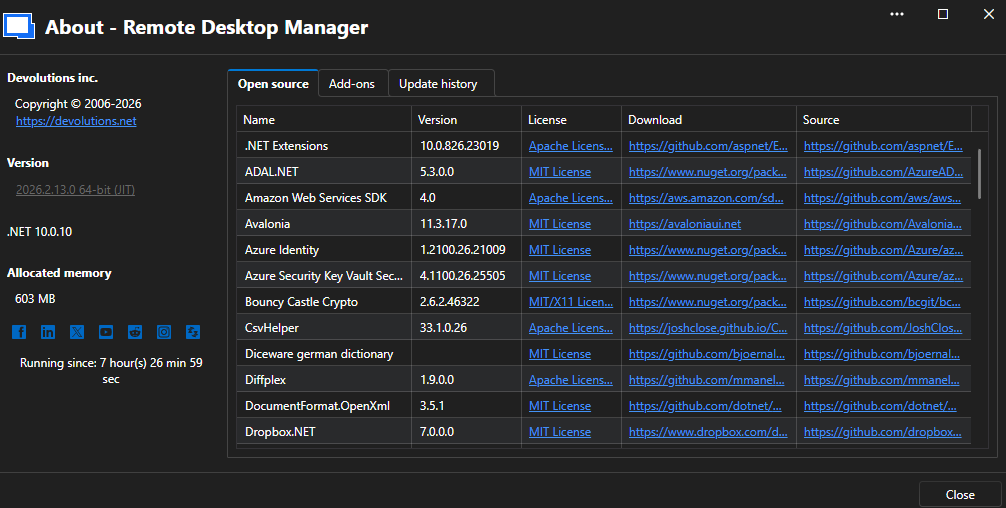

6a9ba857-5769-4ad0-808b-96942f5cdef4.png
27c269be-ceae-4495-83e1-2f9111fdf6eb.png
Hello Tim,
Thank you for the screenshots.
The log controls are still under the Help tab; the button may be hidden if the ribbon is in compact mode.
Please expand the ribbon (double-click any tab header if minimized) and use the following buttons in the Help tab:
- Application Logs > Report tab > Send to Support.
- Performance profiling > refresh the workspace while holding Ctrl, reproduce one failing launch and one successful launch, then use Send trace to support.
Could you also confirm which SSH engine is selected in the SSH Tunnel entry's Advanced tab (Devolutions SSH, PuTTY, or OpenSSH)?
The direct-tcpip behavior differs between engines and this detail will help narrow the cause.
As an interim workaround, adding a small pre-warm step on the SSH Tunnel entry, such as a short SSH shell command executed on tunnel open, often masks this timing issue by triggering the forwarded channel before the RDP client starts.
Finally, is the failure limited to the first launch of the day, or does it also happen intermittently later on?
Reference: https://docs.devolutions.net/rdm/knowledge-base/how-to-articles/send-application-logs/
Best regards,
Carl Marien
Hi,
I send the Application Logs.
The performance profiling is since I can't reproduce the issue at will. But when the issued happend the Profiler was loading really but then empty when opening it.
The SSH Tunnel uses SSH from the RDM embedded.
The failure is not limited to the first launch. Typically if the issue happens it happens on the first time opening a RDP connection at that day but afterwards other connections also have on problems on first opening and in 1 or 2 cases I think even the same connection later in the day.
Thanks.
Tim
Hi,
I did manage to capture the problem with the Profiler.
The connection did not work on first try and then on the second it worked.
I did send it to the Support if you did not receive it can also send it here if needed.
I am looking forward to your findings from the logs.
Thanks
Tim
Hello,
Thank you for sending the Application Logs.
Based on everything you have shared, we have opened an internal QA investigation into this issue. We will follow up as soon as we have more information, or if we need anything further from you.
Best regards,
Carl Marien
Hello,
We've managed to reproduce the issue, and a ticket has been sent to the Engineering team.
Best regards,
Antoine Mauger
Hello,
Thank you for being so patient!
I'm pleased to inform you that a new version of RDM (2026.2.18.0) has been released, featuring the fix for your issue.
Latest Version: Download RDM
Please let us know if this works or if you encounter any issues.
Best regards,
Maxim Robert