Switching between favorite sessions is no longer possible with a single click
Switching between favorite sessions is no longer possible with a single click

Hello,
since around version 2026.2.xx.x, it's no longer possible to switch between active RDP sessions in the Favorites View with a single click. Now I always have to use the context menu and select "Switch to Session". Is there any way to revert this to the previous behavior?
Thanks in Advance!
All Comments (6)
Hello,
Do you mean you need to press this button to make it switch and that compared to before you just had to select it in the navigation panel and it would directly switch to that opened embedded session?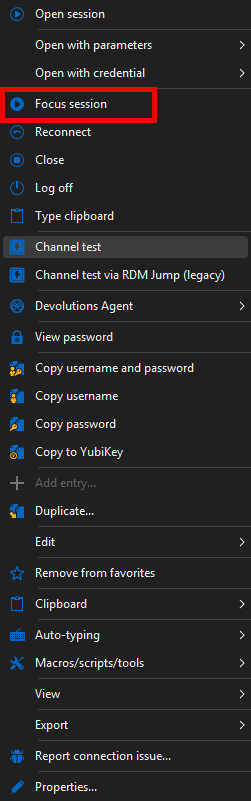
If so then I can reproduce the issue. We will open a ticket to being back the old behavior and keep you updated on the progress.
Best Regards,
Michaël Beaudin
2375fc47-8795-4215-ba7d-534e22c8816a.png
Hello,
I'm really sorry I didn't check what the option is called in English beforehand and simply guessed.
Yes, I meant that I have to click "Focus session" in the context menu (as shown in your screenshot) every time I want to switch between active rdp sessions in the favorites view. In earlier versions and in the regular vault view, a simple left-click on another active RDP session entry was enough to switch between them.
I would be very happy if this could be fixed, or at least if there was an option to restore the old behavior.
Thanks and best regards
Florian
Hello,
I've found and fixed the issue. You can expect this to take effect with the upcoming 2026.2.13 version.
Regards,
Jafran Majeau
Thank you very much!
Best regards,
Florian
Hello,
Thank you for being so patient!
I'm pleased to inform you that a new version of RDM (2026.2.13.0) has been released, featuring the fix for your issue.
Latest Version: Download RDM
Please let us know if this works or if you encounter any issues.
Best regards,
Maxim Robert
Hello,
I just tried it, and it's working perfectly again!
Thank you so much for the quick fix!
Best regards
Florian