What is the purpose this

Ok, on the name field, what is the purpose of the line just below the pin. I cannot manually adjust the window. Why is it even here? the line to the right I can adjust the window, but if the names of my folders/objects are too big then i have only been able to find is to right click and hit best fit. Isn't that the purpose the bar?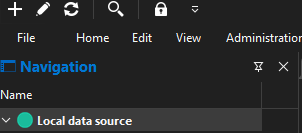
f8265c65-9a08-4312-ba63-83534486edc2.png
ca3c16f0-4854-4b18-b47d-1d54e7257f65.png
All Comments (7)
Ok, on the name field, what is the purpose of the line just below the pin. I cannot manually adjust the window. Why is it even here? the line to the right I can adjust the window, but if the names of my folders/objects are too big then i have only been able to find is to right click and hit best fit. Isn't that the purpose the bar?
Hello.
That line is there to allow room for additional columns in the grid.
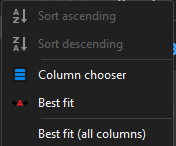
You can add more columns by right-clicking the header area and selecting Column Chooser, then choosing the columns you would like to display. Once added, you can also use Best Fit to automatically adjust the column width if the names are too long.
Best Regard.
Carl Marien
But you cannot resize by dragging the column. In my case i don't need it so why is it forced on?
Hello Grant,
I'm not entirely sure which behavior you're referring to. Would you be available for a quick support session so you can show me what you mean? That would help me better understand the issue and determine whether it's expected behavior or something we need to investigate further.
Best regards,
Carl Marien
Sure, how would we meet?
Hello Grant,
Thank you! I'll send you an email shortly with the details to schedule a support session. Once you receive it, we can arrange a time that works for you and go over the behavior together.
Looking forward to speaking with you.
Best regards,
Carl Marien
Hi everyone,
Just wanted to follow up here after a great screen-sharing session with Grant. We went through the columns panel together, and Grant found that using the auto-hide option gave him the extra screen real estate he was looking for while still keeping quick access to the panel when needed.
We also touched on the network scan tool, the advanced search filters for finding entries by IP or host, and the difference between the built-in IDRAC entry type and a generic Website entry when connecting to remote management interfaces on non-Dell hardware.
I'm following up with our development team about why the columns bar appears by default even when no columns are added yet. I'll share what I learn.
Thanks for the great conversation, Grant. Closing this thread out.
Carl Marien