Scripts folder explorer does not show nested folders in PSU 2026.2.0
Scripts folder explorer does not show nested folders in PSU 2026.2.0

I was able to reproduce the issue mentioned here. The scripts are created on disk 💾 in nested folders, but the Scripts folder explorer does not show the child folders. After clicking the parent folder, the UI shows No Data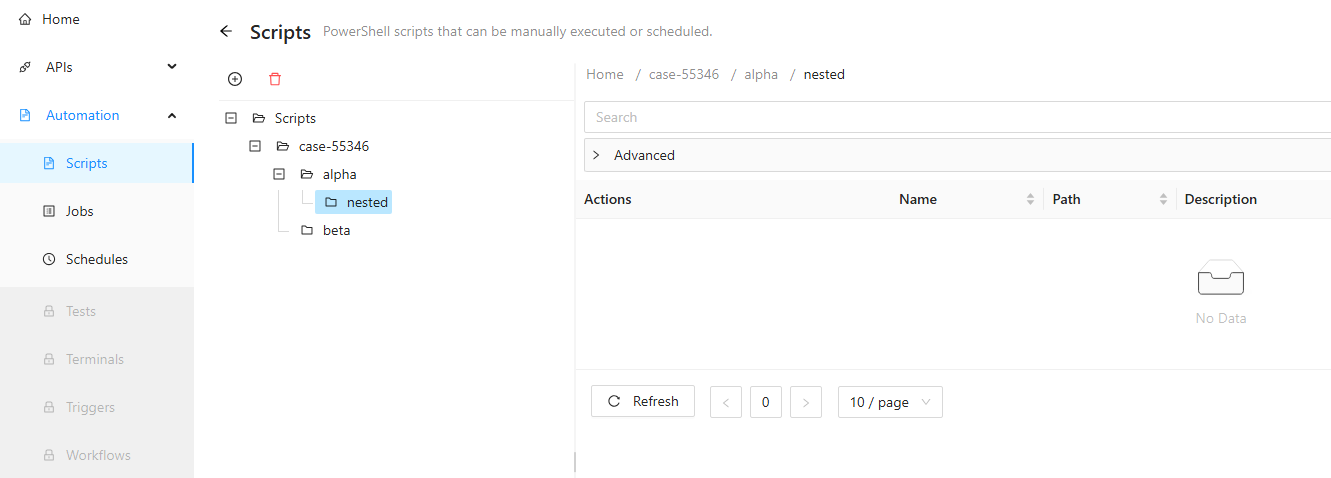
$scripts = @(
    @{ Name = 'folder-view-root.ps1';  Path = 'folder-view-root.ps1'; Script = '"root"' }
    @{ Name = 'folder-view-alpha.ps1'; Path = 'folder-view\alpha\folder-view-alpha.ps1'; Script = '"alpha"' }
    @{ Name = 'folder-view-beta.ps1';  Path = 'folder-view\beta\folder-view-beta.ps1'; Script = '"beta"' }
)

foreach ($script in $scripts) {
    New-PSUScript `
        -Name $script.Name `
        -Path $script.Path `
        -ScriptBlock ([scriptblock]::Create($script.Script))
}
53d58e5c-b81f-4ed9-a7e4-9a648679925a.png
All Comments (1)
I was able to reproduce the issue mentioned here. The scripts are created on disk 💾 in nested folders, but the Scripts folder explorer does not show the child folders. After clicking the parent folder, the UI shows No Data
$scripts = @(
@{ Name = 'folder-view-root.ps1'; Path = 'folder-view-root.ps1'; Script = '"root"' }
@{ Name = 'folder-view-alpha.ps1'; Path = 'folder-view\alpha\folder-view-alpha.ps1'; Script = '"alpha"' }
@{ Name = 'folder-view-beta.ps1'; Path = 'folder-view\beta\folder-view-beta.ps1'; Script = '"beta"' }
)
foreach ($script in $scripts) {
New-PSUScript `
-Name $script.Name `
-Path $script.Path `
-ScriptBlock ([scriptblock]::Create($script.Script))
}
@DataTraveler
I was wrong on this. The actual issue was much smaller in scope. When the selected folder or the folder opened directly from the URL, is a parent with child folders but no direct scripts, the table says `No Data` while the tree node remains collapsed.
I sent an update to the support team to clarify that this is not really a bug but more of a potential display tweak.