Proton password manager

Dear support,
we are currently testing Proton as a password manager solution.
I'm currently trying to gain access via RDM to Proton but it is not working.
I'm adding my username, password and the extra password in the fields you can see below but it can not connect: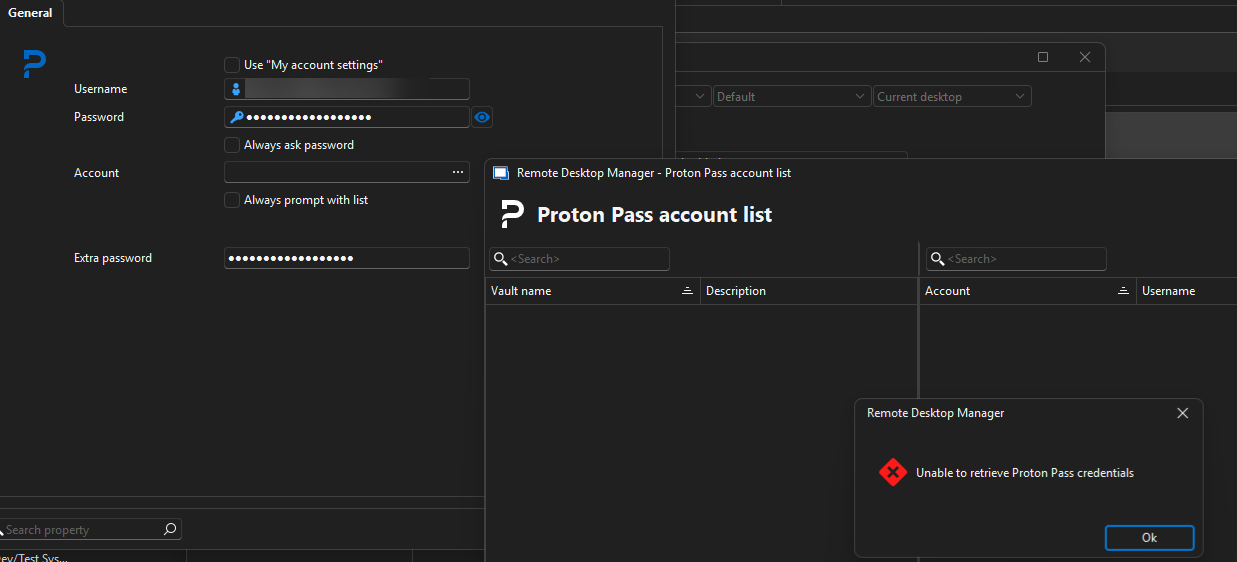
Am I doing something wrong or is there something that needs to be set on Proton site?
Regards
Dennis
1f4f47c2-6a05-42f2-8a94-c5c0717bdcc1.png
All Comments (5)
Hi dgrimmen,
Thanks for sharing that screenshot, it helps a lot!
A couple of quick things I'd like to check before we go further:
- What version of RDM (Windows) are you on? You can find it under Help – About.
- Does your Proton account use a mailbox password (a secondary password that older Proton accounts have)? If you're not sure or your account doesn't use one, try leaving the Extra password field empty and give it another shot.
Let me know what you find and we'll go from there!
Best regards,
Eduard Sepulveda Lopez
Hi dgrimmen,
Thanks for sharing that screenshot, it helps a lot!
A couple of quick things I'd like to check before we go further:
- What version of RDM (Windows) are you on? You can find it under Help – About.
- Does your Proton account use a mailbox password (a secondary password that older Proton accounts have)? If you're not sure or your account doesn't use one, try leaving the Extra password field empty and give it another shot.
Let me know what you find and we'll go from there!
Best regards,
@Eduard Sepúlveda López
Hello,
I have tried it with version 2025.1.33 and with the newest version 2026.2.11.0. Both are not working.
I have tried it with extra password and without.
Best regards
Dennis
Hi dgrimmen,
Thanks for testing both versions and trying with and without the extra password, that's really helpful to know!
To help us dig deeper, could you let us know:
- Is two-factor authentication (2FA) enabled on your Proton account?
- Is your machine behind a proxy or corporate firewall? Those can sometimes interfere with the connection to Proton's servers.
We'll also send you a private message with a link to securely upload your RDM application logs (Help – Application Logs). Those will give us the clearest picture of what's going on.
Best regards,
Eduard Sepulveda Lopez
Hi dgrimmen,
Thanks for testing both versions and trying with and without the extra password, that's really helpful to know!
To help us dig deeper, could you let us know:
- Is two-factor authentication (2FA) enabled on your Proton account?
- Is your machine behind a proxy or corporate firewall? Those can sometimes interfere with the connection to Proton's servers.
We'll also send you a private message with a link to securely upload your RDM application logs (Help – Application Logs). Those will give us the clearest picture of what's going on.
Best regards,
@Eduard Sepúlveda López
Two-factor authentication is enabled. The machine is not behind a proxy but behind a corporate firewall. However I can use Proton desktop app and browser plugin while being behind the firewall.
I have uploaded the logs related to proton. Thank you.
Regards
Dennis
Hi Dennis,
Thanks for the logs and the details.
We have a lead on what might be causing this. Could you try temporarily disabling 2FA on your Proton account and test the connection in RDM again? We'd like to rule that out as the cause.
We know that's not ideal, so please re-enable it right after testing.
Best regards,
Eduard Sepulveda Lopez