I can no longer copy the name of the system

Previously I could copy this text without have to open properties.
d977c8f2-2939-4e8a-aa47-4f81072dd187.png
All Comments (6)
Hello,
Thank you for reaching out.
Could you please let us know where the option to copy the system name was previously located on your end? Also, could you confirm which version of Remote Desktop Manager you are currently using?
This information will help us better understand the behavior and verify if there was any recent change related to this option.
Best regards,
Carl Marien
i am on 2.8. when you click on an object, in the dashboard you will see the name of the object and properties. You cannot copy the name in the dashboard anymore.
I will update to 2.9 and get back to you.
i updated to 2.9 and still no go.
What is the purpose of this line? it just showed up too in version 2.8 and 2.9. It appears to be worthless.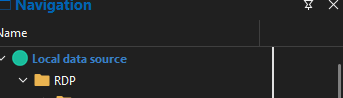
8c32ab94-7c1c-4c8f-941b-9bfd8728675c.png
Hello,
Thank you for the update.
I tested this on my end, but I do not see the strange line shown in your screenshot. Also, I have not received a version where the option to copy the system name from the dashboard is present, so I am unable to compare it with the previous behavior at the moment.
Best regards,
Carl Marien
I appreciate you trying, but I was able to copy. That isn't a "major" issue, but as i have rolling out snmp monitoring, I used the copy to name the new objects.
This image is from the latest .11 version.
When i right click on the left side I get this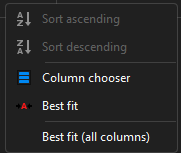
when i right click on the right side i get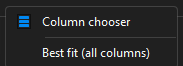
But I cannot move the line myself.
f8d1a8ef-e067-49ba-ad82-c1f33578bbef.png
5a5fe5b6-d00a-4e4f-8bc7-770e0225cc78.png
1d5bb8f6-3d17-4516-80dc-6bd50ab98d65.png
Hello.
Thank you for the additional information.
I responded to your other forum post regarding the line you mentioned here:
https://forum.devolutions.net/topics/55362/what-is-the-purpose-this
Best regards,
Carl Marien