Vault location selector changes after every update

Hi,
Since the latest major updates of RDM the location of the vault selection is changed.
Two versions ago the PAM vaults icon was removed and the vaults were added to the default vault selection (we still get complaints about this change, it would be nice to undo this change) and since version 2026.2 the vault selection is not on the bottom left anymore but on the top left.
Why is this changing so often?
All Comments (7)
Hello,
It's a stepping stone toward unifying the data source list (currently workspaces) and the vault into a single tree that you can expand as needed. It's easy to change in the UI—just right-click on the empty section of the navigation bar to toggle it.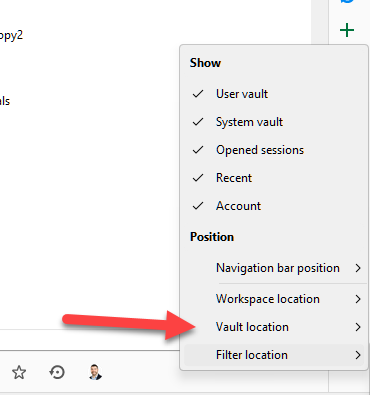
Regards
David Hervieux
248bc64c-fe8a-44e2-b708-942c037fdc21.png
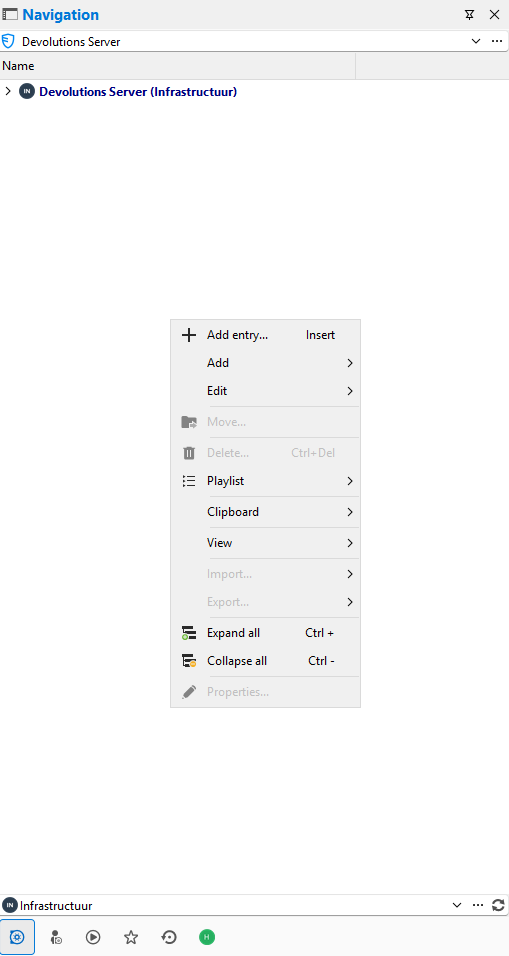
Right clicking on an empty section in the Navigation gives another menu than your example because there is always something selected. I don't have a deselect option.
Hello,
I'm surprised. Could you post a screenshot of what you see?
Regards
David Hervieux
fe45b151-9f72-4503-9bb2-e6325c570f63.png
Hello,
I see. You need to right click into the nav bar section here: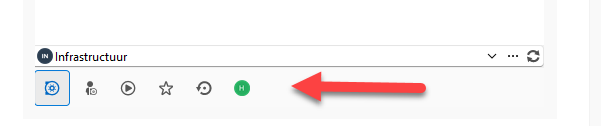
Regards
David Hervieux
319a399a-6992-4d16-b858-f583003fb101.png
I found it, my mistake. But why is it default on top? It was all the time on the bottom and now I have to instruct our users to change this if they want.
Is it also possible to make an option to put the PAM vaults nav bar section like it was before version 2026.x? Adding the PAM vaults to the vaults selection is a change alot of our users complain about. The reason for this is we sometimes need to checkout multiple times a day because of additional PAM rights we need (for example domain admin rights) and it takes a few clicks to get to the priviledged account (more clicks since the pam vaults were added to the vault selection).
Or is there a faster way to get to the check-in/check-out part?
Hello,
Unfortunately, it is not currently possible to move the PAM vaults back into their own navigation bar section like they were before version 2026.x.
However, it is possible to add the PAM vaults or privileged accounts to your favorites, which can help reduce the number of clicks needed to access them.
If this does not fully meet your needs, we can create a feature request so our product team can evaluate the possibility of reintroducing a dedicated PAM section or another faster access option in a future version.
Best regards,
Carl Marien