How to send a right click or paste command in ssh

I'm looking for a way to paste clipboard contents in SSH either via macro, event or post login command. Any ideas?
All Comments (15)
Hello,
We've added this feature back in 2025.3, could you try using the {CLIPBOARD} command in your macro/post-login command and see if it works?
Regards,
Hubert Mireault
Hubert,
I didn't see any documentation on that. Can you give me the exact syntax for using it, assuming the password is xxxx?
Can it be used in the "Events" section specifically to paste a password in the clipboard in after logging into a secondary server?
Thanks,
Brad
Hello,
If you simply enter {CLIPBOARD} as part of your macro string, it should paste your clipboard when it parses this command.
So for example if you have the following string:
sudo{CLIPBOARD}{ENTER}
It should enter the string "sudo", paste your clipboard, and then press the enter key. So provided you've put your password in your clipboard, it should paste your password as part of your command.
Regards,
Hubert Mireault
Does anything need to be "turned on" first? If not, it's not working.
I'm trying to set up a system where I can log into a bastion server, and then from there automatically log in to several other servers in sequence, run a couple commands in each, log out of each and move on to the next. ideally this would be done by running one macro after logging into bastion. I'm not able to store any "keys" on the remote servers, and I'm not able to find a way to enter the passwords (which are the same for each remote server) automatically. Was hoping having that password in the clipboard and using this feature would work, but following your instructions it hangs at the password prompt. See pics.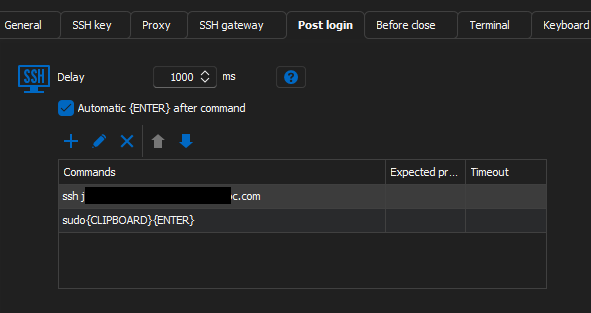
 Apologies for the redactions. It is clear it's doing "something" at the first password prompt. I did make sure the correct password was in the clipboard at the time.
I've tried the same procedure as "events" with the same result. I also tried first manually logging into bastion and then running a typing macro with the commands. Same result. Any ideas? There's gotta be a way to enter a password automatically in an SSH script, right?
3d7a096c-253e-4708-bdb8-039059e621f7.png
e802eb9d-56bb-4663-af8d-f39dc2b19800.png
Hello,
One small note, I mistyped in my original comment and meant sudo{ENTER}{CLIPBOARD} rather than sudo{CLIPBOARD}{ENTER}. But, there's another issue here. Looking at your screenshots, I think you're missing one password prompt. From what I understand, it's doing the following:
- RDM connects to the remote host
- The first macro is sent: ssh yourhost.com
- The first macro triggers the password being required
- The second macro is sent: sudo{CLIPBOARD}{ENTER}
- This second macro is fully sent as part of the password being required, so it sends "sudo<Your clipboard>" and presses the enter key.
Is the password meant to be the same password as in your sudo command? if that's the case, then the full chain of macros you would need would be the following:
- ssh yourhost.com
- {CLIPBOARD}
- sudo{ENTER}{CLIPBOARD}
This would ssh into your second host, trigger the password prompt, send the clipboard for the password prompt, then do the sudo command, press the enter key, and enter your clipboard again.
You technically don't need to add {ENTER} at the end of your commands if you have "Automatic {ENTER} after command" checked, which you do in your screenshot.
Additionally, if you need a command to only be sent when the terminal prompts for a certain value, you can use the "expected prompt" parameter. This could help ensure you only send your clipboard when the password prompt is actually asked. It will do a string match to ensure it only sends the command when the terminal shows that string.
Regards,
Hubert Mireault
Still not there...when I add the extra {clipboard} line, it goes faster, and doesn't have the open space, but still it comes up with permission denied and once again asking for the password.
To try to clarify - the post login you're seeing is after I've logged into bastion server successfully. When the script runs, it contacts "ssh yourhost.com", and then prompts for the password. I can see the "macro running" icon pop up in lower right, and then it gives permission denied.
For the expected prompt - should that be on the line with the server address or the line with the {clipboard}? Or the 3rd line? Or multiple lines?
I feel like we're close here. :)
Hello Brad,
I believe we are close, but at this point it would probably be more efficient to review this together in a short support session rather than continuing through multiple forum replies.
I will send you a session link by email. A quick 15-minute session should help us validate the macro behavior, confirm where the password prompt is being detected, and adjust the expected prompt configuration if needed.
Best regards,
Carl Marien
Carl,
I apologize for the delay on following up with this. I'm still very interested in trying to solve this riddle and a quick session might be just the trick. I don't think I got y our session link. When you have a chance please send it to me. Timing may be difficult because I work nights, but with some planning I can be logged on early morning or in the afternoon.
Thanks,
Brad
Hello Brad,
I sent the support session link to you by email. You had previously mentioned that you were going to be off for two weeks and would reconnect once you were back at work.
I have just sent you another session link. Please let me know if you do not receive it.
Best regards,
Carl Marien
Hello everyone,
During our support session, we were unfortunately not able to reproduce the original issue with the {CLIPBOARD} macro. From our testing, the clipboard functionality appeared to work as expected in our environment.
However, while investigating the problem, we found an alternative approach that is better suited to this scenario. Instead of relying on the clipboard, you can store the password in a sensitive Custom Field and reference that variable in your macro. This avoids the dependency on the clipboard and allows the password to be inserted directly during the automation, providing a more reliable solution for your SSH login sequence.
Since we were able to identify a suitable workaround, I will now close this forum thread. If you encounter any additional issues or have further questions, please don't hesitate to open a new thread or contact our support team.
Best regards,
Carl Marien
Carl,
I'm making progress - this gives new meaning to "baby steps".
IF I am at the password prompt for the server I'm SSHing into, AND I run a Typing Macro that only has $CUSTOM_FIELD1$ in it, RDM will send the password and successfully log me into the server. If I add anything to that typing macro (such as the ssh j2noc@cmsapp1.priv.prod.j2noc.com before the $CUSTOM_FIELD1$, RDM just sits at the password prompt.
SO - is there any way to run two typing macros (or several?) back to back automatically?
Another session may be needed to show you what I mean.
Brad
Carl,
I'm making progress - this gives new meaning to "baby steps".
IF I am at the password prompt for the server I'm SSHing into, AND I run a Typing Macro that only has $CUSTOM_FIELD1$ in it, RDM will send the password and successfully log me into the server. If I add anything to that typing macro (such as the ssh j2noc@cmsapp1.priv.prod.j2noc.com before the $CUSTOM_FIELD1$, RDM just sits at the password prompt.
SO - is there any way to run two typing macros (or several?) back to back automatically?
Another session may be needed to show you what I mean.
Brad
@bradschmidt
HOLY CRAP!!! I think I actually got it!!!! Using Post Login Commands. I had to do that because I couldn't figure out how to do expected prompt on EVENTS. Is there a way? Otherwise I'll end up with very long post login command. Here's what worked: 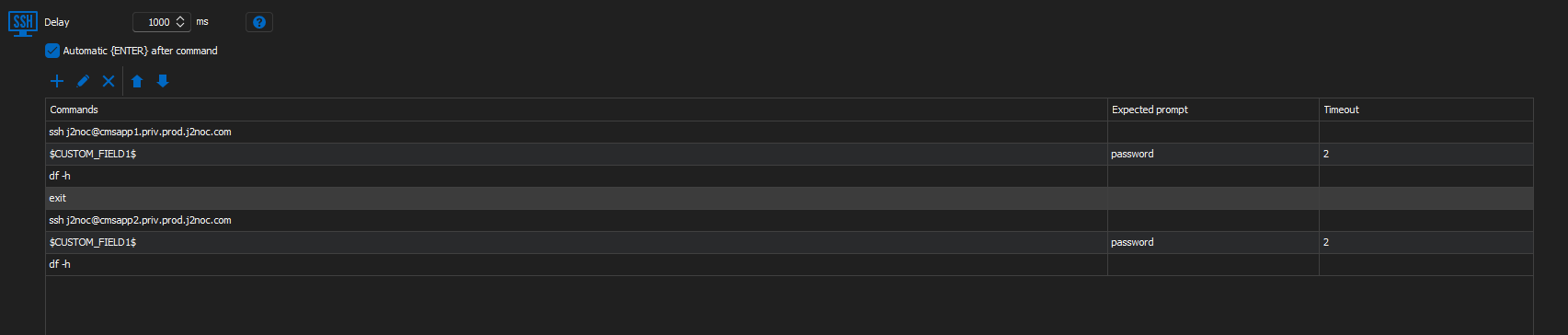
Is there a limit to how long the Post Login Command can be???
5afe144a-7b2c-4e0d-a678-20d128700297.png
Hello Brad,
Congratulations on getting the sequence to work, and thank you for sharing the exact configuration that succeeded on your side.
There is no small hard limit on the length of the Post Login Command list, since it is stored as part of the entry data.
That said, if the sequence becomes very long, it is usually easier to maintain if it is split across a couple of entries, or driven by a script step, purely for readability.
Best regards,
Carl Marien
Carl,
Understood. It looks like my length isn't unmanageable. Just wish I could do it all with the events or a typing macro instead, but with out the password prompt it doesn't seem to work.
One question though: Short of making the duration longer for all the commands, is there a way to make it wait for the previous command to finish? Some commands are quick (likd df -h), others take longer, like starting various tomcats. Trying to make sure each has time to run without making the entire script be a marathon.
Thanks,
Brad
Hello Brad,
Short of making the duration longer for all the commands, is there a way to make it wait for the previous command to finish?
Using the "expected prompt" feature is what you need in this case. There's no way to really know that the command finished, so you need to tell the terminal what the next prompt for it to interact with is.
Usually when a command finishes, your next prompt will be the usual command prompt of your terminal. With my bitvise server, when logged into my user, I get the following: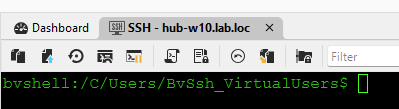
So in my case, in the expected prompt, I can enter "bvshell:/C/User/BvSsh_VirtualUsers$" and the command will only send when it sees this string. I believe you should be able to only put part of this string as well, for example "bvshell" or even "VirtualUsers" in my case. What you have to be wary about is if the string is too generic, it might trigger too early. Let us know how this works for you.
Regards,
Hubert Mireault
7db69102-9323-4725-9f67-efa72118f52a.png