Bug: Copying multi-line colored text from SSH terminal drops whitespace characters
Bug: Copying multi-line colored text from SSH terminal drops whitespace characters

Hello,
I would like to report a bug regarding the copy and paste behavior in the SSH terminal session. When copying multiple lines of output that contain colored text, some whitespace characters are dropped upon pasting.
This issue seems to be directly related to the handling of ANSI color escape sequences during multi-line selection.
Environment:
- RDM Version: 2026.2.7.0 64-bit (PreJIT)
- Client OS: Windows 11 Pro 24H2 (OS Build 26100.8457)
- Server OS: Oracle Linux 9 (Kernel 5.15.0-315.196.5.2.el9uek.x86_64)
- Session Type: SSH Shell
Issue Description & Actual Behavior:
When I execute a command that outputs colored text (e.g., ip route) and copy the multi-line result, the spaces surrounding the colored elements are missing when pasted.
Here is the exact pasted result of the multi-line copy (spaces are missing):
[usr01@xxxx00 ~]$ ip route
default via10.10.1.1devenp0s5proto dhcp src10.10.1.250metric 100
10.10.1.0/24devenp0s5proto kernel scope link src10.10.1.250metric 100
169.254.0.0/16devenp0s5proto dhcp scope link src10.10.1.250metric 100
[usr01@xxxx00 ~]$
And here is the actual terminal display showing the commands being executed (please see the attached image for color reference):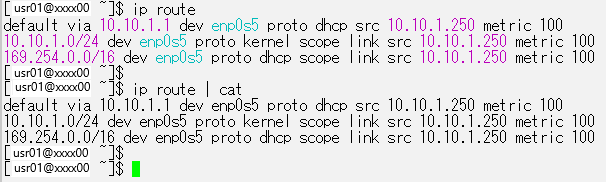
Expected Behavior (and Workarounds):
The spaces should be preserved. I found that the issue does not occur in the following scenarios:
1. When piping the output to cat (which removes ANSI colors):
Copying the multi-line result of ip route | cat works perfectly (as shown in the bottom half of the image).
[usr01@xxxx00 ~]$ ip route | cat
default via 10.10.1.1 dev enp0s5 proto dhcp src 10.10.1.250 metric 100
10.10.1.0/24 dev enp0s5 proto kernel scope link src 10.10.1.250 metric 100
169.254.0.0/16 dev enp0s5 proto dhcp scope link src 10.10.1.250 metric 100
[usr01@xxxx00 ~]$
2. When copying a single line (without line breaks):
Selecting and copying just one colored line preserves the spaces.
10.10.1.0/24 dev enp0s5 proto kernel scope link src 10.10.1.250 metric 100
Could you please investigate this issue with ANSI color handling during multi-line copy?
Thank you.
2026-06-12_11h28_12.png
All Comments (7)
Hello,
Thank you for the detailed report and for already pinpointing the ANSI color sequences as the trigger.
To move this forward, can you confirm the following:
What Workspace (previously known as Data Source) do you have configured?
We will forward the details to our developer team once confirmed.
Thank you in advance!
Best regards,
Sam
Hello Sam,
Thank you for your reply.
I am using a "Local Data Source" Workspace.
Thank you,
Hello,
Thanks for the feedback!
To help us investigate, we have one ask. Could you enable session recording on the SSH entry before reproducing the issue:
- Open the SSH entry's properties, go to Properties > Security > Session recording, set the Mode, and choose a local Destination folder.
- Then go to Administration > System settings > Properties > Security > Session recording, find the SSH recording type setting, and set it to Terminal playback (.TRP).
- With that in place, run ip route, copy the multi-line output, then share the resulting .trp file with us. Full steps are documented here.
Note: recording must be enabled before you open the session, sessions launched before the toggle is set won't be captured.
I will send you a link via DM where you can upload the file when you have the time.
Thank you very much again!
Best regards,
Sam.
Hi Sam,
Thanks for the instructions.
I’ve enabled the session recording as requested and reproduced the issue. I have uploaded the .trp file, as well as test1.txt and test2.txt, via the DM link you provided.
For your reference, I performed the following operations in the recorded session:
1. Ran ip route
2. Right-clicked and copied the displayed output
3. Opened test1.txt using vi and pasted the copied text into it
4. Ran ip route > test2.txt
5. Ran cat test1.txt
6. Ran cat test2.txt
Let me know if you need anything else to investigate further.
Best regards,
kyosai taro
Hello Kyoshi,
Thank you very much for the information.
I have forwarded the case details to our developer team.
I will report back when I have an update from their side.
Best regards,
Sam.
Hello Kyoshi,
Thank you for your patience.
Our developer team has identified the issue and is currently working on a patch.
We will update you once it's been implemented.
In the meantime, I will move this thread to our bug report section so we can track it accordingly.
Thank you again!
Best regards,
Sam
Hi Sam,
Thank you for the update!
I'm glad to hear that the team identified the issue and is working on a patch. I will look forward to your update once it's implemented.
Thank you for your support.
Best regards,
Kyosai Taro