Logging with Duplicated Sessions

When duplicating a session in Remote Desktop Manager (RDM), the logging functionality does not work correctly for the duplicated session. Even when manually changing the logging path within the duplicated session, no logs are being recorded.
Is there a known fix or workaround for this issue?
All Comments (13)
Hello Stefan,
Thank you for contacting us on that matter.
Could you please provide us with the RDM version and the workspace you are currently using?
https://docs.devolutions.net/rdm/workspaces/workspace-types
Thank you for your collaboration.
Best regards,
Alexis Geller Peiro
Hello Alexis,
thank you for the fast reply.
I use currently the version: Free 2026.1.18.0 with a local workspace.
Best Regards,
Stefan
Hello Stefan,
Thank you for the information.
Since you are currently using Remote Desktop Manager Free 2026.1.18.0 with a local workspace, could you please update to the latest 2026.1 version, 2026.1.23.0, and verify if the issue still occurs?
You can find previous versions here:
https://devolutions.net/remote-desktop-manager/previous-versions/
Alternatively, if possible, you may also update to the latest 2026.2 version, 2026.2.8, and let us know if the logging issue persists after the update:
https://devolutions.net/remote-desktop-manager/download/
Best regards,
Alexis Geller Peiro
Hello Alexis,
I've tried both version 2026.1.23.0 and version 2026.2.9, and the issue persists in both. As soon as I duplicate a session, no new log file is being created.
Br,
Stefan
Hi,
Thanks for the report. We were able to pin down what's happening.
By default, an SSH/Telnet session logs to a single fixed file path. When you duplicate an entry, the copy keeps that same log path; so if the original and the duplicate are open at the same time, they both point at the same file. The first session to open holds it, and the second one ends up writing nothing. (Editing the path while a session is already open won't take effect either, until you reconnect.)
The reliable workaround is to give each entry its own log file by adding a variable to the path. On the duplicated entry, open its properties → Logs and set:
- Enable logging on.
- Log mode → All printable output (the Event mode doesn't write the full session to a file, which is another reason nothing shows up).
- Log path type → Custom, with a variable in the filename, for example:
- C:\RDM-Logs\$NAME$_$SESSION_ID$.log
- $SESSION_ID$ is unique per entry, so the original and the duplicate get separate files. If you also want a new file each time you open the session, use C:\RDM-Logs\$NAME$_$DATE_TEXT_ISO$_$TIME_TEXT_ISO$.log.
- Click OK and reconnect the session.
After that, each session writes to its own file and logging works for both. We're also looking at improving the default behavior so this works without the manual step.
Let me know if that does the trick.
David Hervieux
Hello David,
Unfortunately, it is not working.
I followed your steps, but no new log file is being created. What happens is that as soon as I modify the duplicated session, the logging settings are also changed in the original SSH entry. When I click Reconnect on the tab, the session reconnects, but no new log file is created.
The only way I can get it to work is by closing both sessions completely and opening them again from the navigation pane. In that case, logging works as expected. However, logging two instances of the same SSH session simultaneously does not seem to work.
Anyway, I will use another program when I need to log different activities from the same session.
Thank you for your fast reply and for your help.
Br,
Stefan
Hello,
Just to continue my investigation, could you let me know exactly what is configured for the path of the logs? You could export you session without the credentials if you want or post a print screen of the log configuration.
Regards
David Hervieux
Hello David,
this is configured for my standard logging: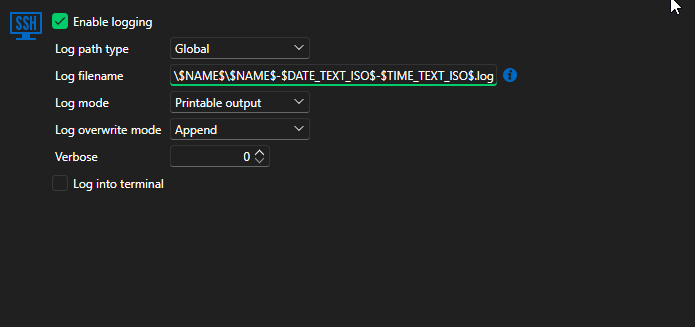
and this for my duplicated session: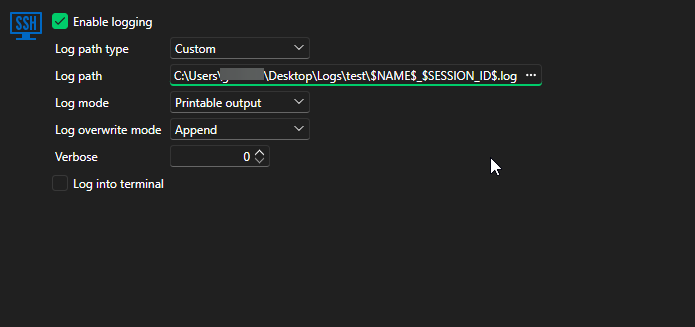
Br,
Stefan
a89246b1-9131-408d-8c3b-adadec1b5226.png
319bcb87-a98c-4870-a3e4-4d17767c4c59.png
Hello Stefan,
Could you please confirm whether the issue still persists on your side with the latest version of Remote Desktop Manager?
Regarding logging within the same session, we have identified a bug related to this behavior. Our development team is currently working on a fix and aims to resolve it as soon as possible.
Thank you for your patience and collaboration.
Best regards,
Alexis Geller Peiro
Hello Alexis,
I installed version 2026.2.14.0 today, but the issue still persists.
If I duplicate a session and modify its logging settings, the duplicated session does not generate any logs. Instead, the logging settings are applied to the original (root) session, which is also not ideal.
In my opinion, the best solution would be for the duplicated session to maintain its own independent logging configuration. Any changes made to the duplicated session should not overwrite or affect the settings of the original session.
Br,
Stefan
Hi @stefan,
We were able to reproduce the behavior you described, and we can confirm that it’s an issue that will be reported to our development team for further investigation.
We appreciate you bringing this to our attention.
Please don't hesitate to ask us any other questions.
Best regards,
Alexis Geller Peiro
Hello,
We've fixed this issue, you can expect this to take effect with the upcoming 2026.3 version.
Regards,
Jafran Majeau
Hello Jafran,
Thank you very much for the information. I’m looking forward to the fix. 😊
Br,
Stefan