RDM MCP — RDM_execute_opened_connection_action not working on SSH sessions
RDM MCP — RDM_execute_opened_connection_action not working on SSH sessions

Hi,
Is RDM_execute_opened_connection_action expected to be functional in the current experimental MCP version, or is it still work in progress? If it should work — is there a known workaround or additional configuration required?
Version: Remote Desktop Manager 2026.2.8.0
Feature: MCP Server (experimental)
Issue
Calling RDM_execute_opened_connection_action on an active SSH (SSHShell) session always returns a generic error, regardless of the action used.
The connection is visible in RDM_list_opened_connections and all actions (send_command, get_terminal_status, take_screenshot) are listed as available via RDM_list_opened_connection_actions — but none can be executed.
Example call
json
{
"actionName": "send_command",
"connectionIds": ["b22f1d22-22e2-4bfs-b2cf-222e6c1d7151"],
"parameters": {
"command": "date",
"captureOutput": true,
"timeout": 30000
}
}
Error: An error occurred invoking 'RDM_execute_opened_connection_action'.
Same error occurs for get_terminal_status and take_screenshot. RDM was in the foreground with the SSH tab active.
BR
DI
All Comments (20)
Hi @danieliwaszkiewicz,
Let me introduce myself first. I'm Maxime, AI Software Architect, I am the developer of the MCP server and the AI Assistant in RDM.
I'll answer your question about whether it should work first, then go into more detail about my findings. Yes, it should work. I just tested it locally in RDM with the AI Assistant using 3 SSH entries (Linux, macOS, Windows) and on the same 3 entries using an MCP client (VSCode) connected to RDM. I'm experiencing some lag and timeouts on my end, and RDM is slow when I send the prompt to get the top 3 processes on my Windows machine. I'll have to investigate that further with my colleague responsible for the SSH terminal, as there is tight integration with it to extract the output of the command.
We have the same request structure being sent to the MCP server, so the issue is not that
  "actionName": "send_command",
  "connectionIds": [
    "<redacted>"
  ],
  "parameters": {
    "command": "<redacted>",
    "captureOutput": true,
    "timeout": 30000
  }
}
Can you provide more information about your SSH entry so that I can investigate in the right direction? Is it Windows, Linux, or macOS machine? If it's Windows, then what I mentioned about the lag and timeout issues might explain it. If it's Linux or macOS, then I'll need to investigate further.
I'll start investigating the Windows-specific issues while I wait for your reply.
Thanks,
Maxime Forest
Hi Maxime,
Thanks for the quick response and for testing this yourself!
Here are the details:
- RDM client OS: Windows (Cloud Desktop)
- SSH target: Linux (Ubuntu), standard username/password authentication
- Connection type: Regular SSH session (no key-based auth, no jump host)
- Session state: The SSH connection was open and active in RDM at the time of the MCP call — I could see the terminal tab with the session running
- Datasource: Devolutions Hub Business (not a local database)
The error was consistent across all three actions (send_command, get_terminal_status, take_screenshot), so it doesn't seem action-specific.
On a positive note — other MCP operations like creating folders, moving/copying entries, and importing work very well overall. I do experience some lags and timeouts there too, but the operations complete successfully on the Hub side even when the MCP call times out on the client.
Let me know if you need any additional details or logs.
Thanks,
Daniel
I'll do some testing regarding the calls that sometimes timeout for creating folders, moving and copying entries. Are you doing like 30-40-50 entries? What's the use case look like when that happens?
Maxime Forest
Hi Maxime,
The use case was copying ~80 entries (26 per folder × 3 sub folders) into a new folder structure, sent in parallel batches of 4–10 entries per RDM_copy_entries call.
Honestly, I think the main bottleneck might just be Hub Business itself — even when I move or copy a larger number of entries manually in RDM, it also takes quite a while. So the MCP timeouts might simply reflect that underlying latency rather than anything specific to the MCP layer.
Thanks,
Daniel
Could most likely be issues regarding Hub, now called Devolutions Cloud especially if you're experiencing the same issues in the Web UI or RDM. I'll relay the information to my colleagues so they can look at it.
The MCP server in itself is using the same paths as what the UI of RDM would be using tweaked to work with a prompt and no UI interactions in RDM (confirm dialogs).
Maxime Forest
After more testing, I can confirm the issue is not specific to SSH or to send_command. All actions via RDM_execute_opened_connection_action fail regardless of connection type.
Tested and failing: send_command, get_terminal_status, get_connection_info, take_screenshot on SSHShell, and send_command, take_screenshot, close_connection, logoff on RDPConfigured.
In every case the error returned is the same generic message: "An error occurred invoking 'RDM_execute_opened_connection_action'." — no details, no stack trace, no error code.
All other MCP tools work fine (RDM_search_entries, RDM_copy_entries, RDM_create_folders, etc.), so it seems the issue is isolated entirely to RDM_execute_opened_connection_action.
Should I test this with a different AI? Could it be a claude desktop issue?
I'll do a full validation of every connections types that supports sending commands through the send_command MCP tools. I've investigated a bit this afternoon and found some issues that are easily fixable on my end that will most likely fix all of them at the same time.
Thanks for reporting this!
Maxime Forest
Hi Maxime,
Any update on the fix? Is it already included in one of the recent releases?
Thanks,
Daniel
Hi @danieliwaszkiewicz,
We've recently released a new version of RDM (2026.2.14) on July 15th, which includes the fixes for the MCP tools.
I was on vacation last week; otherwise, I would have given you an update earlier!
Let me know if everything works as expected on your end after you update, and don't hesitate to reach out.
Best regards,
Maxime Forest
Hi Maxime,
A few things to report after testing version 2026.2.14 (Jetsocat [Devolutions.Jetsocat] Version 2026.2.3):
1. RDM_execute_opened_connection_action still not working
The fix mentioned in the release notes doesn't seem to have taken effect on my end — RDM_execute_opened_connection_action still fails for all actions (send_command, get_terminal_status, get_connection_info, take_screenshot, close_connection, logoff) on both SSHShell and RDPConfigured connections. The error returned is always the same generic message with no details.
2. Clicking "Background Services" crashes RDM
Steps to reproduce:
Open RDM
Open Claude Desktop — MCP connection is established successfully
Click Background Services in the RDM menu
RDM crashes and closes completely
After the crash:
Reopening RDM does not restore the MCP connection — a full Claude Desktop restart is required
MCP server settings are not saved — options like "Start server on startup", "Automatically approve new MCP client connections" and "Exclude sensitive data (passwords) from responses" are reset to defaults after every crash
The log at the time of crash shows $/proxy/serverDisconnected — RDM itself sends the disconnect signal before closing.
Are these known issues in 2026.2.14, or would it be worth doing a clean reinstall and testing again from scratch?
Thanks,
Daniel
@danieliwaszkiewicz Let me see if I can reproduce it with the steps provided. I'm currently installing 2026.2.14 and the exact jetsocat version locally, and will test it with Claude Desktop. I'll also check the other bugs you've mentioned (MCP server settings not getting saved).
I can answer this in the meantime:
a full Claude Desktop restart is required
When RDM closes or crashes, the child process which holds the MCP server is killed. Claude Desktop has no retry mechanism implemented on their end when a MCP server becomes unreachable; it ends up stopping the connection and staying like that. The only way to get it back is, like you said, to restart Claude Desktop. They have an open issue on their GitHub repository https://github.com/anthropics/claude-code/issues/54136 since April 27th.
Maxime Forest
@danieliwaszkiewicz Sorry for the delay, I was testing various use cases all afternoon and looking at logs of Claude Desktop before I reply here.
I was able to reproduce the issue you're getting with Claude Desktop not being able to interact with opened connections in RDM. I tested it also with 2 other apps that can connect to MCP server (RDM with AI Assistant & VS Code) and both had no issues getting me the "top 5 processes" from an SSH Linux VM.
The issue is really with Claude Desktop only, even the Claude Code CLI can execute SSH commands using the RDM MCP tools.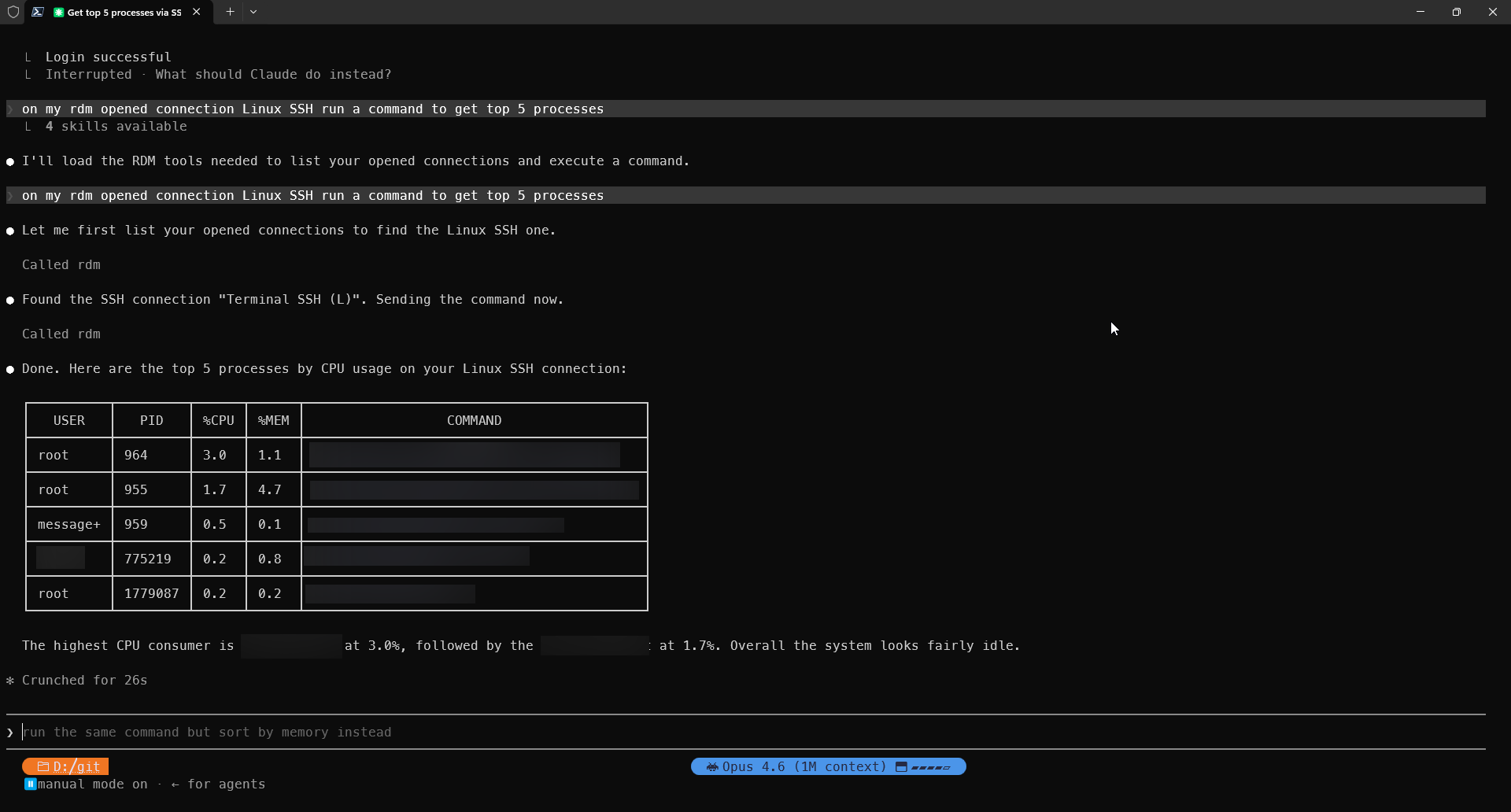
Claude Desktop formats the JSON input sent to the MCP server tool differently which explains the error.
I'll have to do a workaround specifically for Claude Desktop and that specific MCP tool to make it work, I'll be working on this tomorrow. I'll try to let you know when I have an ETA of this fix.
Maxime Forest
11d14499-bb18-4070-b0ae-bd8d940b7b39.png
@danieliwaszkiewicz I decided to test it again this morning in Claude Desktop and at my surprise it is working on both 2026.2.14 and the internal future 2026.3.0 version. Can you test it again on your end after updating your Claude Desktop?
Maxime Forest
Hi Maxime,
I've checked and I already have the latest version of Claude Desktop installed, but the issue still persists — RDM_execute_opened_connection_action keeps returning the same generic error for all actions on both SSH and RDP connections.
Could you confirm which exact version of Claude Desktop you were testing with?
Thanks,
Daniel
@danieliwaszkiewicz Windows Claude 1.22209.3 (babe11) 2026-07-19T02:06:35.000Z.
Maxime Forest
I have the same version: 1.22209.3 (babe11) from 2026-07-19
Claude 1.22209.3 (babe11) 2026-07-19T02:06:35.000Z
Daniel
@danieliwaszkiewicz I've had the issue again since around 11 AM. I found a way to handle the schema / contract not being respected when the tool is called so that it just works. I'm about to get the fix reviewed, tested by QA, and ready for a future 2026.2.X version of RDM. I'll keep you posted when I have more information on the release date.
Maxime Forest
Quick update, if everything goes as planned, RDM should have a new update next Monday (August 3rd) that should fix your issue.
Best regards,
Maxime Forest
Hi!
RDM was released today, and it includes the fixes! Please let me know if everything is working as expected on your end, and I'll close this topic.
RDM 2016.2.17.0
Release notes: https://devolutions.net/remote-desktop-manager/release-notes/
Maxime Forest
Hi Maxime,
After a restart it started working! Successfully retrieved CPU, RAM, and disk info from a Linux SSH session via MCP. Great work on the fix!
Thanks,
Daniel