License showing as Cloud Free and experiencing "Unable to find credential entry" errors
License showing as Cloud Free and experiencing "Unable to find credential entry" errors

Hi!
I am using Remote Desktop Manager version 2026.2.7.0 64 bit JIT on Windows 11.
I hold a paid Single User License, but I am running into a couple of urgent issues.
1. Data Source and License Status
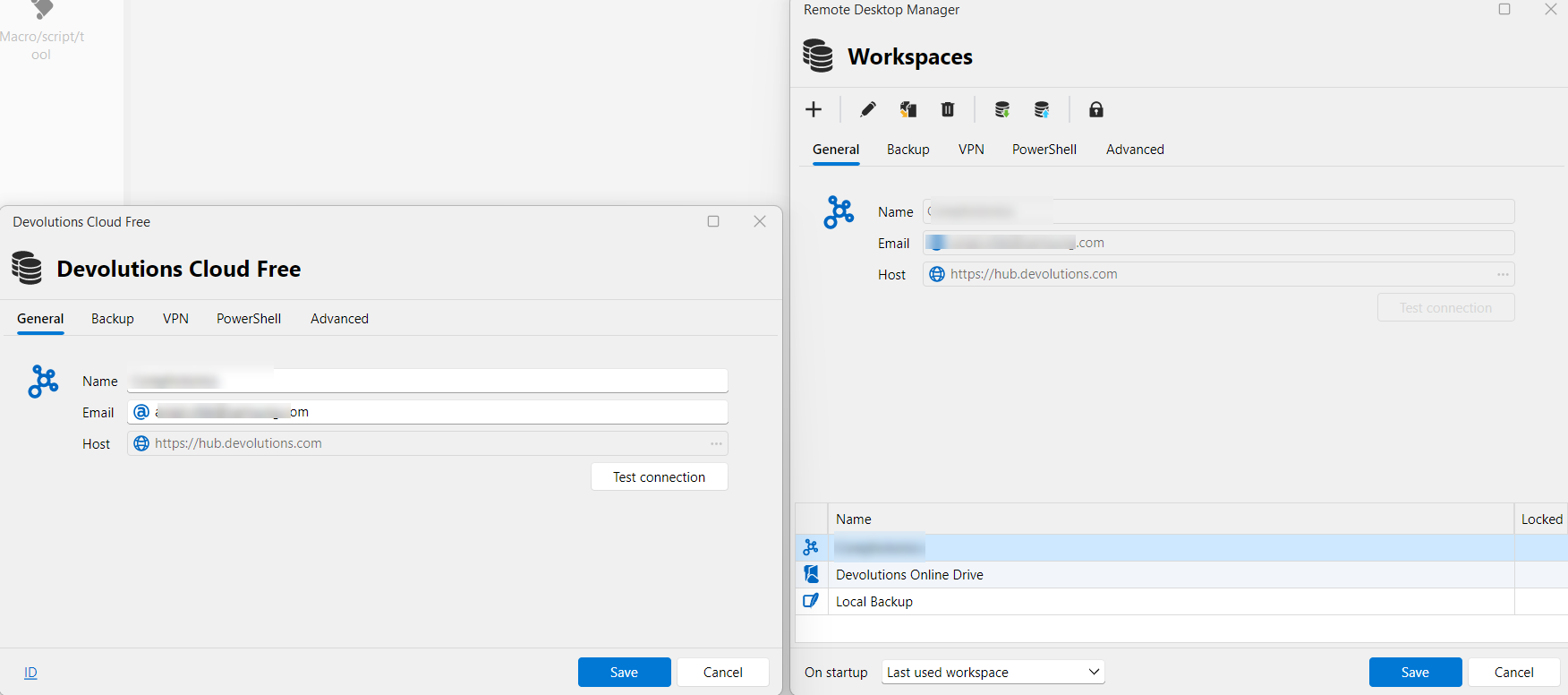
I notice that the interface now shows Workspaces instead of Data Sources. My active workspace is currently listed as "Devolutions Cloud Free" pointing to the hub URL.
- Given that I have a paid Single User License, why am I seeing the free cloud edition label?
- Am I using the incorrect type of workspace, or did I miss an activation step?
2. Missing Credentials and Error Popup
More importantly, I have started encountering the following error popup:
"Unable to find the credential entry; this setting will be lost."
Following this error, it seems that my saved credentials and passwords are starting to disappear or get deleted from my application, which is very concerning.
I apologize if I am missing something basic here, but I want to make sure my data is safe and that my paid license is correctly applied.
Thank you for your assistance, and I look forward to your guidance.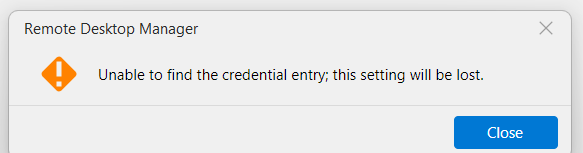
635f200a-22d8-42ee-bc47-8e98a4329719.png
a97cc217-ce50-4cb2-8b09-499ae9b6ab45.png
All Comments (6)
Hello,
RDM and Devolutions Cloud are 2 different platforms here in the Devolutions ecosystem.
In your case, you have a license to use RDM, but your workspace is Devolutions Cloud Free, which is free of usage in your case. This is why you are seeing Devolutions Cloud Free.
Regarding the issue with the credential link, it was something addressed already earlier this week. Let me check if there's a fix and get back to you shortly.
Best regards,
Jeff Dagenais
Hello,
A fix regarding your issue is available in RDM 2026.2.7.0. Is this the version that you are running?
If you, you can download this version here https://devolutions.net/download-center/#rdm
Best regards,
Jeff Dagenais
Hello,
A fix regarding your issue is available in RDM 2026.2.7.0. Is this the version that you are running?
If you, you can download this version here https://devolutions.net/download-center/#rdm
Best regards,
@Jeff Dagenais
Hi Jeff,
Thank you for the quick response.
As I mentioned in my original post, I am already running version 2026.2.7.0 (64-bit JIT on Windows 11).
This is exactly why I am so concerned the "Unable to find credential entry" error and the disappearing passwords are actively happening to me on this specific version, which you mentioned should contain the fix.
Since the issue is still persisting in 2026.2.7.0 and I am worried about losing more data, what would be the next steps to resolve this?
Hello,
Thank you for your feedback.
Could you try installing version 2026.1.23.0 as a portable installation to see if you can use the entries as it was before the update?
https://docs.devolutions.net/rdm/kb/how-to-articles/portable-rdm-installation/
https://cdn.devolutions.net/download/Devolutions.RemoteDesktopManager.Bin.2026.1.23.0.zip
What entry types are displaying this error message?
How are your credentials configured on your entries? Are they set using the Linked (vault) option?
Have you set the Linked (vault) option elsewhere, like in the VPN settings?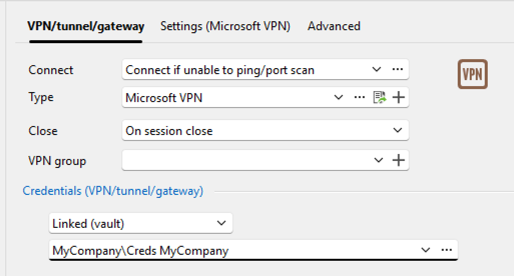
Thank you for your collaboration.
Best regards,
Érica Poirier
6c9adf87-6951-4561-b06d-8d9199139b52.png
Hello,
Thank you for your feedback.
Could you try installing version 2026.1.23.0 as a portable installation to see if you can use the entries as it was before the update?
https://docs.devolutions.net/rdm/kb/how-to-articles/portable-rdm-installation/
https://cdn.devolutions.net/download/Devolutions.RemoteDesktopManager.Bin.2026.1.23.0.zip
What entry types are displaying this error message?
How are your credentials configured on your entries? Are they set using the Linked (vault) option?
Have you set the Linked (vault) option elsewhere, like in the VPN settings?
Thank you for your collaboration.
Best regards,
@Erica Poirier
Hi Erica,
Thank you for the reply.
To answer your questions, the error happens on RDP entries. Their credentials are configured using the Linked (user vault) option. I do not use this option in the VPN settings.
Honestly, I prefer not to install the portable version. I am worried that mixing different versions might cause more severe disruptions or data loss.
Also, since the last update, I started experiencing another strange issue. The computer folder tree on the left side suddenly collapses completely on its own. I then have to manually reopen the entire tree just to see my objects.
Is there another way we can troubleshoot or fix these issues on my current version?
Thanks.
Hi,
As an alternative way to debug this, could you please show us the details of your entries via the web client, located at https://hub.devolutions.com in your case. In the web client locate your vault (user vault?) and your entry. In the dashboard, open the ... and view raw data.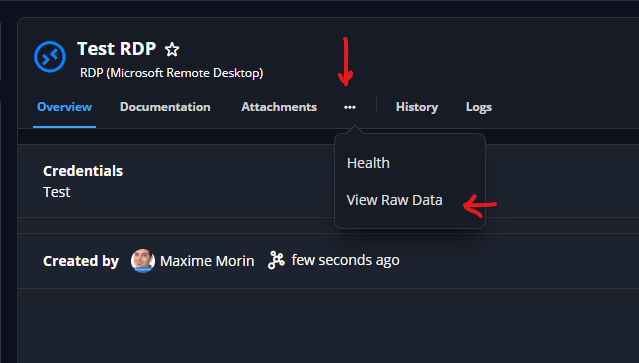
Please share at least these fields (red); you can share more, if you feel they might be related and are not sensitive :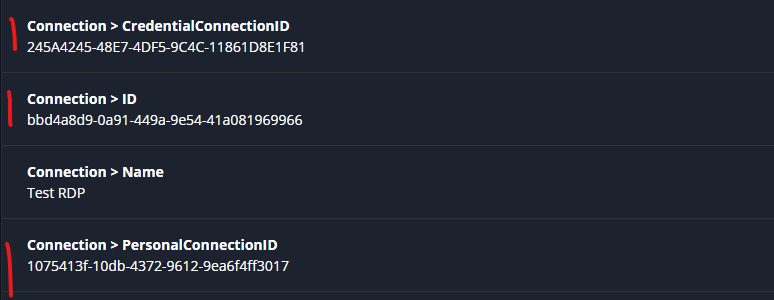
Meanwhile, the .7 version should have the fix, but we might have missed a specific case. Ideally, to avoid losing data, you shouldn't save entries that prompt those errors. As Erica suggested, the portable RDM 2026.1.23 is a good way to continue working, even if it's the same data source / workspace.
Thank you, have a good day!
Maxime Morin
a6fce263-b207-4f8f-af3d-fa2d6f7a2c1b.png
53d7e1a0-408d-4ae4-88e3-6368c5e5d6a7.png