latest version has broken ssh key authentication

I have had the same key setup for years now and in last version it working.
I updated to 2026.2.7.0 64-bit (PreJIT) this morning and now all connection that used to work with this key fail.
If I use user/pass it works. Using same key in WinSCP (same server) still works.
What was changed?
I am connecting to server 1 (RHEL) via ssh as usera + key. This is the jump host setup in the ssh gateway tab.
I am then connecting to server 2 (RHEL) via ssh as userb + same key.
This has worked for years.
Checking logs on server 2 and it seems to be failing because it is passing usera to server 2 instead of userb
this was setup as inherited which used to work but is not now.
I switch connection to use username/pass and hardcoded. but it is still passing the usera to server 2 instead of userb.
bc6b94b2-0e47-40aa-8f20-ec2bc89f7831.png
c11fcf6c-b137-419e-a5b0-a5683db6ac19.png
All Comments (9)
Does anyone else have this issue?
Is anyone looking into it?
Hello,
Could you please tell us which data source/workspace type you are using?
If it is a Devolutions Cloud please let us know if it was previously a Hub Personal (free version) or a Hub Business.
Best Regards,
Michaël Beaudin
Hello,
We've managed to reproduce this issue internally and will be working on a fix shortly.
We'll let you know once we have an update.
Regards
Jonathan Del Signore
Just to make sure we target your exact setup in the fix, could you please tell us where your 2 usernames are set (e.g. on the SSH terminal entry, on a linked SSH key and/or gateway, etc)? If you're using the same SSH key entry for both the gateway and the SSH server, it might explain why it's using the same user twice.
Thank you
Jonathan Del Signore
Just to make sure we target your exact setup in the fix, could you please tell us where your 2 usernames are set (e.g. on the SSH terminal entry, on a linked SSH key and/or gateway, etc)? If you're using the same SSH key entry for both the gateway and the SSH server, it might explain why it's using the same user twice.
Thank you
@Jonathan Del Signore
I have serverB setup with user/pass but only user is entered (userB). And ssh key set.
I have serverA setup as a gateway within. Also username/pass but only userA set + ssh key.
So it should launch.
1. Start with gateway (ssh userA@serverA) and authenticate via ssh key.
2.Then connect to serverB (ssh userB@serverB) and authenticate via ssh key.
But in step 2. It seemed to be dropping the userB and I am guessing doing an (ssh serverB) which by default uses current user (userA).
I still can't quite replicate the issue with that configuration. The SSH key on the terminal entry, did you set it up as embedded data, or a link of some kind (Linked (vault), local file, etc)?
And if it's a link, can you make sure there's no username set on the key itself, in the "Login name" tab? That's the only way I found to break the setup, since the key username overwrites the server one.
Thanks
Jonathan Del Signore
I still can't quite replicate the issue with that configuration. The SSH key on the terminal entry, did you set it up as embedded data, or a link of some kind (Linked (vault), local file, etc)?
And if it's a link, can you make sure there's no username set on the key itself, in the "Login name" tab? That's the only way I found to break the setup, since the key username overwrites the server one.
Thanks
@Jonathan Del Signore
Sorry for the late reply, busy couple weeks with many days away.
It is local id_rsa.ppk file. while checking that i did seem to find that the login name was set. I dont recall ever setting that so it must have been there a long time. So i'm guessing something was broken before and maybe something got fixed which caused an issue for me base don this previously being setup.
I realize I didn't confirm with you after you found the underlying issue, but is your setup fixed now that you removed the username from the key?
Simply making sure you're not waiting on us for anything else.
Regards
Jonathan Del Signore
I realize I didn't confirm with you after you found the underlying issue, but is your setup fixed now that you removed the username from the key?
Simply making sure you're not waiting on us for anything else.
Regards
@Jonathan Del Signore
yes blanking these fields solved it: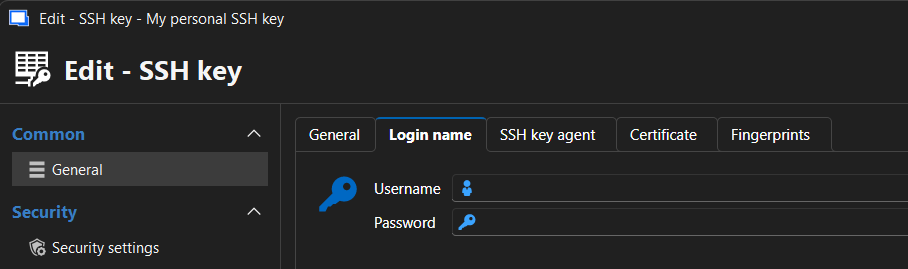
fcee89f9-af4c-422c-a151-048af77b1001.png