Connect when available, Connect after failed scan in 2026.2 beta
Connect when available, Connect after failed scan in 2026.2 beta

Hello - Having a very hard time in the beta with a feature I use all the time: Connect when available, and Connect after failed scan. I do find the Connect when available buried under several menu levels, but is no longer easy to find and very frustrating to use. Once used, it stays persistent across all subsequent connections to a host which is super annoying when you're trying to finally disconnect from a server. The option for Connect after failed scan has been wonderful for rebooting systems and automatically reconnecting afterward. That option appears to no longer be available at all. I did find the setting of "Connect when available delay in Settings->Tools, however it either doesn't do what I think it should do, or doesn't work at all.
Is there new functionality I'm missing to replace these? Can the previous capabilities please be returned?
P.S. - I'll add in general that the Connect when available capability would be much more effective scanning for port availability (3389) rather than ping, as many systems are firewalled, don't allow icmp, etc and will never respond to ping.
Thanks for listening and a great product!
--Jeff
All Comments (4)
Hello,
We have a new way to customize the Open. The documentation is not updated yet. You can click on Open (more)... and find 'Open when available.' Make sure to pin it, and this will appear in the menu after that: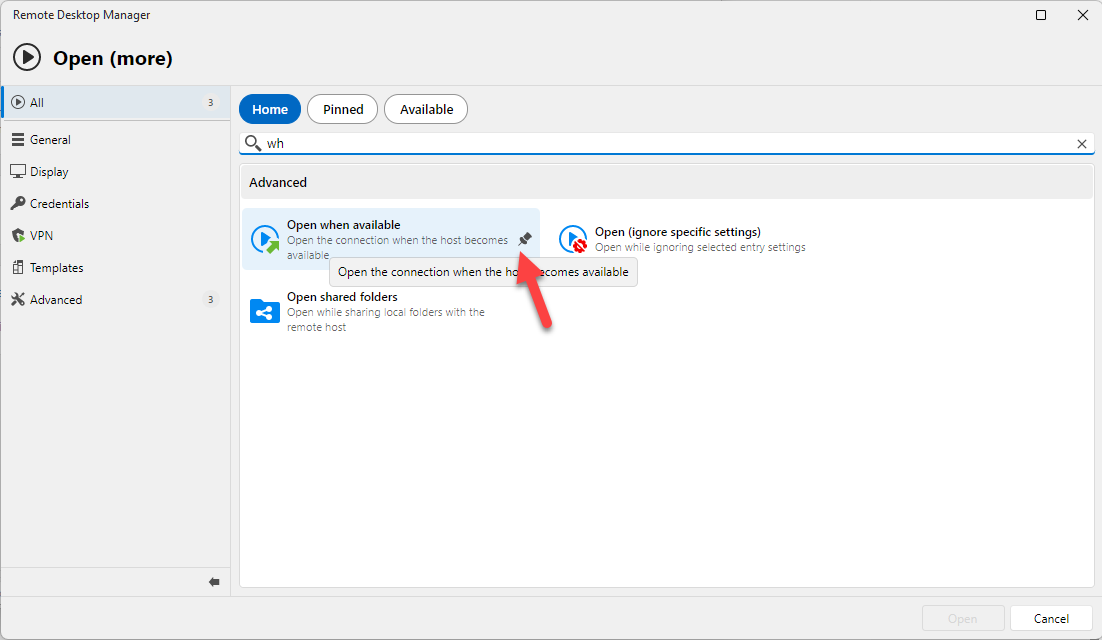
Let me know if I misunderstood your issue.
Regards
David Hervieux
0bf11001-babf-44c6-9b54-eb9c208d2996.png
Hi David - Thanks for the response. I have tried pinning the 'Open when available' option, but it still does not make itself more available or appear on any menu or list I can find. I've tried the pinning both at the global level and at the connection level but still does not show up anywhere but buried under the Open (more) section. Also, what about the former, very useful for server reboots, 'Connect after failed scan' option? Will it be carried forward to these new builds?
Thanks again,
--Jeff
FYI - With build 2026.2.5, the Macros/scripts/tools tab re-appeared which put the 'lost' options back in place where they've always been. Thank you!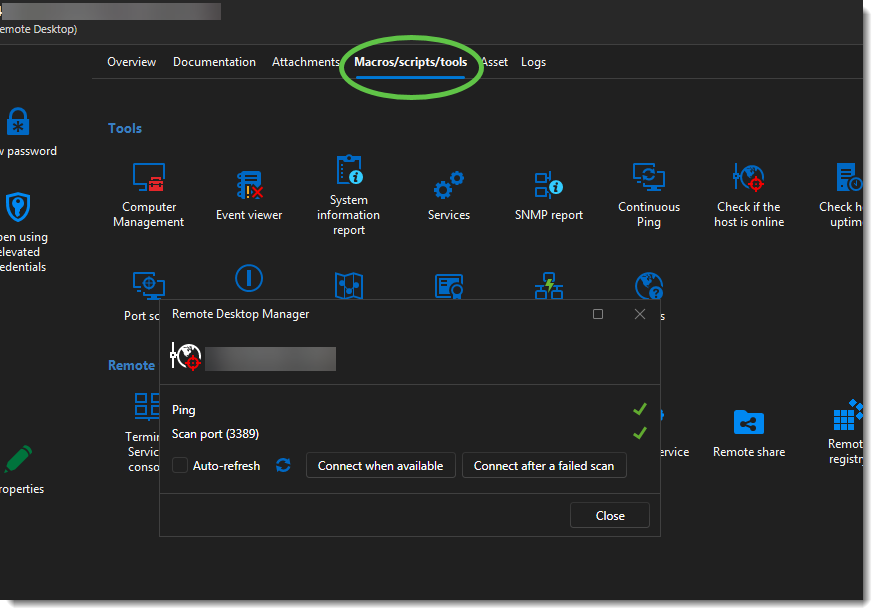
af8044ff-7e49-4469-bf85-79c5d3c7718f.png
Hello,
I was not investigating in the right place, and I think it has already been fixed in our internal build. That's why I was unable to understand the issue. Sorry about that.
Regards
David Hervieux