MFA caching for PSM SSH Proxy not working

Hello,
I've tried to set up two different PSM SSH Proxy connections with MFA Caching and neither of which succeeded
Environment 1:
The connection through the PSM SSH Proxy works, when the credentials are defined in the PSM SSH Proxy entry. However, if the MFA caching is enabled, the connection crashes.
The authentication mode is set to CyberArk and the credentials are hard coded into the entry: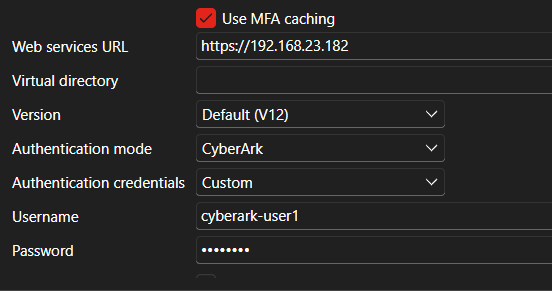
If I try to connect with this setting, I get two errors: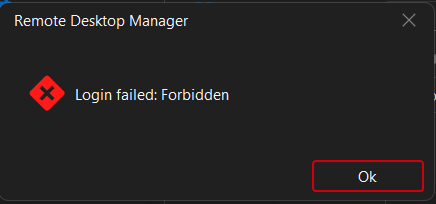
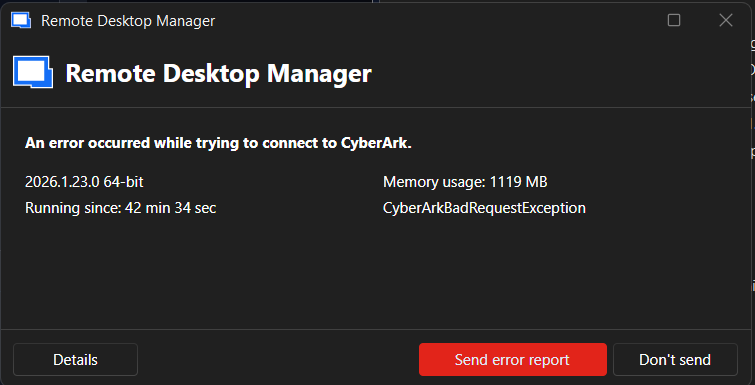
The SSH Terminal entry should be configured correctly, because it works without MFA Caching.
This is the latest CyberArk version (15.0), so I suspect the issue is caused by some change to the API. The passphrase for the key is not enabled.
Environment 2:
In this case, the CyberArk environment is on version 14.2 and there is enforced MFA with SAML, so the PSM SSH entry is configured for SAML authentication.
When trying to connect through the PSM SSH Proxy, it first asks for SAML authentication, which goes through correctly, but after that I get a prompt for interactive authentication: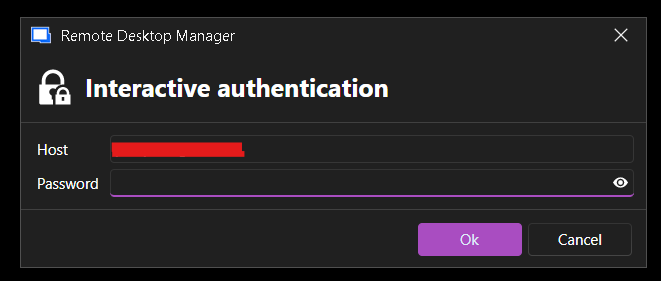
I have no idea which password it requests. The host field contains the hostname of the PSM SSH Proxy. In this case, the passphrase for the SSH key is enforced.
Could you confirm whether this is a known issue with the latest CyberArk versions, or whether there's a configuration on the RDM side I might be missing? I'm happy to provide logs, screenshots, or additional details from either environment if that would help with troubleshooting.
Thank you for your time.
Best regards, Daniil
33fcb9a9-a455-4e58-ab2a-8f181139d32d.png
b5e283b9-dd7c-45d3-a724-ab10599b5185.png
f904b33d-ecf6-4307-b9b1-5539481bbb44.png
c7635264-bcff-48da-81da-fe613791e7cc.png
All Comments (5)
Hello Daniil,
Thank you for the detailed description of both environments.
Based on what you described, the PSM SSH Proxy connection itself is working, but enabling “MFA caching” appears to switch the authentication flow to a session reuse/refresh path that fails (Env 1), and in the SAML scenario the flow completes the web login but then falls back to SSH keyboard-interactive authentication (Env 2), which is why you see an additional password-style prompt.
To proceed, could you share the following so we can confirm whether this is a product issue/compatibility issue or a configuration gap:
- Your Remote Desktop Manager version/build number.
- Environment 1:
- The full text of both error dialogs (copy/paste if possible).
- Logs from a failed attempt with MFA caching enabled, plus a successful attempt with MFA caching disabled (same entry), with approximate timestamps.
- Environment 2:
- The full text of the interactive authentication prompt (it can be a key passphrase prompt presented as “Password”, or SSH keyboard-interactive depending on the proxy/server).
- Logs from the same test.
For Environment 2 (SAML), it is also worth clearing the CyberArk SAML WebView2 cache and retrying, as stale tokens/cookies can cause the post-SAML handoff to misbehave. Steps are documented here:
https://docs.devolutions.net/rdm/kb/troubleshooting-articles/saml-configuration-troubleshooting-cyberark-dashboard/
If you need an immediate workaround to reduce repeated MFA prompts while we investigate MFA caching on the PSM SSH Proxy entry, using a CyberArk Dashboard entry with Auto Refresh enabled can maintain an active CyberArk session (so MFA is not required every time the session stays active), then launching PSM sessions from the dashboard:
https://docs.devolutions.net/rdm/kb/how-to-articles/cyberark-dashboard-configuration/
Additional references that may be relevant depending on the MFA method in use:
- CyberArk MFA delimiter option (RSA/SecurID “append code to password” behavior):
- https://docs.devolutions.net/rdm/kb/knowledge-base/mfa-delimiter-cyberark/
- CyberArk integration overview / related guides:
- https://docs.devolutions.net/rdm/concepts/advanced-concepts/external-pam-integrations/
- https://docs.devolutions.net/rdm/kb/knowledge-base/going-password-less-rdm-cyberark/
Best regards,
Patrick Ouimet
Hello Patrick,
I'm currently using RDM version 2026.2.7.0 (64-bit). As for the requests:
Environment 1:
The first error message is just this window: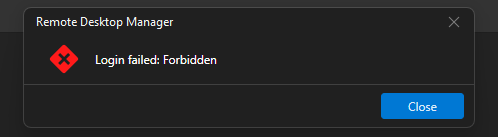
Then it disconnects me from the workspace and I have to log in again. Pressing Yes/No yields the same outcome: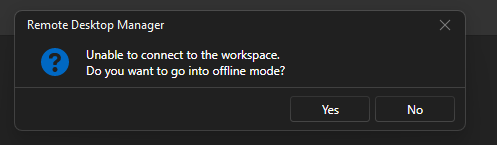
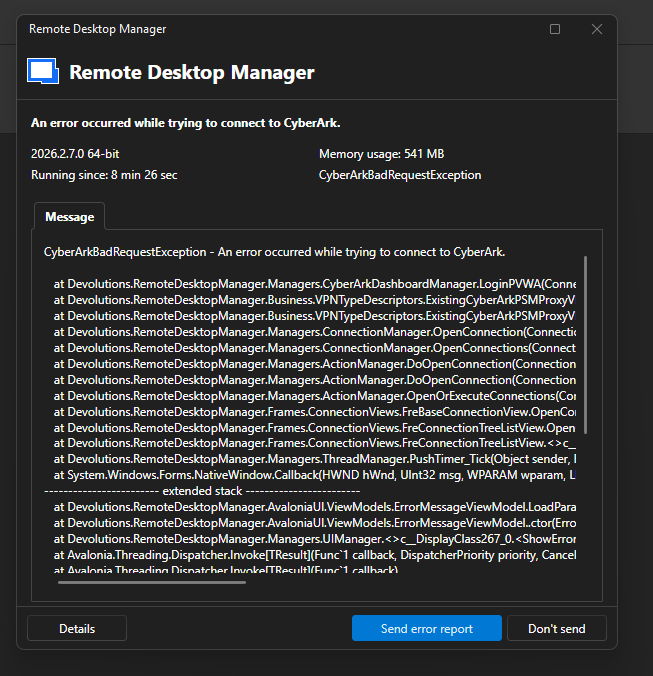
I've attached RemoteDesktopManager.log, RemoteDesktopManager.log.db, RemoteDesktopManager.debug, and the error message. If needed, I can attach more logs or increase the debug level. Please provide instructions on obtaining them.
The connection was tested and the error reproduced on 5 June 2026, around 14:00+ CET. One thing I noticed is that the log complained about an untrusted web certificate, so as a test I added it to the trusted root store, but the result was the same.
Environment 2:
After updating to version 2026.2.7.0, I'm unable to replicate the original issue. It now behaves the same as Environment 1. I'll keep you posted if anything changes.
The suggested workaround wouldn't work for us, as that is a different type of connection. It's not possible to launch a PSM SSH Proxy connection from the Dashboard/PVWA.
Best regards,
Daniil
logs.zip
error3.png
error2.png
error1.png
Hello Daniil,
Thank you for the logs.
They point to a clear explanation for why MFA caching specifically fails while the proxy works without it.
When MFA caching is disabled, Remote Desktop Manager sends your credentials directly to the PSM SSH Proxy over SSH, so the connection succeeds. When MFA caching is enabled, RDM must first authenticate to the CyberArk PVWA REST API to establish the cached session before opening the SSH proxy. That REST login is what is failing, and it surfaces as the "An error occurred while trying to connect to CyberArk" crash that disconnects you from the workspace.
The log shows two distinct failures on that REST call to the CyberArk endpoint (pvwa-cpm:443):
- A TLS certificate rejection: "The remote certificate was rejected by the provided RemoteCertificateValidationCallback."
- A TCP connection timeout: SocketException 10060 to pvwa-cpm:443 ("the connected party did not properly respond").
In other words, the SSH proxy itself is healthy. MFA caching cannot complete because RDM cannot reliably reach and trust the PVWA REST endpoint. This is why adding the certificate to the trusted root store alone did not resolve it.
To move forward, could you confirm the following:
- The exact CyberArk server address is configured in the PSM SSH Proxy entry. The log references a host named "pvwa-cpm" — please confirm this points to your PVWA component and not the CPM, as they are different roles.
- That this host is reachable on port 443 from the client machine. A quick test from PowerShell on that machine: Test-NetConnection pvwa-cpm -Port 443 (and, if possible, opening https://<pvwa-address>/PasswordVault in a browser on the same machine).
- The certificate presented by that endpoint: its full chain (is an intermediate missing?) and its Subject/SAN values, so we can confirm the certificate is actually issued for the hostname RDM connects to. A SAN mismatch or incomplete chain would explain a rejection even after trusting the root.
Once the PVWA REST endpoint is consistently reachable and its certificate validates cleanly against the configured hostname, MFA caching should proceed normally.
Best regards,
Patrick Ouimet
Hello Patrick,
The PVWA/CPM address is correct, as I set up this CyberArk instance specifically to test MFA caching with RDM. However, you might be right about the certificate chain or some misconfiguration on my side, so I moved to the second environment, where I'm confident the trust and connections are set up correctly. The downside is that I'm limited on how much I can change on the CyberArk side.
After some additional troubleshooting, I found a few things that were causing issues.
For a connection through PSMP, we normally use a string like:
ssh -i key.file primaryAccount@domain@targetAccount#domain@targetServer@proxyServer
To make this work, I had to configure the CyberArk PSM SSH Proxy entry as follows:
- Set the username to primaryAccount@domain
- Enable "Use MFA Caching" and fill out the configuration as documented
I had originally assumed that the username would not need to be provided, since it should be available from the SAML connection. That assumption was wrong.
Then in the SSH Shell entry:
- Set the host to targetServer
- Set the username to targetAccount#domain (if the target account is local, just use targetAccount)
- Set VPN/Tunnel/Gateway to the configured CyberArk PSM SSH Proxy entry
With this setup, MFA caching works correctly. On the first connection, RDM prompts for SAML logon, and after that the SSH connection goes through seamlessly.
One additional issue I encountered:
Credential saved in the User Vault as "Primary Account login":
- Username: username
- Domain: domain
- Password: ****
Then in the PSM SSH Proxy entry:
- Credentials: Find by name (User Vault) > "Primary Account login"
- Advanced > Username format: {User}@{Domain}
What I would expect with this configuration is that the resulting string matches the format above. However, after examining the logs, the domain is not included. The resulting string looks like primaryAccount@targetAccount... instead of primaryAccount@domain@targetAccount....
Fortunately, this is not a dealbreaker, as it can be worked around by extending the username in the credential entry to username@domain. With that change, the string is constructed correctly. This is workable for now and doesn't crash the application.
I'll test this in one more environment that uses RADIUS authentication instead of SAML, to confirm the settings are correct. I don't have direct access to that environment and will need to coordinate with a colleague, so my next response may be slightly delayed.
Thanks,
Daniil
Hello Daniil,
Thank you for the detailed follow-up and for taking the time to document what works end-to-end.
The configuration you described is consistent with how the PSM SSH Proxy entry is meant to be used in CyberArk environments:
- PSM SSH Proxy entry: Username set to primaryAccount@domain, with MFA caching enabled.
- SSH Shell entry: Host set to the target server, Username set to targetAccount#domain (or just targetAccount for local), and VPN/Tunnel/Gateway set to the PSM SSH Proxy entry above.
Glad to hear MFA caching is now working as expected in Environment 2.
Regarding the username format issue:
You are right that selecting "{User}@{Domain}" in the PSM SSH Proxy entry should expand the Domain field from the linked User Vault credential. The behaviour you observed (the domain being dropped, producing primaryAccount@targetAccount... instead of primaryAccount@domain@targetAccount...) does not match the intended behaviour, so I will reproduce it on our side and, if confirmed, open an internal ticket for the development team.
To make sure I reproduce exactly what you have, could you confirm the following:
- The exact location of the "Username format" setting you used (PSM SSH Proxy entry > Advanced tab > Username format = {User}@{Domain}, or another location).
- That the linked credential is of type "Username / Password" stored in the User Vault, with the Username and Domain fields populated separately (not concatenated).
- Whether the same behaviour occurs when the credential is stored in the same vault as the entry (instead of the User Vault), to determine if the User Vault is part of the trigger.
The workaround you found (placing username@domain directly in the Username field of the credential) is fine to use in the meantime.
I will also wait on the results of your RADIUS test before closing the loop on this case, and there is no rush on your side.
For reference, the PSM SSH Proxy and MFA caching configuration is documented here: https://docs.devolutions.net/rdm/concepts/advanced-concepts/external-pam-integrations/ https://docs.devolutions.net/rdm/kb/how-to-articles/cyberark-dashboard-configuration/
Best regards,
Patrick Ouimet