Deleting the insecure password from the Reports > Password analyzer
Deleting the insecure password from the Reports > Password analyzer

Under: reports/password-analyzer in Devolutions Hub
How can I delete the insecure entries?
Because there is no way to manually remove the password.
When you click on the entries, it can only show "Go to", but there is no other way to delete just the password.
All Comments (3)
Hi RemoteUser,
Thank you for raising this! The Password Analyzer is a read-only reporting tool, so there's no option to delete or clear passwords directly from it.
The "Go to" button is the intended action; it takes you to the entry's properties where you can either update the password to a stronger one or delete the entry entirely if it's no longer needed.
If you have many entries to go through, the Export button can help you generate a CSV of all flagged entries to work through them more efficiently.
Hope that helps! Let me know if you have any other questions.
Best regards,
Eduard Sepulveda Lopez
Hello,
In addition to what my colleague said, we discussed this internally and we think it could be a nice improvement to add a way to edit entries directly from that report. This could allow you to more easily handle these insecure or repeated passwords. We will open a ticket for this.
Regards,
Hubert Mireault
Hello,
I've inspected the current Password Analyzer, and if you double click any row of passwords, it should prompt a window with all entries containing said password. You can then edit these, assuming that you already have the appropriate rights. This has been in place for quite some time, and if you are not seeing this button, it might be cause you are lacking the rights to do so.
Let us know if this is what you were looking for.
Regards,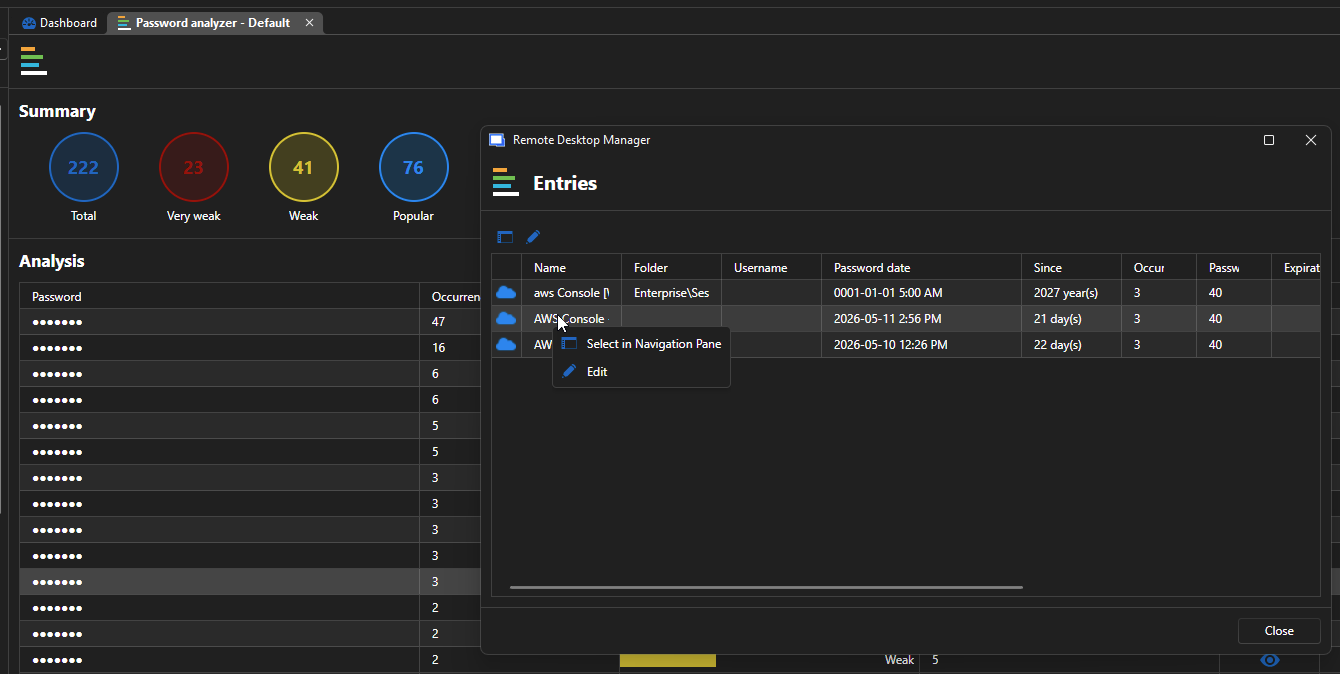
Jafran Majeau
3499b560-4962-4a25-92b4-5b177dc5128f.png