High privileged requirements for Microsoft Azure AD / Entra ID tenant request
High privileged requirements for Microsoft Azure AD / Entra ID tenant request

Can someone here please explain why the RDM application wanted to become a highly privileged application in my Microsoft Azure AD / Entra ID tenant?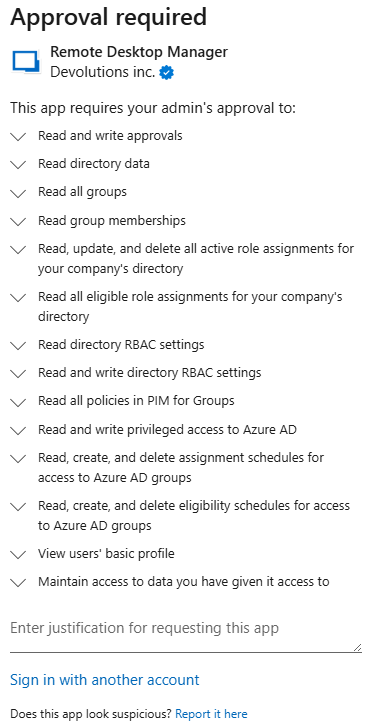
What would occur if the Global Administrator account approves the above request?
The RDM application is only used by 2 or 3 Senior engineers, so I'm not sure why the required approval above is tenant-wide.
Any help would be greatly appreciated.
d411872f-9fd1-44e8-8c11-1c1523e747fc.png
All Comments (1)
Hello RemoteUser,
The “Approval required” screen is generated by Microsoft Entra ID when an application requests Microsoft Graph permissions that require administrator consent.
In your screenshot, the requested permissions map to tenant-wide directory and privileged management capabilities in Entra ID, including:
- Reading directory data, users, groups, and group memberships
- Reading and managing directory role assignments and RBAC settings
- Reading and managing Privileged Identity Management (PIM) for Groups, including eligibility/assignment schedules
These permissions are typically requested when an application needs to interact with Entra ID role management and/or PIM (not just basic sign-in).
What occurs if a Global Administrator approves?
If a Global Administrator approves, tenant-wide admin consent is granted to the “Remote Desktop Manager” enterprise application for the listed Microsoft Graph permissions.
After that, users who use the related RDM Microsoft integration can obtain tokens that include these scopes, allowing the application to make Microsoft Graph calls covered by the granted permissions. (For changes to roles/PIM, Entra ID may still enforce that the signed-in account has the appropriate admin role, but the admin consent is what enables the app to request those scopes in the first place.)
Why is the approval tenant-wide, even if only 2–3 engineers use RDM
Microsoft Graph permissions such as:
All, RoleManagement, and PIM-related scopes are granted at the tenant level. Entra ID does not provide a way to grant these specific scopes only for a subset of users via consent.
If you decide to approve, you can still limit exposure by restricting who can use the enterprise application (for example, requiring user assignment and assigning only the 2–3 engineers, and/or enforcing Conditional Access).
If you want to proceed with least privilege, please confirm which exact action in RDM triggers this prompt (which integration or feature you are enabling). That will determine whether these elevated PIM/RBAC permissions are actually required for your use case.
Documentation:
https://docs.devolutions.net/server/kb/how-to-articles/azure-portal-configuration-guide-microsoft-authentication/
https://docs.devolutions.net/server/web-interface/administration/configuration/server-settings/general/authentication/office-365/
https://docs.devolutions.net/server/web-interface/administration/configuration/server-settings/general/authentication/
Best regards,
Patrick Ouimet