create new SSH-Key - how to show or change private Key passphrase
create new SSH-Key - how to show or change private Key passphrase

Hello,
I use RDM 2026.1.22.0 and used the ssh key generator to generate a SSH key. I pressed th button "generate", than input a passphrase for the private key and then pressed save.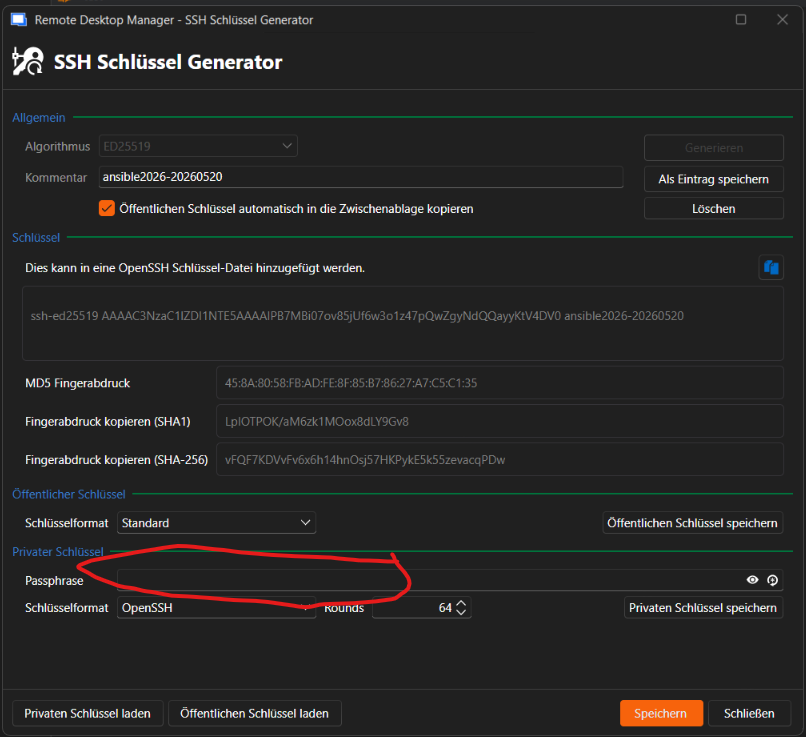 (if a do not enter a passphrase I get a warning after pressing "save")
Now in the next window, I can't find the passphrase. But I am able to enter a new (or the same) passphrase. Apparently this is used if opend in SSH-Key-Agent)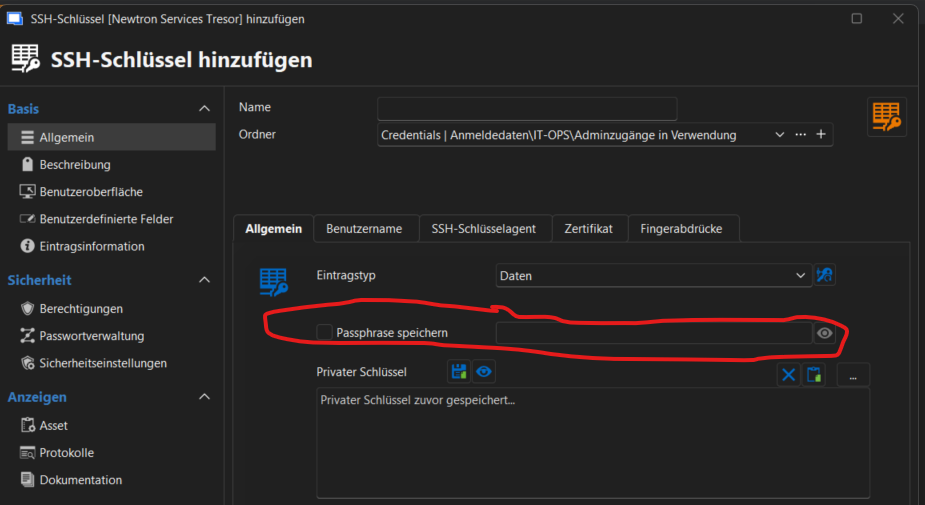
Please direct me to the manual or explain the intend of usage. For me, the feature doesn't work the way I'd expect it to. I expext a password vault to save all relevant keys, passwords and passphases for me.
Regards Konrad
b8688a13-cc54-475d-8045-f5f1eb582618.png
498aea8e-739a-4b4e-8920-60422ebd169a.png
All Comments (3)
Hello,
Thank you for reaching out.
The behavior you are seeing is expected. When saving the SSH key entry in RDM, the passphrase field on the subsequent screen is separate from the one used during key generation. It is intended for use with the SSH Key Agent, not for storing the original private key passphrase.
If you did not set a passphrase on the private key itself, you can simply leave the "Prompt for password" checkbox unchecked and leave the passphrase field empty. RDM will then use the key without prompting for a passphrase.
If you did set a passphrase during key generation and want RDM to supply it automatically to the SSH Key Agent, you can enter it in that field.
Please let us know if you have any further questions.
Best regards,
Carl Marien
Hello, thank you for the answer! From my perspective as a user, it’s at least unexpected that after generating an SSH key, you’re prompted to set a passphrase to save it, but that passphrase isn’t actually stored in Password Safe itself.
Since I hadn’t saved it anywhere else, the SSH key was then useless and had to be regenerated and redeployed.
I would like to suggest considering an improvement to the user experience. A prompt asking whether the passphrase should be saved—with a warning that it cannot be recovered or changed later—would be helpful.
Regardless of any future improvements, I consider my request resolved. Thank you!
Hello,
I wanted to let you know I've opened an internal ticket to improve this. I think that, by default, it should save the passphrase. If you don't want it saved, it's a simple matter of unchecking the "save passphrase" box in the entry before saving it.
Regards,
Hubert Mireault