RDM RDM version 2026.1.22.0 - ArgumentException requiredChainLength
RDM RDM version 2026.1.22.0 - ArgumentException requiredChainLength

Hello,
after getting some Windows Updates I got an issue with the RDM version 2026.1.22.0
I am trying to connect to an on premise server with the Version 2026.1.19
Below you will find the Log details.
Kins regards,
Bernd Wollny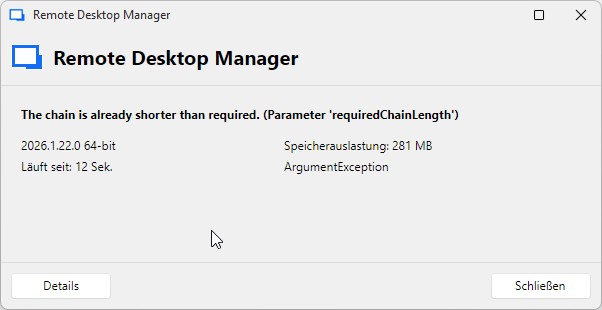
---
ArgumentException - The chain is already shorter than required. (Parameter 'requiredChainLength')
at OpenMcdf.MiniFatChainEnumerator.Shrink(UInt32 requiredChainLength)
at OpenMcdf.MiniFatStream.SetLength(Int64 value)
at OpenMcdf.CfbStream.SetLength(Int64 value)
at Devolutions.RemoteDesktopManager.Managers.OpenMCDFv2OfflineEngine.WriteAllBytes(CfbStream stream, Byte[] bytes)
at Devolutions.RemoteDesktopManager.Managers.OpenMCDFv2OfflineEngine.SaveMeta(RootStorage file)
at Devolutions.RemoteDesktopManager.Managers.OpenMCDFv2OfflineEngine.Reset(Boolean saveChanges, Boolean includeMeta)
at Devolutions.RemoteDesktopManager.Managers.OfflineManager.Reset(ConnectionEngine engine, Boolean includeMeta)
at Devolutions.RemoteDesktopManager.Managers.ConnectionManager.LoadConnections(ConnectionEngine& engine)
at Devolutions.RemoteDesktopManager.Managers.ConnectionManager.LoadConnections(BaseConnectionDataSource dataSource, ConnectionEngine& engine)
at Devolutions.RemoteDesktopManager.Managers.ConnectionManager.RefreshConnections(ConnectionEngine& engine)
at Devolutions.RemoteDesktopManager.Managers.ConnectionManager.RefreshConnectionEngineWithFailover(ConnectionEngine& engine)
at Devolutions.RemoteDesktopManager.Forms.FrmMainDocumentManager.RefreshAllConnectionView(Boolean saveState, Boolean checkOnline, Boolean force)
at Devolutions.RemoteDesktopManager.Managers.MainFormManager.DoFirstLoad(FrmMainDocumentManager mainform)
at Devolutions.RemoteDesktopManager.Forms.FrmMainDocumentManager.DoFirstLoad()
at Devolutions.RemoteDesktopManager.Forms.FrmMainDocumentManager.TmFirstLoad_Tick(Object sender, EventArgs e)
at System.Windows.Forms.NativeWindow.Callback(HWND hWnd, UInt32 msg, WPARAM wparam, LPARAM lparam)
------------------------ extended stack ------------------------
at Devolutions.RemoteDesktopManager.AvaloniaUI.ViewModels.ErrorMessageViewModel.LoadParameters(ErrorMessageParameters parameters)
at Devolutions.RemoteDesktopManager.AvaloniaUI.ViewModels.ErrorMessageViewModel..ctor(ErrorMessageParameters parameters)
at Devolutions.RemoteDesktopManager.Managers.UIManager.ShowErrorMessage(ConnectionEngine engine, Exception exception, String message, String details, String title, String xml)
at Devolutions.RemoteDesktopManager.Managers.UIManager.ShowErrorMessage(ConnectionEngine engine, Exception exception, String message, String title)
at Devolutions.RemoteDesktopManager.Managers.UIManager.ShowErrorMessage(ConnectionEngine engine, Exception exception, String title)
at Devolutions.RemoteDesktopManager.Managers.LogManager.HandleException(Exception exception)
at Devolutions.RemoteDesktopManager.Managers.LogManager.OnThreadException(Object sender, ThreadExceptionEventArgs t)
at System.Windows.Forms.Application.ThreadContext.OnThreadException(Exception ex)
at System.Windows.Forms.NativeWindow.Callback(HWND hWnd, UInt32 msg, WPARAM wparam, LPARAM lparam)
at Windows.Win32.PInvoke.DispatchMessage(MSG* lpMsg)
at System.Windows.Forms.Application.LightThreadContext.FPushMessageLoop(msoloop uReason)
at System.Windows.Forms.Application.LightThreadContext.RunMessageLoop(msoloop reason, Boolean fullModal)
at System.Windows.Forms.Application.ThreadContext.RunMessageLoopInner(msoloop reason, ApplicationContext context)
at System.Windows.Forms.Application.Run(Form mainForm)
at Devolutions.RemoteDesktopManager.Program.Main(String[] args)
2.png
Recommended Answer
Hello Bernd,
Thank you for contacting us on that matter.
Please perform the following steps on your client:
- Close RDM
- Navigate to %localappdata%\devolutions\RemoteDesktopManager
- Search for .mcdf2 files
- Delete all these files
- Start RDM
Please let us know if this fix the behaviour.
Best regards,
Alexis Geller Peiro
All Comments (2)
Hello Bernd,
Thank you for contacting us on that matter.
Please perform the following steps on your client:
- Close RDM
- Navigate to %localappdata%\devolutions\RemoteDesktopManager
- Search for .mcdf2 files
- Delete all these files
- Start RDM
Please let us know if this fix the behaviour.
Best regards,
Alexis Geller Peiro
Hello Alexis,
Thank you this has solved the issue.
Kind regards and nice Whitsunday
Bernd Wollny