PSU 2026.1 - Permissions on Scripts Not Working

Hello,
I just upgraded and now permissions on script that are called from a dashboard for a custom role is no longer working.
I verified that the role has
automation/script - Read
automation/script - Execute
I even tried granting access via the script too.
[5/19/2026 10:32:44 AM] [Error] [App- Intune Enrollment] Permission denied. The role specified does not have access to this resource.
[File]: Intune Enrollment.ps1
[Endpoint]: d91db62a-8508-49b1-96ad-ca82f99415de
[Page]: fcd68ebd-5a2d-4ed4-9408-79eee745ac01
I tried restarting the service as well. Not sure what I am missing. They can access the dashboard just fine, this happens when they click the button to look up the device which calls a script.
All Comments (9)
@michaelwatts I have a couple questions:
- Can you let me know what version you upgraded from?
- Can you also let me know the Security Model you have set?
- Are you using the -Integrated switch with Invoke-PSUScript?
Adam Driscoll
PowerShell Expert and Developer at Devolutions
@michaelwatts I have a couple questions:
- Can you let me know what version you upgraded from?
- Can you also let me know the Security Model you have set?
- Are you using the -Integrated switch with Invoke-PSUScript?
@Adam Driscoll
Hey!
- I don't know the exact version, but it was 5. Might have been 5.6.6.
- I do not see this set in my appsettings.json
- Nope, just:
- $Page:LookupObj = Invoke-PSUScript -Script '\script\script.ps1' -device $deviceName -TrustCertificate -Wait
Strict is the default so you may be running that. The other place it can be set is in .universal\settings.ps1. The reason I ask about integrated mode for the cmdlet, is that we added support for permissions to it in 2026.1.5. Using it is simpler because it doesn't round trip the server and just uses the back channel. There aren't any certificate or URL issues to worry about.
Can you try this?
$Page:LookupObj = Invoke-PSUScript -Script '\script\script.ps1' -device $deviceName -Integrated -Wait
Adam Driscoll
PowerShell Expert and Developer at Devolutions
Strict is the default so you may be running that. The other place it can be set is in .universal\settings.ps1. The reason I ask about integrated mode for the cmdlet, is that we added support for permissions to it in 2026.1.5. Using it is simpler because it doesn't round trip the server and just uses the back channel. There aren't any certificate or URL issues to worry about.
Can you try this?
$Page:LookupObj = Invoke-PSUScript -Script '\script\script.ps1' -device $deviceName -Integrated -Wait
@Adam Driscoll
I made the change. I believe the user has gone home for the day, but I will have them check first thing in the morning. I appreciate your quick response as always! :)
Side note: Am I missing how to remove a permission for a role? 
a329cd89-b1b5-469d-a6ca-d6bd08d12662.png
Thanks. Let me know if that doesn't work. That said, you shouldn't have had to do this so we can continue to investigate if you'd like.
As for removing the permission, it looks like we need to fix that. Can you try going to the Security \ Permissions page to see if it is listed there?
Adam Driscoll
PowerShell Expert and Developer at Devolutions
Thanks. Let me know if that doesn't work. That said, you shouldn't have had to do this so we can continue to investigate if you'd like.
As for removing the permission, it looks like we need to fix that. Can you try going to the Security \ Permissions page to see if it is listed there?
@Adam Driscoll
That did not seem to work for them either. :(
The scripts do not have an environment set, so I assume they use the integrated environment. The dashboard/app on the other hand, is set to use PowerShell 7.4.6 environment.
I was able to remove the permissions via Security -> Permissions.
@michaelwatts Thanks for the update. I'm trying to reproduce this and this is my current configuration. At this point, I'm not seeing the issue but I could have something configured differently.
Dashboards.ps1
New-PSUApp -Name "RunScript" -FilePath "dashboards\RunScript\RunScript.ps1" -BaseUrl "/runscript" -Authenticated -Role @('Custom') -AutoDeploy
Dashboard Definition
New-UDApp -Content {
    New-UDTypography $PSUSecurityModel -Variant h4
     $Roles | % { New-UDTypography $_  -Variant h4 }
    New-UDButton -Text "Run Script" -OnClick {
        Invoke-PSUScript -Name "A.ps1" -Wait
        Show-UDToast "Done"
    }
 }
This is what it looks like when the user logs in to the app.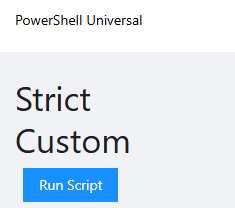
Roles.ps1
New-PSURole -Name "Custom"
Identities - Role is statically assigned. 
If I visit the admin console as the user (just navigate to /admin) and then click the user name in the top right and go to My Identity, I can see the permissions applied. 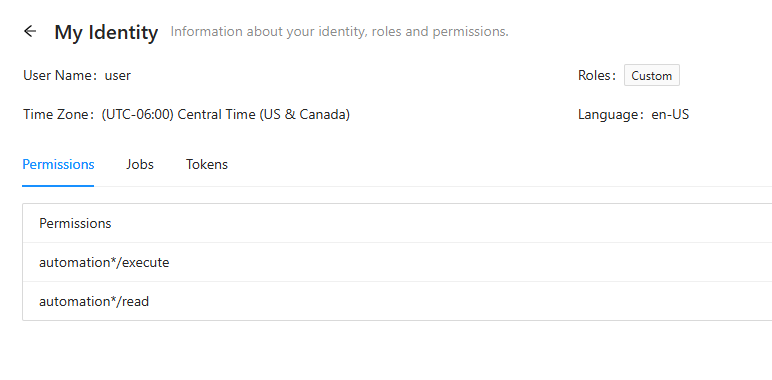
As you can see, the user is capable of running the script from the app. 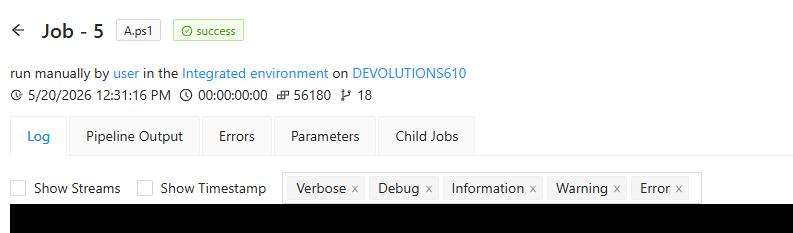
One thing I might suggest is having the user view the My Identity page to see which permissions are actually being applied.
Adam Driscoll
PowerShell Expert and Developer at Devolutions
ff106c9d-adfc-4eea-9f24-886d51b2e630.png
1ada3568-ac93-452a-933d-97f4cd287401.png
a01bdcda-16bf-407d-9b48-639c0d622ce8.png
d5ee53fc-38ce-4448-8af6-9b84409bab63.png
@michaelwatts Thanks for the update. I'm trying to reproduce this and this is my current configuration. At this point, I'm not seeing the issue but I could have something configured differently.
....
One thing I might suggest is having the user view the My Identity page to see which permissions are actually being applied.
@Adam Driscoll
So, the mystery deepens. I had the user visit the My Identity page: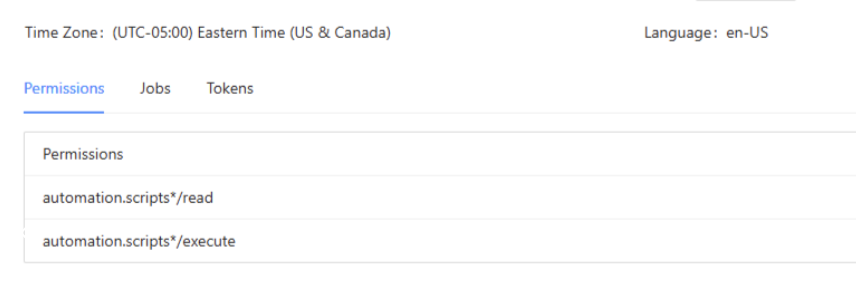 I checked the claims, even the claims show the correct Role & PSUPermission of the same two permissions above.
When clicking the button with the script, this toast message appears: 
However, looking at the jobs page, I see the job actually ran successfully. So, I am really confused why the message is appearing: 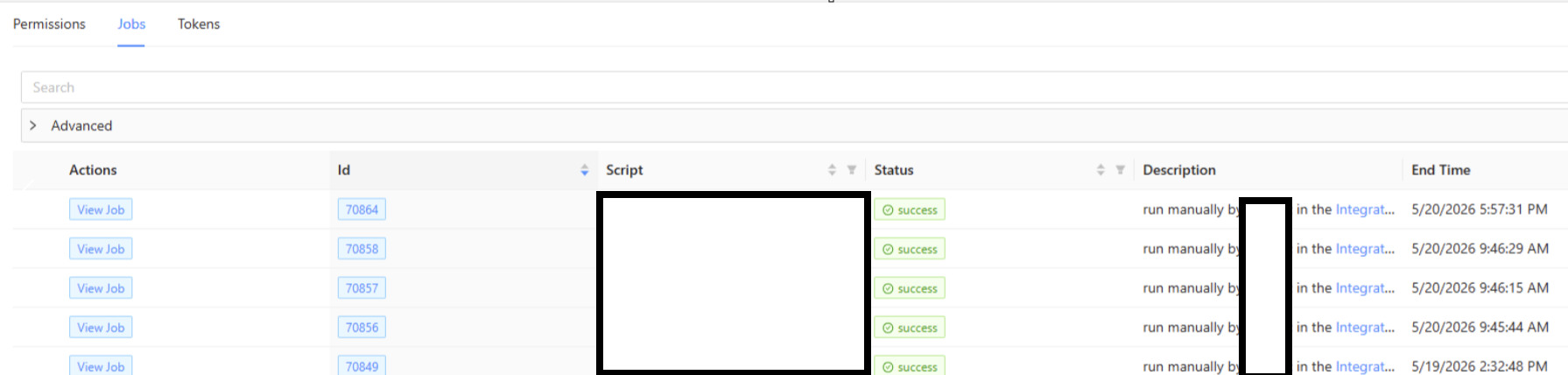
fb82c2d2-13dc-4922-96c6-c2e5bb03bf8a.png
bf46efb1-2633-4bd4-8643-9a5e390a9fe6.png
62abae86-0dd7-4feb-ab74-e3a5784c7f8c.png
@michaelwatts Oh, that's interesting. When using Invoke-PSUScript with -Wait, it calls Wait-PSUJob internally. I wonder if that's what is actually throwing the exception. Can you verify that you are on 2026.1.6? I will double check out source history to see if there have been any changes to that cmdlet.
Adam Driscoll
PowerShell Expert and Developer at Devolutions