Copy Username and Password not working

Hi everyone.
I have issues with the copy paste, and historickly we have had issues with the funcion for a long time.
But now, it dosent work at all for me.
Is is only the "Username and password" that doesent work, the user or password one at a time works fine.
I have tried the "Clipboard Diagnostics".
Paste once or twice, there is no other application taking the content:
Clipboard - CopyMethod : PasteOnce
Clipboard - Paste Once - Count : 1
Clipboard - Empty
Clipboard - Promise - Format : 50098
Clipboard - Promise - Format : 49666
Clipboard - Promise - Format : 49665
Clipboard - Promise - Format : 49954
Clipboard - Promise - Format : 50093
Clipboard - Promise - Format : 13
I hope you have a good input for solving this.
Best Regards
Jens.
Recommended Answer
So it works perfectly with Notepad, but not with Chrome.
Why?
In Chrome’s case, the clipboard is opened from a sandboxed renderer/utility process that does not expose a top-level visible HWND (0). Because of that, it gets blocked from receiving clipboard data.
There’s nothing we can do on Chrome’s side, so the workaround must be done in RDM. The only solution is to enable the option Disable null requester check (advanced).
You may first need to set the Clipboard copy method to Paste once (secure) to enable the checkbox. This is just a workaround for a UI bug. Once Disable null requester check (advanced) is enabled, you can switch the Clipboard copy method back to Legacy if you want.
The Clipboard copy method settings only affect how Copy username and Copy password behave. The Copy username & password action must always use Paste once (secure), as it is the only method that works for that feature.
So what does this option actually do?
When isable null requester check (advanced) is enabled, RDM allows clipboard copy/paste operations for applications that do not, cannot, or refuse to identify themselves properly. This does weaken the protection globally, not just for Chrome.
However, if you want to use Copy username & password with Chrome, there is currently no other choice.
Best regards,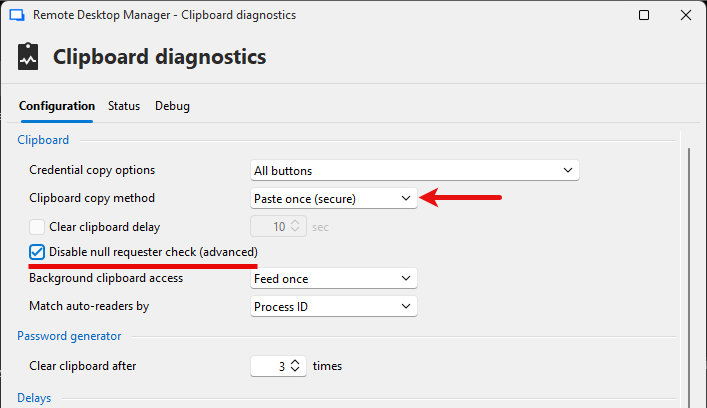
Stéfane Lavergne
2026-05-19_07-57-59.png
All Comments (5)
Hi Jens,
The clipboard diagnostic looks perfect but incomplete. We only see the copy part and no paste request from any app or process.
You have the copy part, which includes the 5 private formats and the text format (13), telling other apps that the content is sensitive and should not be added to clipboard history (Windows Clipboard History, yes, we’re talking to you), along with a text format letting them know we have text available for any requester.
Clipboard - CopyMethod : PasteOnce Clipboard - Paste Once - Count : 1 Clipboard - Empty Clipboard - Promise - Format : 50098 Clipboard - Promise - Format : 49666 Clipboard - Promise - Format : 49665 Clipboard - Promise - Format : 49954 Clipboard - Promise - Format : 50093 Clipboard - Promise - Format : 13
Usually after the copy part is done, a paste requests comes in and we see something like this:
Clipboard - Render - Requester : 399406 - Format : 13
Clipboard - Requester : 399406 - Process Id : 62652 - Name : Notepad
Clipboard - Set - Format : 13
Clipboard - Render - Allowlisted - Requester : 399406
Clipboard - Done!
Clipboard - Empty
In this case Notepad requested a paste, we accepted and sent the data over and cleared the clipboard.
This is good news is, this means no other application or process is "taking" the clipboard content. Paste into notepad should work.
Try it and send me the output.
Best regards,
Stéfane Lavergne
Hi Jens,
The clipboard diagnostic looks perfect but incomplete. We only see the copy part and no paste request from any app or process.
You have the copy part, which includes the 5 private formats and the text format (13), telling other apps that the content is sensitive and should not be added to clipboard history (Windows Clipboard History, yes, we’re talking to you), along with a text format letting them know we have text available for any requester.
Clipboard - CopyMethod : PasteOnce
Clipboard - Paste Once - Count : 1
Clipboard - Empty
Clipboard - Promise - Format : 50098
Clipboard - Promise - Format : 49666
Clipboard - Promise - Format : 49665
Clipboard - Promise - Format : 49954
Clipboard - Promise - Format : 50093
Clipboard - Promise - Format : 13
Usually after the copy part is done, a paste requests comes in and we see something like this:
Clipboard - Render - Requester : 399406 - Format : 13
Clipboard - Requester : 399406 - Process Id : 62652 - Name : Notepad
Clipboard - Set - Format : 13
Clipboard - Render - Allowlisted - Requester : 399406
Clipboard - Done!
Clipboard - EmptyIn this case Notepad requested a paste, we accepted and sent the data over and cleared the clipboard.
This is good news is, this means no other application or process is "taking" the clipboard content. Paste into notepad should work.
Try it and send me the output.
Best regards,
@Stéfane Lavergne
Okay, i did a double paste to notepad:
Clipboard - Copy
Clipboard - Paste Once - Count : 2
Clipboard - Empty
Clipboard - Promise - Format : 50064
Clipboard - Promise - Format : 49251
Clipboard - Promise - Format : 49227
Clipboard - Promise - Format : 50049
Clipboard - Promise - Format : 50065
Clipboard - Promise - Format : 13
Clipboard - Render - Requester : 134376 - Format : 13
Clipboard - Requester : 134376 - Process Id : 13492 - Name : Notepad
Clipboard - Set - Format : 13
Clipboard - Render - Allowlisted - Requester : 134376
Clipboard - Next Clipboard Data
Clipboard - Empty
Clipboard - Promise - Format : 50064
Clipboard - Promise - Format : 49251
Clipboard - Promise - Format : 49227
Clipboard - Promise - Format : 50049
Clipboard - Promise - Format : 50065
Clipboard - Promise - Format : 13
Clipboard - Render - Requester : 134376 - Format : 13
Clipboard - Render - Allow listed - Requester : 134376
Clipboard - Requester : 134376 - Process Id : 13492 - Name : Notepad
Clipboard - Set - Format : 13
Clipboard - Done!
Clipboard - Empty
Also exiting, when i try to do the same to a google chrome instance:
Clipboard - Copy
Clipboard - Paste Once - Count : 2
Clipboard - Empty
Clipboard - Promise - Format : 50064
Clipboard - Promise - Format : 49251
Clipboard - Promise - Format : 49227
Clipboard - Promise - Format : 50049
Clipboard - Promise - Format : 50065
Clipboard - Promise - Format : 13
Clipboard - Render - Requester : 0 - Format : 13
Clipboard - Render - LastError : 0
Clipboard - Render - Requester : 0 - Format : 13
Clipboard - Render - LastError : 0
So it works perfectly with Notepad, but not with Chrome.
Why?
In Chrome’s case, the clipboard is opened from a sandboxed renderer/utility process that does not expose a top-level visible HWND (0). Because of that, it gets blocked from receiving clipboard data.
There’s nothing we can do on Chrome’s side, so the workaround must be done in RDM. The only solution is to enable the option Disable null requester check (advanced).
You may first need to set the Clipboard copy method to Paste once (secure) to enable the checkbox. This is just a workaround for a UI bug. Once Disable null requester check (advanced) is enabled, you can switch the Clipboard copy method back to Legacy if you want.
The Clipboard copy method settings only affect how Copy username and Copy password behave. The Copy username & password action must always use Paste once (secure), as it is the only method that works for that feature.
So what does this option actually do?
When isable null requester check (advanced) is enabled, RDM allows clipboard copy/paste operations for applications that do not, cannot, or refuse to identify themselves properly. This does weaken the protection globally, not just for Chrome.
However, if you want to use Copy username & password with Chrome, there is currently no other choice.
Best regards,
Stéfane Lavergne
2026-05-19_07-57-59.png
So it works perfectly with Notepad, but not with Chrome.
Why?
In Chrome’s case, the clipboard is opened from a sandboxed renderer/utility process that does not expose a top-level visible HWND (0). Because of that, it gets blocked from receiving clipboard data.
There’s nothing we can do on Chrome’s side, so the workaround must be done in RDM. The only solution is to enable the option Disable null requester check (advanced).
You may first need to set the Clipboard copy method to Paste once (secure) to enable the checkbox. This is just a workaround for a UI bug. Once Disable null requester check (advanced) is enabled, you can switch the Clipboard copy method back to Legacy if you want.
The Clipboard copy method settings only affect how Copy username and Copy password behave. The Copy username & password action must always use Paste once (secure), as it is the only method that works for that feature.
So what does this option actually do?
When isable null requester check (advanced) is enabled, RDM allows clipboard copy/paste operations for applications that do not, cannot, or refuse to identify themselves properly. This does weaken the protection globally, not just for Chrome.
However, if you want to use Copy username & password with Chrome, there is currently no other choice.
Best regards,
@Stéfane Lavergne
Hi, that seemed to work! Thank you!
Jens.