save window size upon closing and use it when re-opening

It's truly annoying to have to reset your screen size every freaking time you open remote desktop manager. I have a dual monitor and I like to have it expand slightly over both screens so I can have the server list on one screen and maximum display window on the other.
All Comments (3)
Hello,
If I understand correctly, you're stretching RDM over multiple screens, and after you close and reopen the application, it doesn't keep the size you had last used, instead resetting to its default state. Is this correct?
Could you verify if you have the startup window state value set to "Last saved"? This is located in File > Settings > Application > Application startup. On my end, testing the same scenario, it works.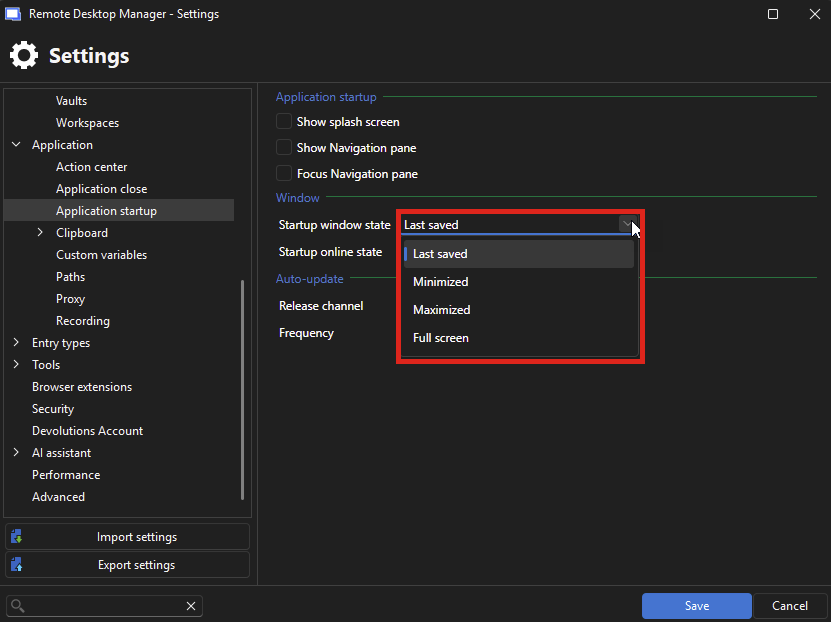
Otherwise, do you have anything particular about your setup or the steps taken that cause this issue? For example, do you tend to change your screen setup between different openings of RDM? Maybe there's an issue restoring the previous state properly if there's either a specific setting in RDM, or a change in the environment.
To me, it sounds like a potential bug and not a missing feature, but it's difficult to pinpoint exactly what is causing this behavior.
Regards,
Hubert Mireault
bac53f8b-f113-425b-a0b5-b9fd5add710c.png
Yes, it's set to last saved. Is there something I need to do to save the size settings or is it supposed to be automatic? I didn't see anything on any menu that allowed me to manually save the settings.
Yes, it should act this way automatically without you needing to perform any specific action nor set any specific configuration, unless you've changed anything from the default values, which it doesn't seem like you.
I'll move this topic to the bug report forum and ask our support team to help diagnose this issue with you. At the moment I'm really unsure what could cause this, as we have multiple developers who have tested this behavior and we don't reproduce this issue.
Regards,
Hubert Mireault