PowerShell Universal - 2026.1.3
PowerShell Universal - 2026.1.3
Release Notes
Improvements
- CVE-2026-3277 The OpenID Connect Client Secret now uses a secret variable rather than a string when configured in the admin console
- Added support for Devolutions license keys
- Install-PSUServer and Update-PSUServer now pull images from the Devolutions’ CDN
- MCP Tool UI is now shown in the admin console when the plugin is enabled
- MCP Tools now pass caller information to the script
- UDTable initially loads data in reverse order when using -ShowSort
Fixes
- Fixed a localization issue with New-UDTable
- Fixed an Invalid configuration error after reloading config
- Fixed an issue install the PowerShell Universal server using the Devolutions.PowerShellUniversal module
- Fixed an issue where a user could not set PSCredential for created variable from module in the admin console
- Fixed an issue where the Delete button disappears on Variables page
- Fixed an issue where the ResetAdminAccount environment variable process would not set PasswordLastSet
- Fixed an issue with MCP Tool authorization
- Fixed Invalid PSModulePath causing issues loading code PowerShell modules
Downloads
Adam Driscoll
PowerShell Expert and Software Architect at Devolutions
All Comments (10)

Oof, zip upgrade in Windows server is just not having it, from 5.6.8 to 2026.1.3
Full of
[Error] [App-Webtools] Startup: The term ‘New-UDIcon’ is not recognized as a name of a cmdlet, function, script file, or executable program.
Check the spelling of the name, or if a path was included, verify that the path is correct and try again.
basically looks like the commands are not known. Using Powershell 7.5.4 Env, even tried integrated still failed.
Im always gun shy on upgrading cause it’s never been a smooth process, a few times its been flawless but more often than not its not just a “drop in new zip extract, update web.config/appsettings.json” and update iis directory and go.
Edit: Looks like installing Universal via powershell module fixed this issue.
Just update to this version, there’s bug at the code editor:
This break’s the code view.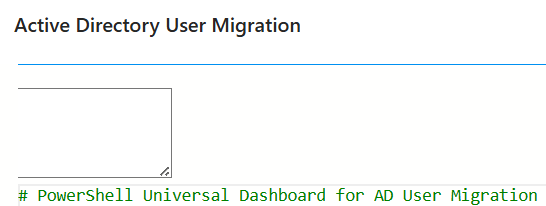
a579ecdb4dfff856d7ae1a02e39f65816ee9f091.png
This upgrade works like a charm in one of my environments, in another I get the same problem I got with 2026.1.1 (mentioned here). It seems unable to load any PS modules whatsoever. Tried restarting the service and also rebooting the entire server, this didn’t help, so now it’s reverted to 2026.1.2 again. Any idea what this might be?
You need to reset your browser cache. For me, pressing Ctrl + F5 was not enough; I had to do it through the browser settings in the latest version.
Thanks for addressing the client secret - using this method currently and it works well.
EDIT: Had to revert this change because my instances stopped working while using the secret configured - they were getting caught in a redirection loop, I didnt get to the bottom of why, but will have to do more testing another time.
ug at the code editor:
This break’s the code view.
We have the same after updating to 2026.1.3 from 5.6.13
Clearing the entire chrome data is only temporary solve the problem and see it back after a while.
While this rectangle appears, also notice that the mouse pointer is getting unprecise.
For example pointing on specific part at the code dosent clicks, and I only can move the cursour via keyboard.
Need to work through vscode, but for quick fixes is more convenient for me to open the code editor directly.
having the same issue after updating from 5.6.13 to 2026.1.4
I’m currently using OIDC settings in “C:\ProgramData\PowerShellUniversal\appsettings.json”. The upgrade in itself doesn’t seem to update this file. How do I alter the json to use a secret variable?
It’s not designed to work with appsettings.json i don’t think, rather, remove your config from appsettings, and add it in the GUI, that way it’ll land in your .universal\authentication.ps1 and will use the secret variable you selected.