Basic authentication issue

is there an issue with Basic Authentication for endpoints on Version 5?
I migrated from V3 and it used to work. Now I get 403 forbidden error message.
All Comments (24)
We’re on PSU 5.0.16 and are using Basic authentication for one of our APIs (endpoints) that gets called multiple times per day, and it works just fine.
Are you sure your login (the username:password combination) that you’re using (the one you converted to Base64) is still valid?
Thank you for your answer. I’m pretty sure the login and password are correct as the same are used to test the API calls against V3 and V5.
We upgraded to V5.1.0 directly so I will test it with the version you are running.
403 is a permission issue and not a credential issue. The login is likely working but the role assignment is not. I would double check the user logging in is receiving the roles you are expecting.
Adam Driscoll
PowerShell Expert and Software Architect at Devolutions
How would you suggest me to check it?
Login to the PSU admin console and navigate to the Identities page. Check the role that is currently assigned to your user.
The identity you are using is likely not statically assigned a role since this is happening. It could be possible that the role you are using no longer has the permissions to access this resource, but I’m unaware of many changes there.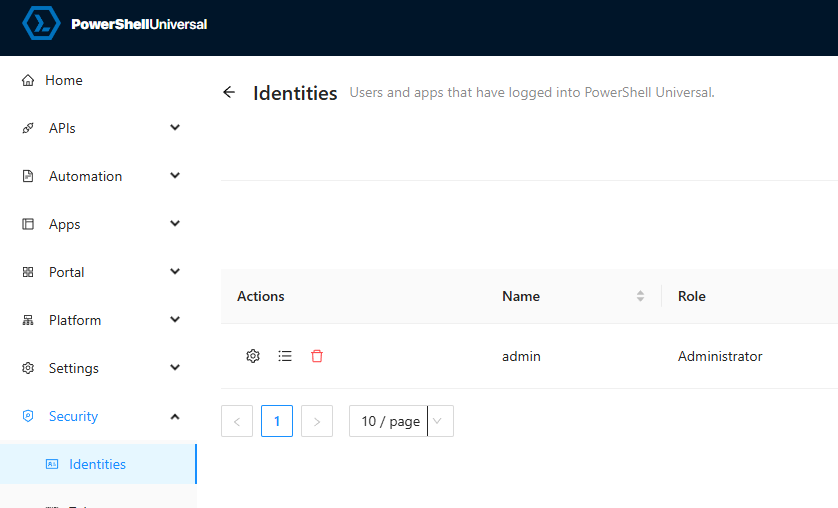
Next, you’ll need to check the role you are expecting the identity to receive. For example, if this user should be receiving the Administrator role, click the Edit Code button on the role page.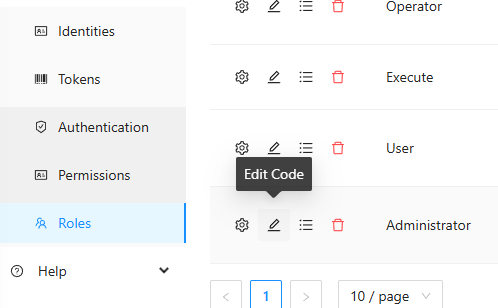
This code runs when a user logs in to decide whether the user gets the role. In v3 and v4, the administrator role used to default to $true but was changed to $false in v5. The reasoning for this was that by default, PSU was pretty insecure by granting all users administrator. Many users weren’t aware this was happening and opening them up to a potential security issue.
You can decide what to return here.
    param(
        [Security.ClaimsPrincipal]$User
    )

    <#
           Policies should return $true or $false to determine whether the user has
           the particular claim that require them for that role.
   #>

    $false
Adam Driscoll
PowerShell Expert and Software Architect at Devolutions
04a15357656b71e043e407aae043bebb24031b34.png
a3241ddf874274df90c1bbaa4795ecc67517530e.png
Hi @Adam Driscoll,
I get that however the role code hasn’t changed on our side.
Also the identity and endpoint have the correct role assigned to it.
I now have changed the admin role output to always return true and the problem remains.
If all that is the same, then I think we will have to dig into some logging to see what is going on. I would start with the system log, as you it should include a claim rejection message.
Adam Driscoll
PowerShell Expert and Software Architect at Devolutions
Ok I will check the logs.
just for your information, here are the role and endpoint. Simple ones.
New-PSURole -Name “SQLTeam” -Policy {
param(
[Security.ClaimsPrincipal]$User
)
$true
}
New-PSUEndpoint -Url “/api/testauth” -Method @(‘GET’) -Endpoint {
return $identity
} -Authentication -Role @(‘SQLTeam’)
$username = “"
$password = "”
Encode the credentials to Base64
$base64AuthInfo = [Convert]::ToBase64String([Text.Encoding]::ASCII.GetBytes(“$($username):$($password)”))
Create the headers with the Authorization header
$headers = @{
Authorization = “Basic $base64AuthInfo”
}
Invoke-RestMethod -Method Get -Uri ‘https:/*****/api/testauth’ -Headers $headers
Invoke-RestMethod : The remote server returned an error: (403) Forbidden.
Found this.
[16:41:31 INF] Universal.Server.Services.UniversalAuthorizationService Principal is not part of role: System.Collections.Generic.List`1[System.String]. Returning 403.
@Adam Driscoll ,
is this related?
2025-01-22 16:53:13.499 +01:00 [INF][Universal.Server.Services.ClaimsEvaluator] Evaluating claims for USER123, Cache: True
2025-01-22 16:53:13.502 +01:00 [INF][Microsoft.AspNetCore.Cors.Infrastructure.CorsService] CORS policy execution failed.
2025-01-22 16:53:13.502 +01:00 [INF][Microsoft.AspNetCore.Cors.Infrastructure.CorsService] Request origin https://BLABLABLA does not have permission to access the resource.
2025-01-22 16:53:13.505 +01:00 [INF][Microsoft.AspNetCore.Routing.EndpointMiddleware] Executing endpoint ‘/_blazor’
2025-01-22 16:53:17.871 +01:00 [INF][Microsoft.AspNetCore.Hosting.Diagnostics] Request starting HTTP/1.1 GET https://BLABLABLA/api/testauth - null null
2025-01-22 16:53:17.888 +01:00 [INF][Universal.Server.Services.UniversalAuthorizationService] Principal is not part of role: System.String. Returning 403.
2025-01-22 16:53:17.890 +01:00 [INF][Microsoft.AspNetCore.Hosting.Diagnostics] Request finished HTTP/1.1 GET https://BLABLABLA/api/testauth - 403 null null 18.4944ms
Yes. Definitely. If you increase your log level to debug, we might get more detail as to why this is happening.
I’m trying a couple different things to see if I can reproduce. I did find an issue with local accounts that don’t have a role assigned, but that will result in a 500 rather than 403.
What other authentication methods do you have enabled? Can you try to clear the claims cache? There is a button on the roles page.
Adam Driscoll
PowerShell Expert and Software Architect at Devolutions
I have Windows, forms and token auth methods enabled.
On IIS I have Windows, Anonymous and Basic enabled.
This is what my appsettings.json looks like:
“SystemLogPath”: “%ProgramData%\PowerShellUniversal\systemLog.txt”,
“SystemLogLevel”: “Debug”
I have installed PSU from scratch, created only one external account (domain\user), assigned admin role to it and created only one endpoint to test.
The same error occurs.
2025-01-23 11:52:01.366 +01:00 [INF][Microsoft.AspNetCore.Hosting.Diagnostics] Request starting HTTP/1.1 GET https://domain/api/testauth - null null
2025-01-23 11:52:01.391 +01:00 [INF][Universal.Server.Services.UniversalAuthorizationService] Principal is not part of role: System.String[]. Returning 403.
2025-01-23 11:52:01.392 +01:00 [INF][Microsoft.AspNetCore.Hosting.Diagnostics] Request finished HTTP/1.1 GET https://domain/api/testauth - 403 null null 26.7602ms
The admin role:
New-PSURole -Name "Administrator" -Description "Administrators can manage settings, create and edit any entity and view all the entities with PowerShell Universal." -Policy {
    param(
        [Security.ClaimsPrincipal]$User
    )

    $true
}Thanks. I will try with Windows auth enabled. I’m also seeing some strange behavior when I have OIDC enabled. I’m getting 404s back when trying to use basic auth.
EDIT: I located the issue. It will require a patch to PSU and will be a part of 5.2.2. This is scheduled for next week.
Adam Driscoll
PowerShell Expert and Software Architect at Devolutions
Thank you for the quick response. Really appreciated.
Do you have a link to the issue in github?
Adam Driscoll
PowerShell Expert and Software Architect at Devolutions
Morning all,
I have updated PSU to 5.2.2 however the issue still occurs.
2025-01-30 11:09:49.967 +01:00 [INF][Microsoft.AspNetCore.Hosting.Diagnostics] Request starting HTTP/1.1 GET https://sqlportal-t.rabonet.com/api/testauth - null null
2025-01-30 11:09:49.991 +01:00 [INF][Universal.Server.Services.UniversalAuthorizationService] Principal is not part of role: System.String[]. Returning 403.
2025-01-30 11:09:49.993 +01:00 [INF][Microsoft.AspNetCore.Hosting.Diagnostics] Request finished HTTP/1.1 GET https://sqlportal-t.rabonet.com/api/testauth - 403 null null 26.0962ms
Any additional help on this please?
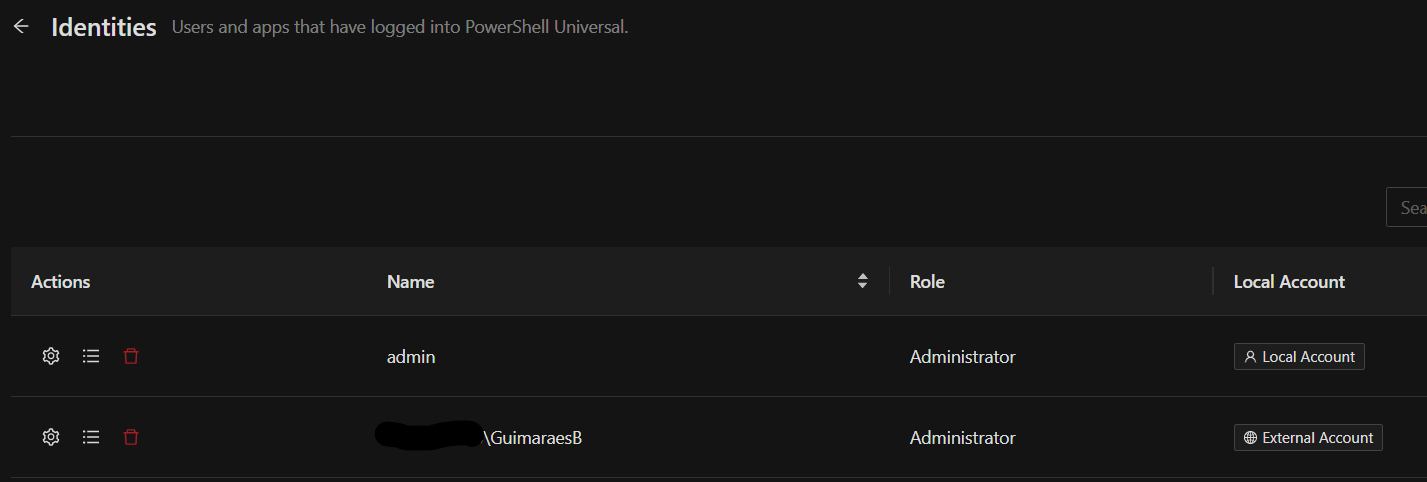
Not sure if this adds anything but the authentication attempt is done using a domain\user external account with basic auth.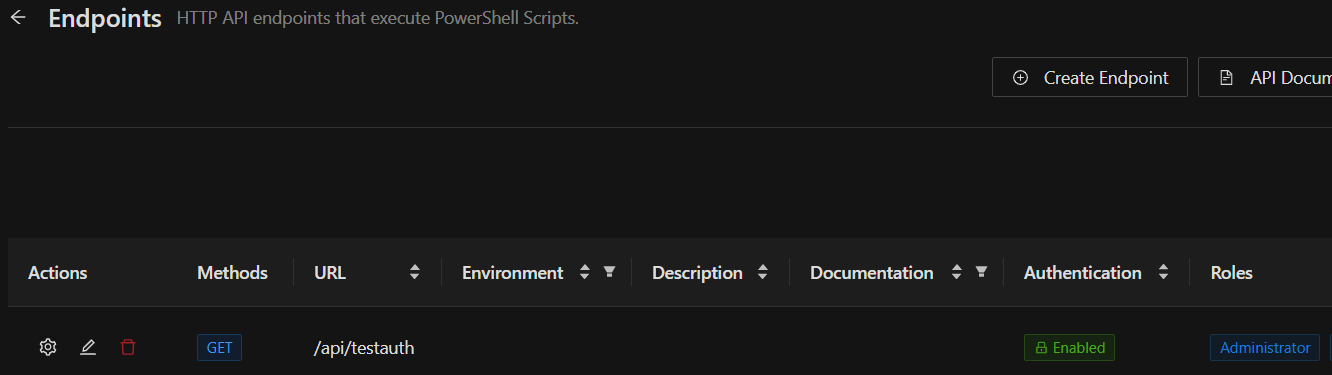
54f4f2c5b83816ac363668957eb411ac2f26c6cc.png
1aa3bc87ce9494b7ff28e8182f8570b91532974c.png
I was able to reproduce your issue in 5.2.1 but can no longer in 5.2.2. I just verified that this configuration is working in my lab. I’ll share my configuration below to see if we can spot any differences.
Here’s my example:
Authentication just returns successful for any user. Authentication is working for you since you receive a 403 and not a 401 so I did not put much time into building a complex authentication script.
Set-PSUAuthenticationMethod -Type "Form" -ScriptBlock {
param(
    [PSCredential]$Credential
)

#
#   You can call whatever cmdlets you like to conduct authentication here.
#   Just make sure to return the $Result with the Success property set to $true
#

New-PSUAuthenticationResult -UserName $Credential.UserName -Success
}
I have statically assigned roles to two different identities. One with a domain name and one without.
I have a single endpoint with the role assigned.
New-PSUEndpoint -Url "/api/get" -Method @('GET') -Endpoint {
"test"
} -Authentication -Role @('Administrator')
To test it, this is my test code:
$pass = '1'
 $creds = [System.Convert]::ToBase64String([System.Text.Encoding]::ASCII.GetBytes("domain\otheruser:$pass"))
invoke-restmethod http://localhost:5000/api/get -Headers @{ Authorization = "Basic $Creds" }
My HTTP request returns the test string.
PS C:\Users\adam> invoke-restmethod http://localhost:5000/api/get -Headers @{ Authorization = "Basic $Creds" }
test
PS C:\Users\adam>
I’m not noticing anything different between our authorization configurations but maybe you will see something.
Can you also try a management API endpoint?
invoke-restmethod http://localhost:5000/api/v1/script -Headers @{ Authorization = "Basic $Creds" }Adam Driscoll
PowerShell Expert and Software Architect at Devolutions
f18b8b3a76406c98a6a027df109d00b83622f705.png
Hi Adam, have you run this on IIS?
Hi Adam,
I did exactly the same what you did and it worked however it stopped working after enabling Windows Authentication and the code 403 returned.
Management API endpoint works with both authentication methods.
I totally overlooked the IIS part of this. Let me try in my lab. Since it’s happening with just custom endpoints and not the management ones, it narrows down where this could be happening.
Adam Driscoll
PowerShell Expert and Software Architect at Devolutions
I can reproduce this in IIS and have a fix. It will be included in 5.3
Adam Driscoll
PowerShell Expert and Software Architect at Devolutions
Great news! Any idea on when 5.3 will be released?
Thank you.
Next Tuesday is the scheduled date.
Adam Driscoll
PowerShell Expert and Software Architect at Devolutions
The issue has been solved. Thank you.