SAML 2 Version 5

Hey,
I am trying to setup SAML2 on my PS Server.
I tried following the guide but I got stuck in an infinite loop. In addition to that, the guide isn’t very clear and the screenshots provided seem to not mirror my install.
We are using the enterprise version and would like to setup SAMl2 using EntraID.
Product: PowerShell Universal
Version: 5.0.16
Recommended Answer
@Adam Driscoll@deroppi
Hi Adam,
Thank you for your support.
For everyone else’s awareness, there was a checkbox called ‘Limit Identities’ that restricted this access. Once unchecked it worked.
EDIT - It is under - Settings/General/Platform
All Comments (29)
Can you collect a system log file? It may provide more information.
This is my SAML2 test config with some the IDs redacted. It is setup with Entra ID. I did test this on 5.2.
        "Authentication__SAML2__Enabled": "true",
        "Authentication__SAML2__CallbackPath": "https://localhost:5001/Saml2/Acs",
        "Authentication__SAML2__EntityId": "spn:<id>",
        "Authentication__SAML2__IdentityProviderEntityId": "https://sts.windows.net/<id>/",
        "Authentication__SAML2__MetadataAddress": "https://login.microsoftonline.com/<id>/federationmetadata/2007-06/federationmetadata.xml",
        "Authentication__SAML2__SingleSignOnServiceUrl": "https://login.microsoftonline.com/<id>/saml2",
I’ll take a look at the docs and make sure they get updated properly for 5.2.
Adam Driscoll
PowerShell Expert and Software Architect at Devolutions
5.0.16 had that issue.
5.1 fixed the SAML2 issue for me.
What I have in authentication.ps1: (redacted)
Set-PSUAuthenticationMethod
-Type "Saml2"
-CallbackPath "https://my-PSU-Server.com/Saml2/Acs"
-MetadataAddress "https://login.microsoftonline.com/32100123-9999-4444-aaaa-bbbbbbbbbbbb/federationmetadata/2007-06/federationmetadata.xml?appid=0000000-1111-2222-3333-444455556666"
-EntityId "spn:00001111-2222-3333-4444-5555666677"
-IdentityProviderEntityId "https://sts.windows.net32100123-9999-4444-aaaa-bbbbbbbbbbbb/"
-SingleSignOnServiceUrl "https://login.microsoftonline.com/32100123-9999-4444-aaaa-bbbbbbbbbbbb/saml2"
Hey @deroppi and @Adam Driscoll Thank you for both reaching out. I updated and I no longer have that issue.
When I log in with SAML now, it just brings me back to the main login page again. I do not get in.
My config mirrors the ones provided.
In Azure my redirect URL is https://HOSTNAME/Saml2/Acs
Just to add, I can see that my Entra account appears as the logged in user for a split second before it sends me back to the the login page.
My SAML Auth fails with this when reviewing the SYSTEM Logs @Adam Driscoll
2025-01-22 10:19:37.456 +00:00 [INF][Microsoft.AspNetCore.Hosting.Diagnostics] Request finished HTTP/2 POST https://HOSTNAME/_blazor/negotiate?negotiateVersion=1 - 200 316 application/json 7.9256ms
2025-01-22 10:19:37.456 +00:00 [INF][Microsoft.AspNetCore.Routing.EndpointMiddleware] Executing endpoint ‘UniversalAutomation.AliveController.Favicon (Universal.Server)’
2025-01-22 10:19:37.456 +00:00 [INF][Microsoft.AspNetCore.Mvc.Infrastructure.ControllerActionInvoker] Route matched with {action = “Favicon”, controller = “Alive”, page = “”}. Executing controller action with signature Microsoft.AspNetCore.Mvc.IActionResult Favicon() on controller UniversalAutomation.AliveController (Universal.Server).
2025-01-22 10:19:37.457 +00:00 [INF][Microsoft.AspNetCore.Mvc.Infrastructure.ControllerActionInvoker] Executing action method UniversalAutomation.AliveController.Favicon (Universal.Server) - Validation state: “Valid”
2025-01-22 10:19:37.457 +00:00 [INF][Microsoft.AspNetCore.Mvc.Infrastructure.ControllerActionInvoker] Executed action method UniversalAutomation.AliveController.Favicon (Universal.Server), returned result Microsoft.AspNetCore.Mvc.RedirectResult in 0.0249ms.
2025-01-22 10:19:37.457 +00:00 [INF][Microsoft.AspNetCore.Mvc.Infrastructure.RedirectResultExecutor] Executing RedirectResult, redirecting to ./assets/favicon.ico.
2025-01-22 10:19:37.457 +00:00 [INF][Microsoft.AspNetCore.Mvc.Infrastructure.ControllerActionInvoker] Executed action UniversalAutomation.AliveController.Favicon (Universal.Server) in 0.6028ms
2025-01-22 10:19:37.457 +00:00 [INF][Microsoft.AspNetCore.Routing.EndpointMiddleware] Executed endpoint ‘UniversalAutomation.AliveController.Favicon (Universal.Server)’
2025-01-22 10:19:37.457 +00:00 [INF][Microsoft.AspNetCore.Hosting.Diagnostics] Request finished HTTP/2 GET https://HOSTNAME/favicon - 302 0 null 7.9867ms
2025-01-22 10:19:37.476 +00:00 [INF][Microsoft.AspNetCore.Hosting.Diagnostics] Request starting HTTP/2 CONNECT https://HOSTNAME/_blazor?id=aO7tBkauPbM5MLODjK7mUA - null null
2025-01-22 10:19:37.476 +00:00 [INF][Microsoft.AspNetCore.Cors.Infrastructure.CorsService] CORS policy execution failed.
2025-01-22 10:19:37.476 +00:00 [INF][Microsoft.AspNetCore.Cors.Infrastructure.CorsService] Request origin https://HOSTNAME does not have permission to access the resource.
2025-01-22 10:19:37.479 +00:00 [INF][Microsoft.AspNetCore.Routing.EndpointMiddleware] Executing endpoint ‘/_blazor’
2025-01-22 10:19:37.629 +00:00 [INF][Microsoft.AspNetCore.Authorization.DefaultAuthorizationService] Authorization failed. These requirements were not met:
PowerShellUniversal.PermissionRequirement
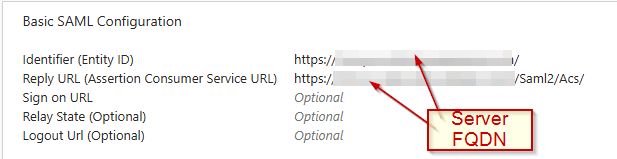
Same here.
Nothing else.
I assume you have users assigned in Azure to your application.
And those users have valid roles in your PSU server?
411a5d38f63abc09deb6eba83768dbf83dbbe851.png
[Microsoft.AspNetCore.Authorization.DefaultAuthorizationService] Authorization failed. These requirements were not met:
PowerShellUniversal.PermissionRequirement
Based on this error message I would think this is a roles issue.
Adam Driscoll
PowerShell Expert and Software Architect at Devolutions
@Adam Driscoll@deroppi This is my custom role. This role is assigned to the enterprise app as well.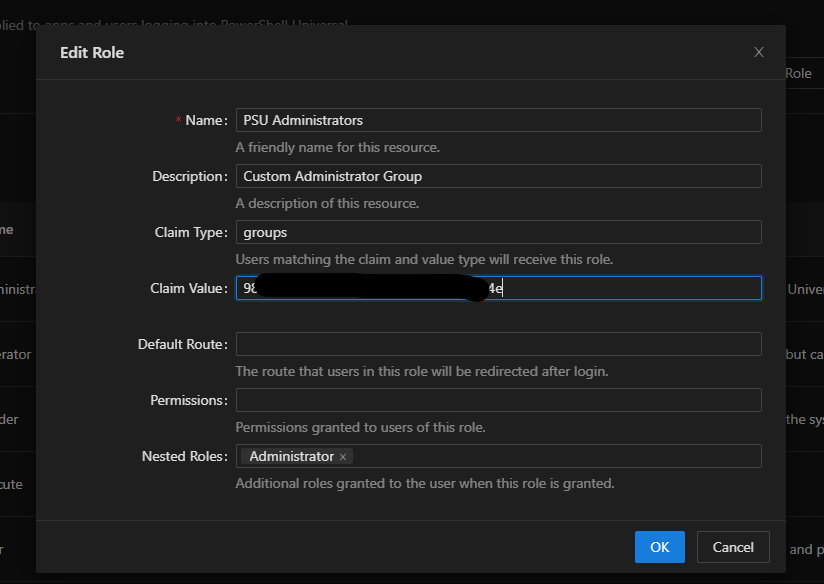
3029731adfa865f810ecbe462dde0dc1703db8f9.png
I don’t have nested roles like this. Let me give that a shot.
Adam Driscoll
PowerShell Expert and Software Architect at Devolutions
PowerShellUniversal.PermissionRequirement
I have tried without.
I am genuinley struggling with trying to get this work so apologise if it feels noobish.
I have tried following the guide and it doesnt align for what should be done on Azure and then what should be done on the app side. After that Im guessing.
Sorry, it may make sense to others but im just struggling.
no nested groups here either.
I don’t use the GUI for roles, but have a script to take care of that.
Basically I take the email address of a user and the groups from the claims (configured email address as an extra in Azure) and have a script check for each role whether that user or group should get that role, and just return a $True if yes.
That allows me to use multiple groups ids for the same role.
Anyway, should not have to do with your issue.
The other thing I would verify is to check that you are receiving the group claims from Azure.
In PSU, login as the default admin and assign the Administrator role directly to your Entra ID user.
It should be listed in the Identities page.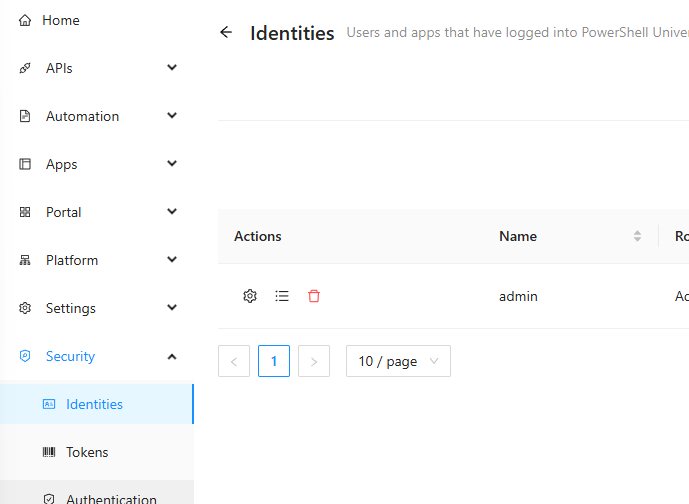
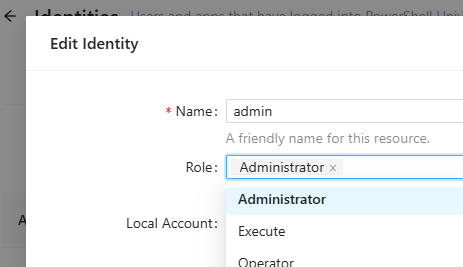
Then attempt to login with SAML. If you get in with this configuration, navigate to the Roles page and click the View Claim Information button. This will display all the groups that PSU received from Entra ID.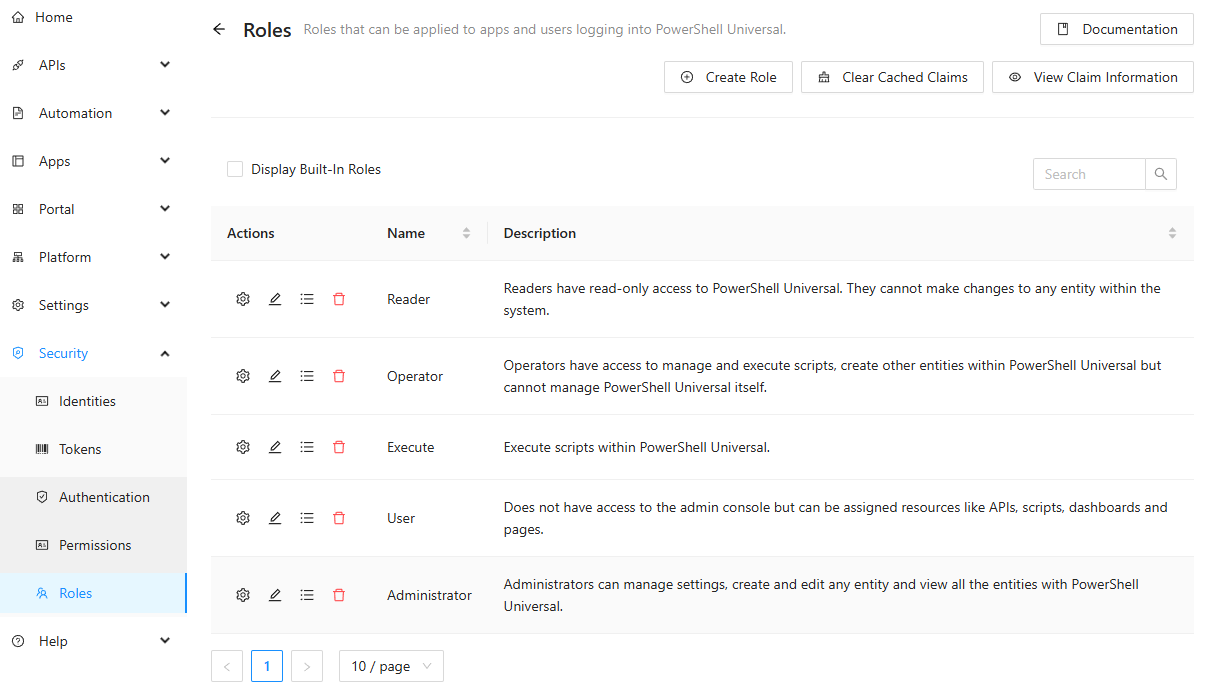
If the list does not contain the group you are expecting, it could be a problem with the app registration on the Entra ID side. Make sure you have the Groups claim added.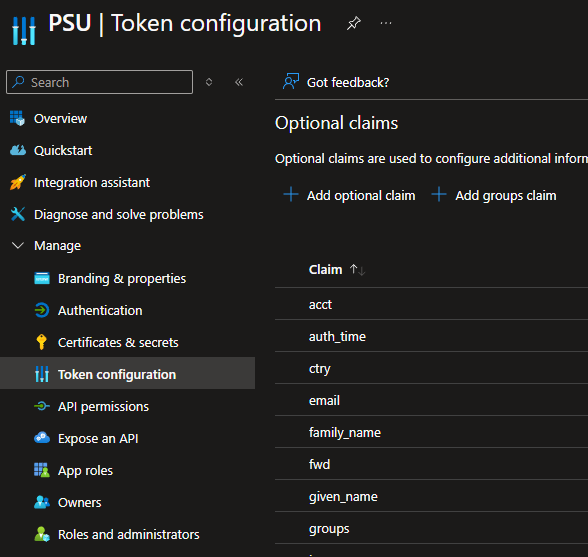
Adam Driscoll
PowerShell Expert and Software Architect at Devolutions
20de140215cc6ed773c84f7d99fcef6e63844305.png
0d1e0e984e9f6e1f60142b456711d73f419d690a.png
343b6e3a996104452fe87a84e772dfb2258192b8.png
2eb9df35ba5e58e7b41ce4608cdcfc712f4f6a26.png
Thanks Adam,
Are we still creating Enterprise/Regristation apps using this method for both openID and SAML2?
docs.powershelluniversal.com
I just recreated as a normal enterprise app and with SAML auth instead of the guide above and it failled with error 500.
My groups claim is there by the way.
When will the guides be updated?
It may be easier if someone shows me a redacted version of the SAML2 config for Entra.
didn’t I do that above?
I remade my entra config to match yours @deroppi and when I sign in now it brings me directly to https://HOSTNAME/Saml2/Acs with error 500. This is different than when I setup my entra app using the openid docs.
if you like the GUI, here is how it shows for me.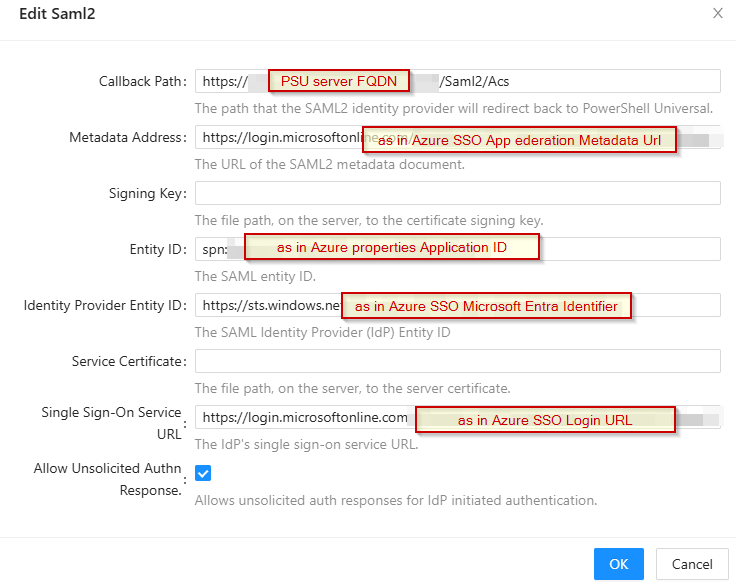
Other than that, I am out of ideas.
It just worked for me once I had these settings in.
I had to add groups to the claims in Azure.
And this: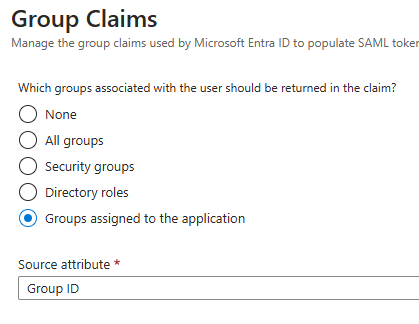
Did not work with all groups.
a1820c4be11a84117a6c6f3a341bacd1a667e857.png
a0fd5a4dadbfe61e3df44d1fcd420ddfeb1a4fe7.png
So I set everything up according to all your images and I get the below. I get this once I have authenticated with SAML and it just sends me to this page.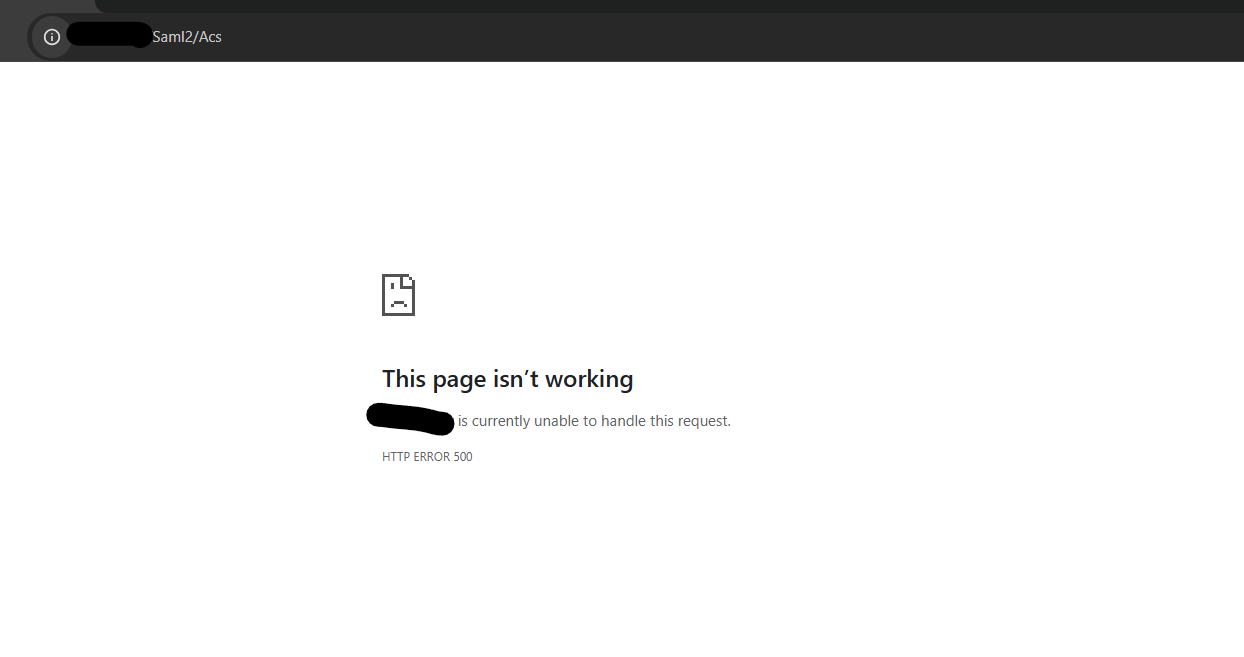
I am on 5.2.1 now.
d8730fa5fa8cd2c4d67c7b2104d78b274ceb3502.png
Now I would check your system log. The exception will be listed there. My guess is that you are not using HTTPS and it is causing an exception due to the secure to insecure redirect.
Adam Driscoll
PowerShell Expert and Software Architect at Devolutions
Hey @Adam Driscoll ,
I reviewed the logs and am unable to see anything in them for that.
I stil see the old part stating -
2025-01-22 17:25:15.183 +00:00 [INF][Microsoft.AspNetCore.Cors.Infrastructure.CorsService] CORS policy execution failed.
2025-01-22 17:25:15.184 +00:00 [INF][Microsoft.AspNetCore.Cors.Infrastructure.CorsService] Request origin https://HOSTNAME does not have permission to access the resource.
2025-01-22 17:25:15.188 +00:00 [INF][Microsoft.AspNetCore.Routing.EndpointMiddleware] Executing endpoint ‘/_blazor/negotiate’
2025-01-22 17:25:15.189 +00:00 [INF][Microsoft.AspNetCore.Routing.EndpointMiddleware] Executed endpoint ‘/_blazor/negotiate’
2025-01-22 17:25:15.189 +00:00 [INF][Microsoft.AspNetCore.Hosting.Diagnostics] Request finished HTTP/2 POST https://HOSTNAME/_blazor/negotiate?negotiateVersion=1 - 200 316 application/json 6.3838ms
2025-01-22 17:25:15.208 +00:00 [INF][Microsoft.AspNetCore.Hosting.Diagnostics] Request starting HTTP/2 CONNECT https://HOSTNAME/_blazor?id=jXeIdb8ndxVrVYTsBb10tA - null null
2025-01-22 17:25:15.208 +00:00 [INF][Microsoft.AspNetCore.Cors.Infrastructure.CorsService] CORS policy execution failed.
2025-01-22 17:25:15.208 +00:00 [INF][Microsoft.AspNetCore.Cors.Infrastructure.CorsService] Request origin https://HOSTNAME does not have permission to access the resource.
2025-01-22 17:25:15.212 +00:00 [INF][Microsoft.AspNetCore.Routing.EndpointMiddleware] Executing endpoint ‘/_blazor’
2025-01-22 17:25:15.301 +00:00 [INF][Microsoft.AspNetCore.Authorization.DefaultAuthorizationService] Authorization failed. These requirements were not met:
PowerShellUniversal.PermissionRequirement
Under the enterprise agreement we bought is there any remote support I can get on this so someone can take a look? It is likely something simple that I have missed.
My config on the app side mirrors what has been provided and the azure images from @deroppi are different to the ones on the docs for v5. I have tested making an app that way too and I gett that 500 error.
My Azure Enterprise app has been created following the URL -
docs.powershelluniversal.com
Just to add, the groups claims is in my azure app.
I do not see my account logging under the identities side.
Feel free to open a support case and we can get something scheduled.
Ironman Software Support
Adam Driscoll
PowerShell Expert and Software Architect at Devolutions
@Adam Driscoll I have created an account and its states pending admin approval.
Hi Adam,
The ticket ID is #10185
@Adam Driscoll@deroppi
Hi Adam,
Thank you for your support.
For everyone else’s awareness, there was a checkbox called ‘Limit Identities’ that restricted this access. Once unchecked it worked.
EDIT - It is under - Settings/General/Platform
Just for clarity, are you referring to the checkbox under Settings/General/Platform that limits access to identities that have been added to the Identities list?
That is correct.
There is an issue with groups, Adam is looking into that.
Right now anyone who is in my tenant can sign into the application (they have no perms though) It does not take into account only users assigned to the enterpise app.
Gotcha. The purpose of that option (at least how I understand it) is that it’s sort of a failsafe to make sure when you’re using external authentication methods that look to see if you’re a member of a group, or something along those lines, that someone malicious couldn’t just add themselves to that group to gain access to PSU inherently because they haven’t explicitly been added as an identity in PSU directly.
Hmm, that makes sense.
Once the groups are fixed, ill enable it again and see if it lets me in as I am part of a group that is set on the Entra App.
If it still does not take into account users who are in that group, you can use a conditional access policy to restrict the access on your app side too.