PowerShell Universal - 5.1.0
PowerShell Universal - 5.1.0
Release Notes
Features
Admin Console
- Added -DarkAppBarLogo to New-PSUBranding (#3170)
- Added .gitignore editor to git page (#3560)
- Added configuration file reload dropdown (#3812)
- Table page sizes are now sticky (#4023)
- Added Nested Role field to roles property form.
- Added Import Secrets button (#4080)
- Added localized date time display to admin console (#3780)
APIs
- Added contact, license, version and terms of service to OpenAPI endpoint docs (#3900)
- Added -ResponseVariable to Invoke-PSUEndpoint (#4054)
Apps
- Added -JavaScript to New-UDEndpoint (#3121)
- Added support for enter key in prompts in apps (#3326)
- Added support for Read-Host -AsSecureString
- Added support for nested modals (#3163)
- Added Columns and SelectedRowIds to $EventData in -LoadData for New-UDTable (#3982)
Automation
- Child jobs not display parent schedule (#3373)
- Added support for copy\paste in terminals (#4096)
Platform
- Added -DefaultTokenLifetime to Set-PSUSettings and admin console (#2872)
- Added preview support for Deployments (#4101)
Portal
- Added support for SimpleSelect in Widgets
Tools
- Added psu.exe git command line tools
- Added psu.exe db migration command line tools
Bug Fixes
Admin Console
- Fixed an issue with the tab URLs updating incorrectly (#4062)
- Fixed an issue when creating secrets (#4074)
- Fixed a display issue with online licenses (#4068)
- Fixed an issue logging in with SAML2 from the login page (#4075)
- Fixed an issue displaying string arrays in schedule parameters (#4084)
- Fixed an issue with the copy button in the API tester in non-secure sites (#4108)
Apps
- Fixed an issue with the unauthorized page (#4065)
- Fixed an issue where the docs app would not load (#4067)
- Fixed an issue with favicons (#4055)
- Fixed an issue with dynamically registered components and Add-UDElement (#3585)
- Fixed an issue with Invoke-UDRedirect -OpenInNewWindow (#4104)
APIs
- Fixed an issue with the endpoint table (#4066)
- Fixed an issue with the endpoint tester and non-JSON values (#4098)
Cmdlets
- Fixed an issue where Get-PSUCache threw an exception rather than returning $null when the key was not found (#4078)
Automation
- Fixed an issue with Write-PSFramework and job logs (#4071)
Platform
- Fixed an issue loading the OpenTelemetry plugin in Docker (#4081)
- Fixed an issue where user sessions were groomed before the data retention setting (#4089)
- Fixed an issue with user scoped logging (#4103)
- Fixed an issue with the configuration file system watcher
Portal
- Fixed an issue with script table display (#4083)
Downloads
Adam Driscoll
PowerShell Expert and Software Architect at Devolutions
All Comments (31)

after updating to 5.1.0 none of my data is showing up anymore
Startup: Parameter set cannot be resolved using the specified named parameters. One or more parameters issued cannot be used together or an insufficient number of parameters were provided.
[00:56:38 ERR][App][Dashboard] Startup: at , : line 1
at , D:\Dashboard.ps1: line 8
at , D:\Dashboard.ps1: line 7
at , : line 1
[00:56:38 ERR][App][Dashboard] Startup: at System.Management.Automation.CmdletParameterBinderController.ThrowAmbiguousParameterSetException(UInt32 parameterSetFlags, MergedCommandParameterMetadata bindableParameters)
at System.Management.Automation.CmdletParameterBinderController.ValidateParameterSets(Boolean prePipelineInput, Boolean setDefault)
at System.Management.Automation.CmdletParameterBinderController.BindCommandLineParametersNoValidation(Collection1 arguments) at System.Management.Automation.CmdletParameterBinderController.BindCommandLineParameters(Collection1 arguments)
at System.Management.Automation.CommandProcessor.BindCommandLineParameters()
at System.Management.Automation.CommandProcessor.Prepare(IDictionary psDefaultParameterValues)
at System.Management.Automation.CommandProcessorBase.DoPrepare(IDictionary psDefaultParameterValues)
at System.Management.Automation.Internal.PipelineProcessor.Start(Boolean incomingStream)
at System.Management.Automation.Internal.PipelineProcessor.SynchronousExecuteEnumerate(Object input)
— End of stack trace from previous location —
at System.Management.Automation.Internal.PipelineProcessor.SynchronousExecuteEnumerate(Object input)
at System.Management.Automation.PipelineOps.InvokePipeline(Object input, Boolean ignoreInput, CommandParameterInternal pipeElements, CommandBaseAst pipeElementAsts, CommandRedirection commandRedirections, FunctionContext funcContext)
at System.Management.Automation.Interpreter.ActionCallInstruction`6.Run(InterpretedFrame frame)
at System.Management.Automation.Interpreter.EnterTryCatchFinallyInstruction.Run(InterpretedFrame frame)
Is this just affecting your app or more wide spread than that? I don’t think there were any changes to app parameter sets nor did I see this specifically so I’d need some help tracking it down.
Adam Driscoll
PowerShell Expert and Software Architect at Devolutions
its affecting my app with every data table, i went back to 5.0.16 and thinks went back to normal its just happening in 5.1.0
i can share a code if that helps
Below is my initial script that app will call when it starts
$token = “xxxxxxxxxxxxxxxxxxxxx”
$headers = @{Authorization = “token $($token)”
Accept = “application/vnd.github.v3.raw”
}
$EndPoints = (Invoke-WebRequest -Headers $headers -Uri https://api.github.com/repos/test/dashboardStage/contents/EndPoints -UseBasicParsing).Content | ConvertFrom-Json
$EndPoints = $EndPoints | where {$.type -eq “file”} | Select -exp download_url | ForEach-Object {
Invoke-Expression $((Invoke-WebRequest -Headers $headers -Uri $ -UseBasicParsing).Content)
}
$Pages = (Invoke-WebRequest -Headers $headers -Uri https://api.github.com/repos/test/dashboardStage/contents/Pages -UseBasicParsing).Content | ConvertFrom-Json
$Pages = $Pages | where {$.type -eq “file”} | Select -exp download_url | ForEach-Object {
Invoke-Expression $((Invoke-WebRequest -Headers $headers -Uri $ -UseBasicParsing ).Content)
}
New-UDDashboard -Pages $Pages -Title “test” -Theme (Get-UDTheme -Name ‘MaterialDesign’)
i have my code in github and above script will download endpoints and pages and it works great up to 5.0.16 its just for some reason it errors out with 5.1.0
Ok. We did do some work on -LoadData for the table to return more data back to caller about columns. Could be related. Can you share your table code, even if you have to trim it a bit?
Adam Driscoll
PowerShell Expert and Software Architect at Devolutions
here is also the code for a page with services table
New-UDPage -Name “Services” -Icon (New-UDIcon -Icon rotate -Size 1x) -Content {
New-UDScrollUp

    New-UDDynamic -Id 'services' -Content {

        $Services = $Cache:tlsInstances | Where-Object { $_.Tag -in @("tls-app-bm-stage") } | Select-Object -ExpandProperty InstanceId

            $ServicesObj = ForEach($_ in $Services) { $_.Substring(0,$_.Length-4) + ".tls.local" }

                $ServicesList = $ServicesObj | Invoke-Parallel -ImportFunctions -ScriptBlock {

                    $sessionOp = New-CimSessionOption –Protocol DCOM

                       $sessionDcom = New-CimSession –SessionOption $sessionOp –ComputerName $_

                         Get-CimInstance -ClassName Win32_Service -CimSession $sessionDcom | Where-Object { $_.Name -match "bmanagerr*" } | Select-Object Name, State, PSComputerName | Sort-Object Name

                         Get-CimSession | Remove-CimSession

                         }

                             $Data = @( $ServicesList | ForEach-Object {


    [PSCustomObject]@{
        Name     = $_.Name
        Status   = $_.State.ToString()
        Instance = $_.PSComputerName -replace(".tls.local","")

        }
     }
  )

                            $Columns = @(

                              New-UDTableColumn -Property Name -Title Name -ShowSort -IncludeInExport -IncludeInSearch -ShowFilter -FilterType select
                                New-UDTableColumn -Property Status -Title Status -ShowSort -IncludeInExport -IncludeInSearch -ShowFilter -FilterType select
                                   New-UDTableColumn -Property Instance -Title Instance -ShowSort -IncludeInExport -IncludeInSearch -ShowFilter -FilterType select
                                      New-UDTableColumn -Property Select -Title Select -Render {
                                if ($EventData.Status -eq 'Running') {

                                   New-UDTooltip -Place top -TooltipContent { "Restart Service!" } -Content {
                                     New-UDButton -Icon (New-UDIcon -Icon 'rotate') -Style @{ BackgroundColor = "#26a69a"; Width = "125px" } -ShowLoading -Text "Restart" -OnClick {
                                     $sessionOp = New-CimSessionOption –Protocol DCOM
                                     $sessionDcom = New-CimSession –SessionOption $sessionOp –ComputerName $($EventData.Instance)
                                     Get-CimInstance -ClassName Win32_Service -CimSession $sessionDcom | Where-Object { $_.Name -eq $($EventData.Name) } | Invoke-CimMethod -Name StopService
                                     Start-Sleep -Seconds 5
                                     Get-CimInstance -ClassName Win32_Service -CimSession $sessionDcom | Where-Object { $_.Name -eq $($EventData.Name) } | Invoke-CimMethod -Name StartService
                                      Get-CimSession | Remove-CimSession
                                         Sync-UDElement -Id "services" -Broadcast
                                            Show-UDToast -Message "Service Restarted!" -MessageColor Green -Title $EventData.Name -Position topCenter -Duration 2500
        }
     }
  }
                                else {

                              New-UDTooltip -Place top -TooltipContent { "Start Service!" } -Content {
                                New-UDButton -Icon (New-UDIcon -Icon 'play') -Style @{ BackgroundColor = "#FE2E2E"; Width = "125px" } -ShowLoading -Text "Start" -OnClick {
                                  $sessionOp = New-CimSessionOption –Protocol DCOM
                                  $sessionDcom = New-CimSession –SessionOption $sessionOp –ComputerName $($EventData.Instance)
                                  Get-CimInstance -ClassName Win32_Service -CimSession $sessionDcom | Where-Object { $_.Name -eq $($EventData.Name) } | Invoke-CimMethod -Name StartService
                                    Get-CimSession | Remove-CimSession
                                      Sync-UDElement -Id "services" -Broadcast
                                         Show-UDToast -Message "Service Started!" -MessageColor Green -Title $EventData.Name -Position topCenter -Duration 2500
        }
     }
  }
}
)
                              New-UDTable -Title 'Services' -Data $Data -Columns $Columns -Sort -Export -ShowSearch -ShowPagination

        } -LoadingComponent { New-UDProgress }

                              New-UDButton -Icon (New-UDIcon -Icon 'rotate') -Style @{ BackgroundColor = "#26a69a"; Width = "125px" } -ShowLoading -Text "Refresh" -OnClick {
                                 Start-Sleep -Seconds 2
                                    Sync-UDElement -Id "services" -Broadcast
                                       Start-Sleep -Seconds 2
        }
} -Role ‘Operator’
Thanks. I will take a look shortly.
Adam Driscoll
PowerShell Expert and Software Architect at Devolutions
Here what i was able to narrow based on the initial code i provided first
New-UDEndpoint: Parameter set cannot be resolved using the specified named parameters. One or more parameters issued cannot be used together or an insufficient number of parameters were provided.
so it seems the issue has nothing to do with the table its with reading new-udendpoint.
some extra log error after removing
-Schedule (New-UDEndpointSchedule -Every 1 -Day) from new-udendpoint -endpoint
Failed to get app. App was null. Make sure to return an app from your script.
Startup: at System.Management.Automation.LanguagePrimitives.ThrowInvalidCastException(Object valueToConvert, Type resultType)
at System.Management.Automation.LanguagePrimitives.ConvertNoConversion(Object valueToConvert, Type resultType, Boolean recurse, PSObject originalValueToConvert, IFormatProvider formatProvider, TypeTable backupTable)
at System.Management.Automation.LanguagePrimitives.ConversionData1.Invoke(Object valueToConvert, Type resultType, Boolean recurse, PSObject originalValueToConvert, IFormatProvider formatProvider, TypeTable backupTable) at System.Management.Automation.LanguagePrimitives.ConvertTo(Object valueToConvert, Type resultType, Boolean recursion, IFormatProvider formatProvider, TypeTable backupTypeTable) at System.Management.Automation.Internal.PSDataCollectionStream1.Write(Object obj, Boolean enumerateCollection)
at System.Management.Automation.Internal.Pipe.AddToPipe(Object obj)
at System.Management.Automation.Cmdlet.WriteObject(Object sendToPipeline)
at UniversalDashboard.Cmdlets.NewEndpointCommand.EndProcessing() in C:\actions-runner_work\universal\universal\src\UniversalDashboard\Cmdlets\NewEndpointCommand.cs:line 91
at System.Management.Automation.CommandProcessorBase.Complete()
Startup: Cannot convert the “UniversalDashboard.Models.Endpoint” value of type “UniversalDashboard.Models.Endpoint” to type “System.Collections.Hashtable”.
I just migrated from 4.5 and I see error in logs: [ERR][UniversalAutomation.ExecutionService] Error flushing job logs
System.ObjectDisposedException: Cannot access a disposed object.
Object name: ‘IServiceProvider’.
at Microsoft.Extensions.DependencyInjection.ServiceLookup.ThrowHelper.ThrowObjectDisposedException()
at PowerShellUniversal.Extensibility.EFTable2.InsertRange(IEnumerable1 items) in C:\actions-runner_work\universal\universal\src\PowerShellUniversal.Extensibility\Persistence\EFTable.cs:line 57
at UniversalAutomation.ExecutionCallback.<.ctor>b__15_0()
I don’t know if it is related but I keep getting jobs stuck “queued”
I ended up reverting back to 4.5
Hi,
Just tried to migrate from 5.0.16 to 5.1.0 on Windows MSI, but it failed to start :
2024-12-11 09:12:40.269 +01:00 [FTL] Fatal error starting PowerShell Universal.
System.ArgumentNullException: Value cannot be null. (Parameter ‘s’)
at System.ArgumentNullException.Throw(String paramName)
at System.Text.Encoding.GetBytes(String s)
at Universal.Server.Startup.ConfigureServices(IServiceCollection services) in C:\actions-runner_work\universal\universal\src\Universal.Server\Startup.cs:line 267
at System.RuntimeMethodHandle.InvokeMethod(Object target, Void** arguments, Signature sig, Boolean isConstructor)
at System.Reflection.MethodBaseInvoker.InvokeDirectByRefWithFewArgs(Object obj, Span`1 copyOfArgs, BindingFlags invokeAttr)
at System.Reflection.MethodBaseInvoker.InvokeWithOneArg(Object obj, BindingFlags invokeAttr, Binder binder, Object parameters, CultureInfo culture)
at Microsoft.AspNetCore.Hosting.ConfigureServicesBuilder.InvokeCore(Object instance, IServiceCollection services)
at Microsoft.AspNetCore.Hosting.GenericWebHostBuilder.UseStartup(Type startupType, HostBuilderContext context, IServiceCollection services, Object instance)
at Microsoft.AspNetCore.Hosting.GenericWebHostBuilder.<>c__DisplayClass7_0.b__0(HostBuilderContext context, IServiceCollection services)
at Microsoft.Extensions.Hosting.HostBuilder.InitializeServiceProvider()
at Microsoft.Extensions.Hosting.HostBuilder.Build()
at Universal.Server.Program.Main(String args) in C:\actions-runner_work\universal\universal\src\Universal.Server\Program.cs:line 37
After upgrading from 5.0.16 to 5.1.0 we can no longer edit any Apps.
The editor loads but instantly gets replaced by the following error:
An error occured. Cannot access a disposed object. Object name: ‘Microsoft.JSInterop.DotNetObjectReference`1[[BlazorMonaco.Editor.Editor, BlazorMonaco, Version=3.3.0.0, Culture=neutral, PublicKeyToken=null]]’.
at Microsoft.JSInterop.DotNetObjectReference1.get_Value() at BlazorMonaco.Editor.Global.Create(IJSRuntime jsRuntime, String domElementId, StandaloneEditorConstructionOptions options, EditorOverrideServices overrideServices, DotNetObjectReference1 dotnetObjectRef) at BlazorMonaco.Editor.StandaloneCodeEditor.OnAfterRenderAsync(Boolean firstRender) at Microsoft.AspNetCore.Components.RenderTree.Renderer.GetErrorHandledTask(Task taskToHandle, ComponentState owningComponentState)
@AnonymousUser
Based on the line number, this looks like it’s failing to start because the JWT key is missing in the app settings. Did you change this value at all?
@chauberg
I’ll open an issue for this. Do this only happen on apps or every editor?
Milestone: 5.1.1 Milestone · GitHub
Adam Driscoll
PowerShell Expert and Software Architect at Devolutions
Works fine on Scripts and under Settings > Files
Ok. Thank you. I’m not seeing this behavior at the moment.
Can you tell me more about your app? Are you using multiple pages, the module editor? Is it a pretty big app?
Adam Driscoll
PowerShell Expert and Software Architect at Devolutions
Seems unrelated to the App itself, happens on all Apps for us, small or big. No pages.
@Adam Driscoll
You are right, something went wrong with the backup of the config file (appsettings.json)
I’ve retry to update, and now it’s working. Thank you !
Groom is failing here after the update. Any ideas?
[ERR][UniversalAutomation.GroomService] Failed to groom.
System.InvalidOperationException: The LINQ expression 'DbSet<Terminal>()
    .Where(t => t.Name
        .EqualsIgnoreCase(__ti_Terminal_0))' could not be translated. Additional information: Translation of method 'PowerShellUniversal.StringExtensions.EqualsIgnoreCase' failed. If this method can be mapped to your custom function, see https://go.microsoft.com/fwlink/?linkid=2132413 for more information. Either rewrite the query in a form that can be translated, or switch to client evaluation explicitly by inserting a call to 'AsEnumerable', 'AsAsyncEnumerable', 'ToList', or 'ToListAsync'. See https://go.microsoft.com/fwlink/?linkid=2101038 for more information.
   at Microsoft.EntityFrameworkCore.Query.QueryableMethodTranslatingExpressionVisitor.Translate(Expression expression)
   at Microsoft.EntityFrameworkCore.Query.QueryCompilationContext.CreateQueryExecutor[TResult](Expression query)
   at Microsoft.EntityFrameworkCore.Query.Internal.QueryCompiler.<>c__DisplayClass9_0`1.<Execute>b__0()
   at Microsoft.EntityFrameworkCore.Query.Internal.CompiledQueryCache.GetOrAddQuery[TResult](Object cacheKey, Func`1 compiler)
   at Microsoft.EntityFrameworkCore.Query.Internal.QueryCompiler.Execute[TResult](Expression query)
   at Microsoft.EntityFrameworkCore.Query.Internal.EntityQueryable`1.GetEnumerator()
   at System.Linq.Enumerable.ToDictionary[TSource,TKey,TElement](IEnumerable`1 source, Func`2 keySelector, Func`2 elementSelector, IEqualityComparer`1 comparer)
   at System.Linq.Enumerable.ToDictionary[TSource,TKey,TElement](IEnumerable`1 source, Func`2 keySelector, Func`2 elementSelector)
   at PowerShellUniversal.MemoryTable`1..ctor(IEnumerable`1 items) in C:\actions-runner\_work\universal\universal\src\PowerShellUniversal\MemoryTable.cs:line 10
   at PowerShellUniversal.Extensibility.EFTable`2.Where(Expression`1 predicate) in C:\actions-runner\_work\universal\universal\src\PowerShellUniversal.Extensibility\Persistence\EFTable.cs:line 570
   at UniversalAutomation.GroomService.GroomIdleTerminals() in C:\actions-runner\_work\universal\universal\src\Universal.Server\Services\GroomService.cs:line 54
at UniversalAutomation.GroomService.Groom() in C:\actions-runner\_work\universal\universal\src\Universal.Server\Services\GroomService.cs:line 296Can you let me know what DB type you are using?
Adam Driscoll
PowerShell Expert and Software Architect at Devolutions
SQLite. It was an upgrade from 4.4.1 if that makes a difference.
I just restored a snapshot to roll back to 5.0.16. 5.1.0 was causing a memory leak. The Universal.Server.exe was taking 4.9 GB of memory, and the entire server was unresponsive. No changes to any scripts or schedules were made post-upgrade from 5.0.16 to 5.1.0.
Seeing the same here, after 24hr or so I’m up to ~5gb. Only 2 apps, normal usage seems like 1gb after a restart.
I do update a large hashtable every hour into the persistent cache, I was wondering if it wasn’t purging the old values automatically when overwritten.
If would be very helpful if either of you could collect a memory dump that I can analyze. I can provide a dropbox link in a DM to upload it to.
Adam Driscoll
PowerShell Expert and Software Architect at Devolutions
I’ve already gone back to 5.0.16 so I can’t provide that unless I upgrade again. I will upgrade my test environment. but we don’t run anything there, so I don’t know for sure that it’ll happen on that system.
5.1.0 upgrade went well for me.
4 days up, I just checked memory and we are at 2GB, but the server is not being used heavily.
I have process explorer running and keep an eye on it.
I get the same error when editing apps - I also get it when editing endpoints and roles.
Editing scripts doesn’t give me the error.
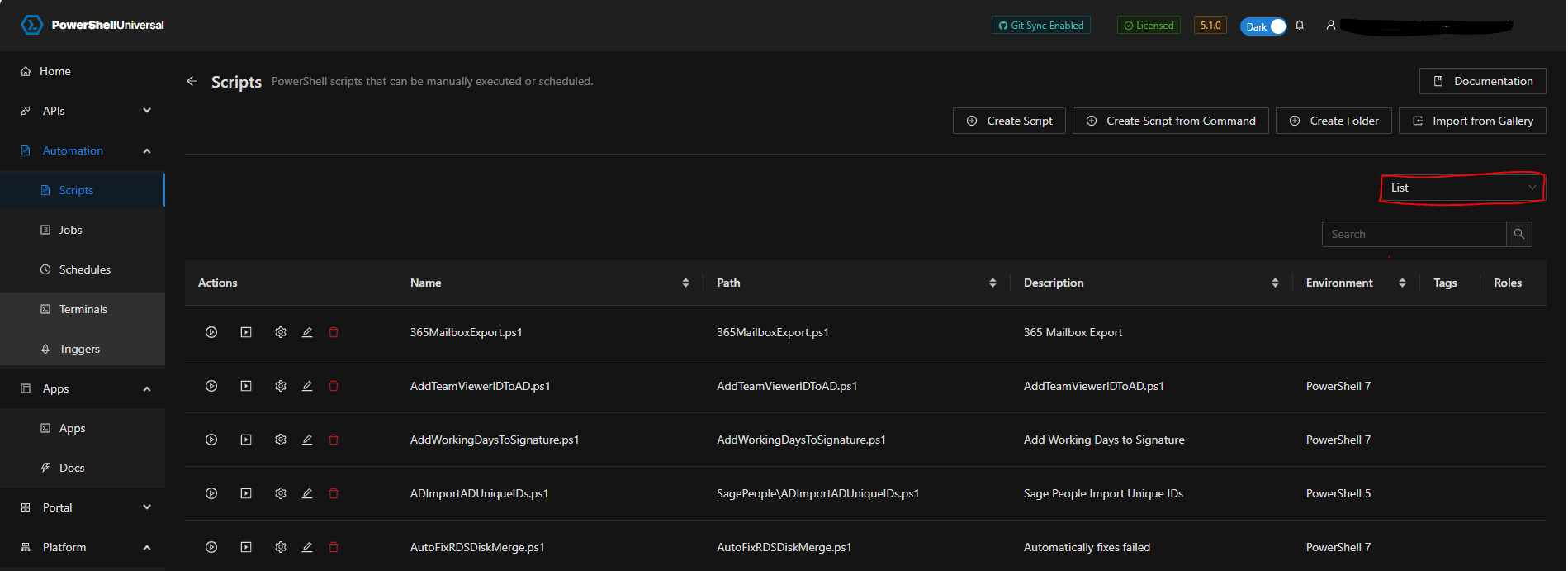
Also, unable to view root directory of scripts in folder view, but can see them in list view. It is only the root folder (Scripts folder in the image) if I select a sub folder the scripts within that folder are visible.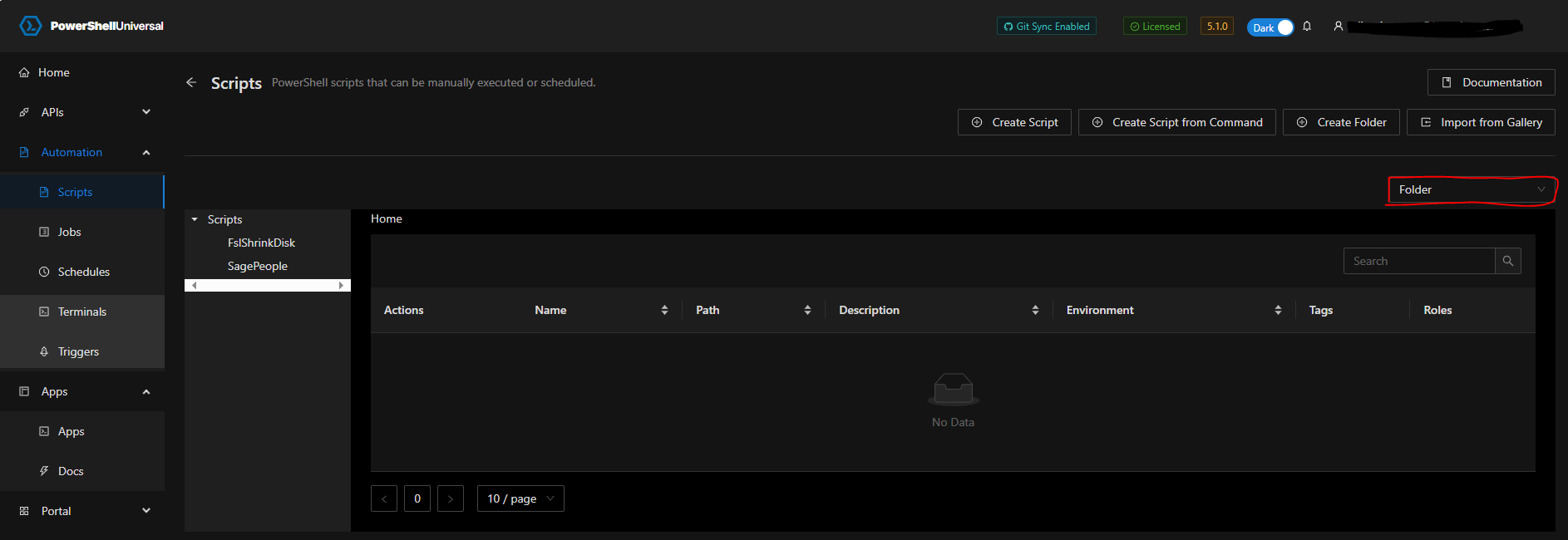
MSI Install
SQL Database
Upgrade from 5.0.16
5b20f46f068be71dc5b559335e4726cee24c9b38.png
1fa48b7aead4459ab1116ef297b61b78957a222e.png
03bfdff9190d75077bd5dce5b14e51a775b714a9.png
So far my dev. environment hasn’t had a memory issue, but it’s literally not doing anything other than running whatever internal healthchecks and tasks PSU runs on any installation.
I think we’ve found root cause for the memory issue. Entity Framework (our DB ORM), it eagerly loading tons of data during job executions. This is causing both large amounts of data to be returned from the database and then equally amounts of large data to be updated in the database. This puts a ton of strain on both PSU and the DB. Additionally, the eager loading is happening when using Get-PSUJob or viewing the jobs table, which can put more load on the system.
On small, less busy environments it was likely not noticeable but once that jobs table reaches a certain size, it will be. It is possible to reproduce this by running 10s of jobs at once or by using child jobs. It will also cause jobs to have invalid state and time stamps. It looks like this was a problem since somewhere in the 5.0.x release but I’m not clear on the specific version or why 5.1 exasperated the problem.
We’ll have a 5.1.2 release coming out shortly to address this.
Adam Driscoll
PowerShell Expert and Software Architect at Devolutions
Oh. Well, that sounds likely. We do have some very heavy hitting jobs that run overnight, and some do do use Get-PSUJob.