PSU v4 to v5 issues
I’ve been running PSU v4 for a while in my current org and its been an awesome success story that’s helped aid our audit and compliance requirements for access reviews, something we’ve had failings in managing before. What I’ve been able to achieve with this tool has been amazing and an off the shelf extremely expensive IAM solution that was purchased before I joined, has not been able to compete given the bespoke nature of our environment and all the technical debt that exists to unpick. Honestly, it’s got us out of some pretty hot water!
I’ve been running my solution off a single server until recently where I’m looking to get a dev box up and running, (we’re putting in a request for 2 more licenses).
I figured I may as well get the dev server on v5.
I installed v5 and used the same repository codebase from v4, here’s my initial feedback and struggles:
- Errors were thrown for my variables as the -secret parameter no longer exists. (maybe it’s worth keeping a deprecated non-functional parameter for backward compatibility here?)
- I noticed when adding new secrets the variables.ps1 was updated with the -secret parameter to which i’d then also have to remove to prevent the error.
- Variables that had been saved to the database which I expected to be showing as $null after a fresh install of v5 (only the repository folder was cloned from my v4 instance, and the local db was freshly generated) - none of the variable values save, if i edit them and update the value, then restart the service, they show as $null again each time. I figured maybe i just need to delete the variable and re-add it via the GUI but i also tried this and the value is showing as $null after restarting the service.
My dashboard wont load. My first action is to click on edit in the app and goto the Log tab. it seems to take quite a long time to load compared to v4 which was pretty instant, in fact I thought it hadn’t worked at first and tried clicking other things to which no tab worked. it just sort of stalled, then threw a javascript error. The second time i went through I was more patient and the log tab eventually loaded. - (Maybe a pre-loader or some feedback to show it’s still doing something.) Navigating away from this page also seemed to just stall, but once loaded it was responsive again between other pages.
- At the moment I figure the reason my dashboard wont load is mainly to do with my variable issues, so i’ll wait to get this sorted before troubleshooting further.
- I’ve had similar lag/delay when trying to update values in variables, I hit okay and it does nothing. Waiting for 20 seconds and it eventually closes the modal and updates the variable with a toast success message. (it doesnt always seem to do this, I’ve noticed it after restarting the PSU service, I went on to try editing another variable after this and it was responsive again)
- Similar lag seen when trying to update settings\platform and hitting save. (I added proxy details) no feedback from the button, around 10 - 20 seconds later I got a ‘saved’ toast.
Any ideas? I think the GUI delays and dashboard not issues can be ignored for now until I figure out whats happening with the variables.
TLDR & some more info on my environment:
Clean windows server VM, install of the v5.0.0-rc5 msi as a service
Repository folder copied from my V4 instance.
OIDC auth works perfectly, no issues there!
Attempted to manually update variable values in the database but cant get this to work and cant progress further, database variables value’s just set to $null each time upon restarting the PSU service.
All Comments (37)
Really appreciate the effort you put in to try out v5.
The particular issue with the -Secret is resolved and will be in the final release.
The database saved variables, I’m not sure but we may need to open an issue for this.
I’d agree on hold off on debugging the dashboard until we have the variables issue resolved. I did have another user mention they had a 100+ page dashboard load in v5 without issue so mileage may vary. We changed little in the dashboard framework in terms of breaking changes. Only some additions here and there.
The lag you are seeing is likely due to how we have saving items in Blazor and we need to address that. One issue with v4 was certain things were asynchronous. So that 20 second delay was likely happening in the server, but it didn’t affect the UI. This was a better user experience, obviously, but it also meant that we could run into race conditions if you changed things too quickly. We should certainly open an issue for this and look at, both, speeding up this saving process and avoiding blocking the UI.
Adam Driscoll
PowerShell Expert and Software Architect at Devolutions
Thanks for the response, and I’m happy to perform any more testing as required or if you need anything else, please let me know!

database variables value’s just set to $null each time upon restarting the PSU service.
Hey @Adam Driscoll
I can confirm this issue on 5.0.0 GA as well.
Variables saved in the DB show with value $null (also in the DB, so it’s not just a visual thing in the GUI), immediately after hitting F5 or changing Function in the Admin GUI and going back to the variables section.
Do we need to open an issue for that? This is a major problem I think…
Another related issue is that even deleting the variables or secrets from the UI does not really delete them in the DB table. This should also be addressed to keep things clean.
Thanks for you efforts!!!
Best regards,
Don
This has been resolved today and will be in the nightly 5.0.1 builds. We will be doing a patch release next week sometime while we fix a couple more issues and collect any other feedback.
This actually was an issue with the configuration system itself so you may see some other oddities until you have the patch installed.
Adam Driscoll
PowerShell Expert and Software Architect at Devolutions
I’ve been testing this out briefly, upgrading went without a hitch.
After the upgrade we got errors related to Published Folders, with a mandatory -Name paramater missing. I added that parameter manually which solved the issue.
On the automation side we’re running into issues with our scripts, firstly we got scripts that are failing without any messages or output (I need to investigate those) but we have a trigger script that collects metadata about our scripts and reports in our ITSM-system and those are having issues with cmdlets like Get-PSUJob, Get-PSUJobOutput,Get-PSUJobPipelineOutput. (The script is running in the integrated environment)
The error message suggests I need to specify a computername or use Connect-PSUServer. Specifying the URL (Specifying the Computername causes it to attempt to connect to port 5000 over http) of the server causes an SSLException:
[8/22/2024 8:51:44 AM] Status(StatusCode=“Internal”, Detail=“Error starting gRPC call. HttpRequestException: The SSL connection could not be established, see inner exception. AuthenticationException: The remote certificate is invalid according to the validation procedure: RemoteCertificateNameMismatch”, DebugException=“System.Net.Http.HttpRequestException: The SSL connection could not be established, see inner exception.”)
Oh, and the log output in jobs seems to be sorted (by timestamp) causing the messages within the same timestamp to appear out of order/jumbled.Edit: Actually, looking closer, maybe it just shows the newest message first? That fooled me for a second
Edit 2: Actually it does appear to be ordered in a way causing the output to not be shown in the correct order, the entire script is basically executed in the same second and each time I run it the messages appear in potentially different order (the order does seem to be persistent though, so maybe it’s an issue with the SQL?)
Edit 3: Scripts that are failing without output seems to be running when clearing the credential (in scripts.ps1, the UI doesn’t allow for a blank credential), bunch of other problems I need to sus out because it needs that security context to run
On the automation side we’re running into issues with our scripts, firstly we got scripts that are failing without any messages or output (I need to investigate those) but we have a trigger script that collects metadata about our scripts and reports in our ITSM-system and those are having issues with cmdlets likeGet-PSUJob,Get-PSUJobOutput,Get-PSUJobPipelineOutput. (The script is running in the integrated environment)
Do you have HTTPS configured for your PSU server? The cmdlets now use the forward facing gRPC channel for all communication and it seems like it’s not trusting the cert for some reason. We could add some configuration to work around this but would probably need to determine if that’s the actual issue.
Edit 2: Actually it does appear to be ordered in a way causing the output to not be shown in the correct order, the entire script is basically executed in the same second and each time I run it the messages appear in potentially different order (the order does seem to be persistent though, so maybe it’s an issue with the SQL?)
I’ll open an issue for this. I’ve noticed this as well. Not sure if it’s a UI thing or something else.
Adam Driscoll
PowerShell Expert and Software Architect at Devolutions
Do you have HTTPS configured for your PSU server? The cmdlets now use the forward facing gRPC channel for all communication and it seems like it’s not trusting the cert for some reason. We could add some configuration to work around this but would probably need to determine if that’s the actual issue.
Yeah we configured https.
Notably our certificates are issued to the computername (i.e. CN=FQDN), but universal is hosted on a different FQDN, which is also in its SAN, so our configuration for kestrel looks a bit like this:
{
  "Kestrel": {
    "Endpoints": {
      "HTTP": {
        "Url": "http://fqdn.example.org:80"
      },
      "HTTPS": {
        "Url": "https://fqdn.example.org:443",
        "Certificate": {
          "Subject": "computername.example.com",
          "Store": "My",
          "Location": "LocalMachine",
          "AllowInvalid": "false"
        }
      }
    },
    "RedirectToHttps": "true"
  }

  ....
}
The certificate looks something like this:
Subject: CN=computername.example.com
SAN:
  DNS-Name=computername.example.com
  DNS-Name=fqdn.example.org
I’m off work for today, but tommorrow I’ll see if I can issue a different certificate, or address universal using the computername FQDN instead and report back.
So update on the above, changing the certificate to one with the CN being the same as the URL used to access Universal solved the issues with the remote certificate mismatch.
I’m still unable to get any output either using Get-PSUJob on its own or by specifying the URL, I assume I could use Connect-PSUServer with an app-token.
I also noticed you had already uploaded 5.0.1 which I upgraded to, because it had a change related to gRPC, just to test if that solved it, maybe that solved the Subject vs. SAN issue but I already changed the certificate.
Is there a different error you are seeing when you call Get-PSUJob?
Adam Driscoll
PowerShell Expert and Software Architect at Devolutions
Yes the error is just that it’s unauthenticated:
Status(StatusCode=“Unauthenticated”, Detail=“Bad gRPC response. HTTP status code: 401”)
(Same after updating to 5.0.1, I didn’t test with Connect-PSUServer yet and supplying an AppToken)
The cmdlet authorization is more rigid in v5. You could be running into that if they are scheduled.
docs.powershelluniversal.com
Adam Driscoll
PowerShell Expert and Software Architect at Devolutions
This is for a trigger script for handling Failed/Completed jobs. But I can definitely start using an App Token if its necessary
@Adam Driscoll I’m running into the exact same gRPC errors about a lack of authentication. Our PSU instance is also configured to use HTTPS, and its certificate is a public cert issued by Let’s Encrypt. Please advise so I don’t need to roll back to v4.
I’ve tried using the API settings below inside the appsettings.json file:
  "Api": {
    "OpenAPI": {
      "Name": "Endpoints",
      "Description": "Endpoints defined within the PowerShell Universal admin console.",
      "Url": "v2",
      "Version": "v2"
    },
    "Url": "https://<our-psu-fqdn>/psu",
    "GrpcPort": 0
  },
but this made no difference. I’m not sure if I’m setting the parameter(s) correctly, though.
Edit: I had to restore my snapshot of the host to get 4.3.4 to work again, as something that 5.0.4 did is now not allowing things to work. I’m not sure what, but I was unable to authenticate even with local creds after reinstalling 4.3.4, so I’m guessing it touched the DB and did something 4.3.4 doesn’t work with.
I ended up getting it working by just creating an app token from a user (i.e. admin with the administrator role, less might work, but haven’t had a lot of time to test) and using the command Connect-PSUServer -AppToken '...' -ComputerName 'https://psufqdn.example.org' with the computername being an url to your instance of PSU.
It works fine after that, but I still think it’s a bit weird that you need to take a specific identity when it’s for the server itself.
Where are you referencing the token at? I got the error about gRPC when running a script that launches another script via Invoke-PSUScript and passes some parameters to it.
Our instance of PSU has a Let’s Encrypt cert, so I’m under the impression that part of the error is due to the processes now trying to access the server on its internal hostname and getting a cert error due to the name not matching what the cert says it’s for.
The App Token can be generated in the application tokens section (Security → Tokens), I used admin as the identity and administrator as the role, and set the expiration to never. (Again, just for testing, actual production values could probably be stricter)
The token is a base64-encoded string representing a JSON Web Token, which starts like ey[... and a bunch of gibberish]
The use of -Computername followed with an URL to the external hostname, and as long as its resolvable by the server itself that works just fine here. We do use an Internal CA instead of Let’s Encrypt, but that should have no bearing on it as long as the used certificates are trusted in your environment.
So when I put that Connect-PSUServer cmdlet with those 2 parameters in before any cmdlets that require the new authentication, in my case Get-PSUJob, Get-PSUJobOutput and Get-PSUJobPipelineOutput, then those cmdlets simply work as before without any changes to syntax.
I hope that helps
Edit: Just to put an example script, my scripts used to look like this:
$JobOutput = Get-PSUJobOutput -JobId $Job.Id
$JobPipelineOutput = Get-PSUJobPipelineOutput -JobId $Job.Id
$PSUJob = Get-PSUJob -Id $Job.Id
Now the script looks like this:
Connect-PSUServer -AppToken 'ey...' -ComputerName 'https://mypsu.example.org'
$JobOutput = Get-PSUJobOutput -JobId $Job.Id
$JobPipelineOutput = Get-PSUJobPipelineOutput -JobId $Job.Id
$PSUJob = Get-PSUJob -Id $Job.Id
I am having the same issue.
I simply do:
$script=Invoke-PSUScript -Script scriptvars.ps1 -Wait
This has worked in v4.
In v5 it throws an error:
This is my dev instance and I am using a self-signed certificate with FQDN of the server.
fa394b047a2aa87f39941a267147cabfa753d6cc.png
What version of PSU did you install? This was fixed for me in the 5.0.2 release
Thanks. I have lots of tokens already but wasn’t sure where to use one in regard with this. It seems like more of a workaround and a hack to do this rather than the PSU processes and agents having their own trusted certs pinned for their own internal communications.
I installed what was served just by running
Install-PSUServer
and I got 5.0.4
I got it with 5.0.4 so there’s still no fix as of 5.0.4 other than what you’re saying with the tokens.
Try this:
$script=Invoke-PSUScript -Script scriptvars.ps1 -Wait -TrustCertificate
Adam Driscoll
PowerShell Expert and Software Architect at Devolutions
What is the root context of these scripts? Schedule? App? API?
Are those authenticated? It should be passing authentication context down through those systems. In the case of schedules, it has no authentication context, hence why app tokens work. This was a change to the security model in v5.
That said, I think we need to provide some sort of configuration to reduce how strict this model is because it does add a lot more complexity than was in v4.
The problem in v5 is that, based on your privileges, you could, for example, have access to create or edit scripts but not apps. If you have unfettered access to the cmdlets in your scripts, it doesn’t really matter what your privileges are because you could just elevate past any privileges by adding cmdlet calls to your scripts. We use the user’s current context to determine what they have access to but if there isn’t a user context, then it has no access.
Adam Driscoll
PowerShell Expert and Software Architect at Devolutions
Thank you.That changed the error to:
On my dev server I just have 2 identities,
chief with admin role
and
dexcon with user role
I tried logging in as admin, but the error remains the same.
ece39132b6da23d758fb8789c713457b9fe473ee.png
What is the root context of these scripts? Schedule? App? API?
One of the scripts I had it happen on is this one that runs other scripts to download device configs nightly (partially redacted for privacy/security reasons):
Invoke-PSUScript -Script "Hudu\DownloadPaloAltoConfig.ps1" -HuduDeviceID '20998' -HuduCompanyID '5' -PaloAltoDeviceIP 'redacted' -HuduCredentialID '3855'  | Wait-PSUJob -Timeout 60
Invoke-PSUScript -Script "Hudu\DownloadPaloAltoConfig.ps1" -HuduDeviceID '20923' -HuduCompanyID '44' -PaloAltoDeviceIP 'redacted' -HuduCredentialID '3776' | Wait-PSUJob -Timeout 60
Invoke-PSUScript -Script "Hudu\DownloadPaloAltoConfig.ps1" -HuduDeviceID '13219' -HuduCompanyID '11' -PaloAltoDeviceIP 'redacted' -HuduCredentialID '2848'  | Wait-PSUJob -Timeout 60
Invoke-PSUScript -Script "Hudu\DownloadPaloAltoConfig.ps1" -HuduDeviceID '12132' -HuduCompanyID '14' -PaloAltoDeviceIP 'redacted' -HuduCredentialID '2725'  | Wait-PSUJob -Timeout 60
Invoke-PSUScript -Script "Hudu\DownloadPaloAltoConfig.ps1" -HuduDeviceID '8159' -HuduCompanyID '14' -PaloAltoDeviceIP 'redacted' -HuduCredentialID '2088'  | Wait-PSUJob -Timeout 60
Invoke-PSUScript -Script "Hudu\DownloadPaloAltoConfig.ps1" -HuduDeviceID '12263' -HuduCompanyID '22' -PaloAltoDeviceIP 'redacted' -HuduCredentialID '3805'  | Wait-PSUJob -Timeout 60
Invoke-PSUScript -Script "Hudu\DownloadPaloAltoConfig.ps1" -HuduDeviceID '14160' -HuduCompanyID '22' -PaloAltoDeviceIP 'redacted' -HuduCredentialID '3759'  | Wait-PSUJob -Timeout 60
Invoke-PSUScript -Script "Hudu\DownloadPaloAltoConfig.ps1" -HuduDeviceID '48300' -HuduCompanyID '22' -PaloAltoDeviceIP 'redacted' -HuduCredentialID '4018'  | Wait-PSUJob -Timeout 60
Invoke-PSUScript -Script "Hudu\DownloadPaloAltoConfig.ps1" -HuduDeviceID '14106' -HuduCompanyID '5' -PaloAltoDeviceIP 'redacted' -HuduCredentialID '3896'  | Wait-PSUJob -Timeout 60
Invoke-PSUScript -Script "Hudu\DownloadPaloAltoConfig.ps1" -HuduDeviceID '10358' -HuduCompanyID '16' -PaloAltoDeviceIP 'redacted' -HuduCredentialID '3858'  | Wait-PSUJob -Timeout 60
The main script is run as a scheduled job every night at midnight, with the following settings: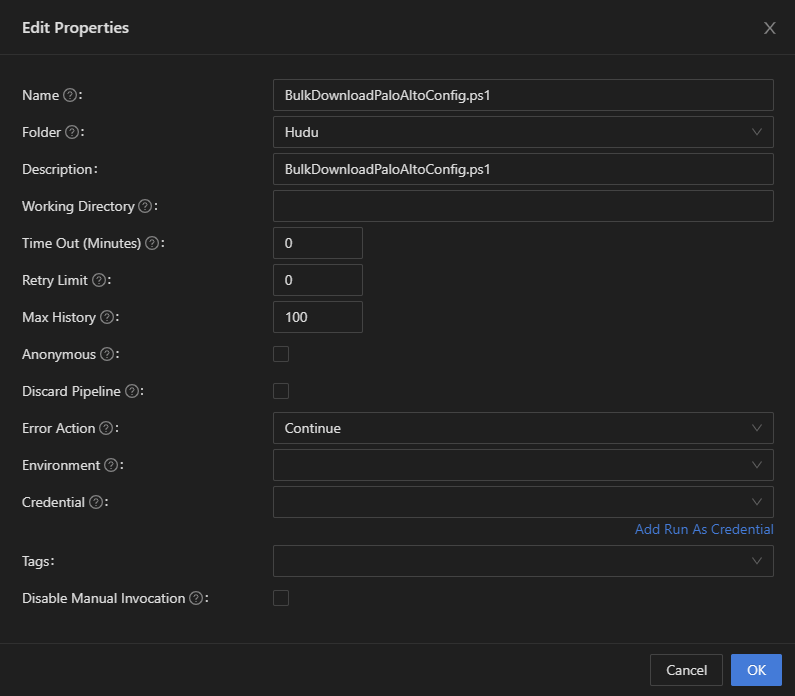
Are those authenticated? It should be passing authentication context down through those systems. In the case of schedules, it has no authentication context, hence why app tokens work. This was a change to the security model in v5.
I’ll give the App Token a shot in a few days when I can attempt the upgrade to 5.0.x again.
That said, I think we need to provide some sort of configuration to reduce how strict this model is because it does add a lot more complexity than was in v4.
I wholeheartedly agree. The new process - while more secure - adds way more complexity and administrative overhead to the process (especially for setups that have loads of scripts that they would now have to modify accordingly, along with creating more App Tokens just for this purpose, etc.).
As for the workaround of using Connect-PSUServer with an App Token, I think official documentation needs to be created explaining the gRPC change with examples of how to get past it rather than just saying “this changed” and wishing people good luck at figuring out how to interpret it.
9275fa39eb7285daf48b49d53fa3c2f656702c45.png
Sounds good. Thanks for the feedback. We do have documentation about the new authentication and authorization here.
docs.powershelluniversal.com
Feel free to provide any feedback on the documentation. We also linked to that documentation in the breaking changes:
docs.powershelluniversal.com
That said, I’ll make it more clear in the documentation with the exact error message you may see if you are running into this.
Adam Driscoll
PowerShell Expert and Software Architect at Devolutions
The Module document does have more info about this, as you said - thanks.
I think it would be beneficial to have a way for users to either:
- Disable this new method altogether (i.e., go back to how it worked in v4), but I’m not sure that would be possible or easy to do
- Set the
Connect-PSUServersettings globally rather than having to do it per script (thus potentially requiring multiple scripts to be modified and causing a lot of overhead). If one could just be defined in the customizedappsettings.jsonor something, and then everything can just default to use that unless overridden by the user via a script modification, or something like that, that would solve all of this headache.
It would be pretty easy to disable the enforcement via an appsettings.json change.
Adam Driscoll
PowerShell Expert and Software Architect at Devolutions
Thanks. I got my stuff back working.
I may not be understanding the reasons for making this security change, my own assumption would be that it’s mainly to prevent injection-style attacks where user input could potentially be exploited to run cmdlets that affect the management.
From that perspective, I could personally see that:
- Triggers get excluded from the security model. (These scripts are unlikely to be injected as input is known beforehand, except for potential pipeline/host output from the job if retrieved)
- Possibility of configuring the security model on a per-environment basis if that’s feasible in terms of performance (This would allow a clean upgrade without changing scripts as you can simply point the scripts to that environment)
- Maybe the option of defining scripts with a pre-configured list of cmdlets (á la JEA), not sure if that’s feasible or scalable but then you could enforce app/script/api cmdlets that way as well
with that feedback out of the way, I’ve been looking into my scripts again after getting our triggers working, to see why they don’t work, most of our scripts runs as a specific identity/credential, but it seems that none of these work on the new Windows PowerShell and PowerShell environments as they simply time out if I have a credential specified, only the actual executable one (i.e. the one pointing to pwsh.exe), am I correct in assuming that running as a specific windows identity is not supported for these agent environments?
It’s really not about injection and more about different levels of permissions for admins in the console. That said 5.0.5, we added a setting to revert this behavior back to the v4 permissive model.
docs.powershelluniversal.com
In terms of the scripts not running as other user’s properly, there shouldn’t be any limitation on the agent environments. I’ll open an issue for this.
Adam Driscoll
PowerShell Expert and Software Architect at Devolutions
Try to upgrade from 4.3.4 to 5.0.4 and got the following issues:
Apps not show’s at all (app tab is empty), in the appdata, I can see my dashboard and the dashboard configuration file is also seems valid.
Scheduled task, Slow responsiveness, after edit any scheduled task it being deleted.
Modules edit from dashboard, I cant edit the modules directly from the psu.
Sorry to poke again on that topic, low priority, I can use scripts with auth tokens.
On my test system running 5.0.5 I have set:
“Api”: {
“Url”: “http://localhost:5000”,
“SecurityModel”: “Permissive”
}
I have 2 users, an admin (adminuistrator role) and a user (user role).
The app is set to administrator and user role.
I have 2 pages, identical code, both calling a script.
Only difference:
One is using a token, the other not.
The one using the token works for the admin and for the user.
The one using
$script=Invoke-PSUScript -Wait -name eav.ps1
works for the admin but gives an 403 error for the user.
(btw, it has to be -name, with -script instead it will fail as well)
When I add the “execute” role the user, logout and back in, the script will run.
This very much looks like the issue I had with 4.3.3, after upgrade from 4.3.2, and then fixed again in 4.3.4.
So the certificate trust that was also an issue in the triggers, is still happening on scripts themselves, even despite going back to the permissive model.
Using “-TrustCertificate” works, but it isn’t actually a self-signed certificate, and it’s not one where the SAN/Subject should be confused, like was happening with triggers.
One of my scripts that use Set-PSUCache has a pretty sizable request (~4500 AD user objects with two supplemental attributes), this is failing, after working around the above, with the following errors:
Failed to connect to server with gRPC. Attempting gRPC-Web.gRPC requires extra configuration on .NET implementations that don't support gRPC over HTTP/2. An HTTP provider must be specified using GrpcChannelOptions.HttpHandler.The configured HTTP provider must either support HTTP/2 or be configured to use gRPC-Web. See https://aka.ms/aspnet/grpc/netstandard for details.
Status(StatusCode="ResourceExhausted", Detail="Received message exceeds the maximum configured message size.")
@Adam Driscoll commented on one of my posts, about Permissive mode not working correctly with APIs and apps, and said it’ll be addressed in PSU 5.0.6, so maybe it’s also not working correctly with scripts.
There is also a fix coming for this size limitation issue as well. It’s currently set at 4MB but will be unlimited in 5.0.6.
Adam Driscoll
PowerShell Expert and Software Architect at Devolutions
We recently updated from v4 to v5 and I’m having an issue with getting the identity of the caller in a script started by an Invoke-PSUScript call in a dashboard.
Currently have the following code to invoke the script which works.
Invoke-PSUScript -Script (Get-PSUScript -Name "Script.ps1") -UserName $SomeInput (and some other script parameters) | Tee-Object -Variable job | Wait-PSUJob
The problem is when trying to get the identity of the caller in “Script.ps1” by calling
$UAJob.Identity.Name
it just returns “System” whereas in v4 I would get the user that triggered the invoke in the dashboard.
Currently have TrustCertificate: true and SecurityModel: Permissive in appsettings.json
I would really prefer to have this information available so I don’t have to pass it to the script manually and this worked in v4.