PowerShell Universal - 4.2.0
PowerShell Universal - 4.2.0
Release Notes
APIs
- Added -Local to Get-PSUEventHubConnection (#2715)
- Added support for calling Send-PSUEvent remotely (#2719)
- Improved API performance
- Added C# API plugin
- Added Set-PSUEndpoint
- Fixed an issue where renaming endpoint paths would not have any effect (#2737)
Apps
- Added -OnClick to New-UDCard (#2697)
- Removed the Mandatory flag for -Text on New-UDMenuItem (#2685)
- Fix style issue with -Multiple and -Icon on New-UDAutocomplete (#2632)
- Added -Variant to New-UDIconButton (#2363)
- Fixed styling issues with New-UDToggleButton (#2532)
- Get-UDPage -Name now works with Page names and file names (#2543)
- Added -CountDescription and -RowsPerPage to New-UDTableTextOption (#2219)
- Fixed name issues with New-UDSelectGroup (#2701)
- Improved performance of Get-UDElement (#2733)
- Apply -Dense to all sub-list items (#2749)
- Fixed an issue where New-UDDatePicker would return a string rather than a DateTime object (#2716)
- Make New-UDTransferList search case-insensitive (#2729)
- Added -FullHeight to Show-UDModal (#2722)
- Fixed an issue with Out-UDDataGridData where it would not filter properly
- Added -Dense, -LeftTitle, -LeftSubTitle, -RightTitle, -RightSubTitle to New-UDTransferList (#2714)
- Improved App Designer properties layout (#2793)
- Automatic navigation now uses -Title as the link for the navigation link (#2758)
- Improved the performance of New-UDDataGrid checkbox selection
- Added -Wait to Sync-UDElement
- Added -Sx to New-UDSelect
- Fix issue with single char issue on New-UDTextbox (#2800)
- Fix variant when using -Mask on New-UDTextbox (#2807)
- Added app page properties (#2757/#2567)
- Added -Icon to New-UDButtonGroupItem (#2789)
- Added -Color, -Disabled, -FullWidth, -Orientation, -Size, -Sx, and -Variant to New-UDButtonGroup (#2789)
- Added live docs for New-UDButtonGroup (#2789)
- Fixed an issue with New-UDDataGridColumn default values (#2828)
- Fixed an issue where using the logout button would not forward back to the app after logging in again (#2642)
- Added -OnRowStyle and -HeaderStyle to New-UDTable (#156, #758)
- Fixed an issue where Sync-UDElement could throw an exception
- Added -IdentityColumn, -RowHeight, -HideExport and -DisableRowSelectionOnClick to New-UDDataGrid
- Fixed card margin issue (#2801)
- Fixed issue with -ShowLoading with dark themes (#2691)
Automation
- Added a filter for job status (#2694)
- Added support for minimal job environments
- Added support for hiding scheduled jobs (#2710)
- Fixed an issue with Invoke-PSUScript and SecureString parameters
- Wait-PSUJob now supports -JobId
- Wait-PSUJob now returns pipeline output and terminating errors
- Invoke-PSUScript now supports -WaitTimeout
- Added -Schedule to Get-PSUJob
- Fixed an issue starting terminals in the Agent environment
- Added -Parameters to New-PSUSchedule and updated the serializer to use this format by default
- Fixed an issue where Get-PSUSchedule -Integrated would not return the NextExecutionTime
- Added -Parameters to Invoke-PSUScript
Platform
- Added New-PSUHealthCheck and New-PSUHealthCheckResult (#2522)
- Added Conflict Module Health check (#2700)
- Adjusted the authentication re-check on the login page to reduce 401s (#2688)
- Dashboard and API endpoint files are now deleted when the resource is removed. (#2676)
- Added the ability to configure disabled drives for the Drive Space health check (#2476)
- Fixed an issue with overlapping tooltips on the computer delete button (#2707)
- Added reserve proxy plugin (YARP)
- Added OpenTelemetry plugin
- Added reload configuration file dropdown
- Added a minimap toggle to the editor
- Fixed an issue with loading Az.Accounts in PSU
- Updated Swashbuckle NuGet package (##2682)
- Included PSResourceGet GA module and remove pre-release PSGet (#2740)
- PowerShell Universal can now be installed as a Progressive Web App
- Added static PowerShell 7 environment to prevent issues when upgrading the underlying PowerShell version (#2765)
- Fixed an issue with array variables (#2693)
- Fixed an issue where the agent environment wouldn’t work on Linux
- Added support for Computer Groups and accompanying cmdlets
- Added -FileEncoding to Set-PSUSetting
- Added Basic authentication
- Added Get-PSUGitSetting, Set-PSUGitSetting and Remove-PSUGitSetting
- Added Merge-PSUGitEdit, Start-PSUGitEdit and Stop-PSUGitEdit
- Added Sync-PSUGit
- Added -Commits, -UncommittedChanges, -EditInProgress to Get-PSUGitStatus
- Fixed an issue with -DefaultRoute on New-PSURole not working with forms authentication
- Modified variable properties (#2778)
- Added Clear-PSUCache
Deprecated
- Queues configured in appsettings.json - Replaced with computer groups
- Browser based debugging tools - Replaced with VS Code extension
Downloads
Adam Driscoll
PowerShell Expert and Developer at Devolutions
All Comments (12)

Browser based debugging tools - Replaced with VS Code extension
Is there any documentation about the Browser based debugging tools - Replaced with VS Code extension?
Thanks for the release and a lot of updates!
I think you have still issues with data grid filtering.
See below example: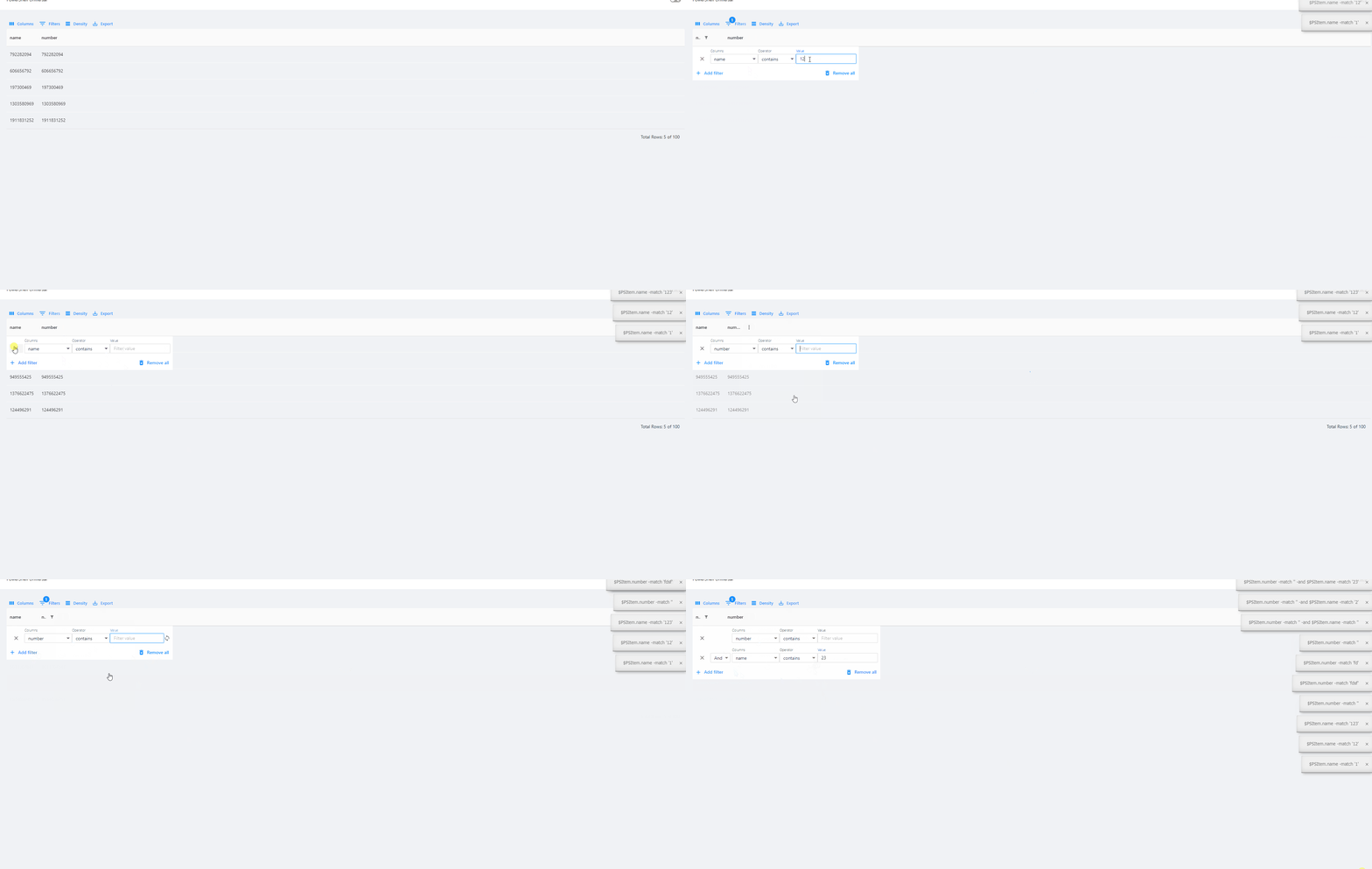
26b51f584334b26f1ca6046dd0ed2cc395f20431.gif
@AnonymousUser - This is because the data is a number and not a string. We likely need to convert it to a string in order for contains to work. We need to remove that toast as well.
    New-UDDataGrid -LoadRows {
        $Data = @(
            @{ Name = 'Adam'; Number = [string](Get-Random) }
            @{ Name = 'Tom'; Number = [string](Get-Random) }
            @{ Name = 'Sarah'; Number = [string](Get-Random) }
        )
        $Data | Out-UDDataGridData -Context $EventData -TotalRows $Rows.Length
    } -Columns @(
        New-UDDataGridColumn -Field name -Filterable
        New-UDDataGridColumn -Field number -Filterable
    ) -AutoHeight $true
@AnonymousUserhttps://docs.powershelluniversal.com/development/visual-studio-code-extension#debugging
Note, I did open this issue as I noticed in my test lab it’s pretty hard to find the right process ID: No process ID in VS Code Debugger tools · Issue #2845 · ironmansoftware/issues · GitHub
Adam Driscoll
PowerShell Expert and Developer at Devolutions
Hello @Adam Driscoll I’ve been using New-UDElement with style attributes to set the colors on rows depending on the returned data (completed, Failed, Error etc… However, I’d prefer to color the whole row. Can you please show an example how this can be achieved using -OnRowStyle for New-UDTable based on the row data? I don’t seem to find anything on this new table feaures in the documentation. Cheers!
should the vscode extension version be 4.2 ? mine is on 4.1 and cant see any way to update it?
my settings.ps1 looks like this - (but i have no environment called ‘pwsh’) - is that right ?
basically i dont see any processes under “platform”
$Parameters = @{
LogLevel = "Error"
DefaultEnvironment = "7.2.13"
SecurityEnvironment = "Integrated"
ApiEnvironment = "Integrated"
DebuggerEnvironment = "pwsh"
}
Set-PSUSetting @ParametersMines still on 4.1.
I’m just waiting for VS-code to push it down
Any additional information about Powershell Universal PWA? Can we define a custom/name PWA URL for a UD App/Dashboard?
I find that this feature would be very useful.
We are looking at the VS Code deployment. Something works locally but fails on the build machines…
Adam Driscoll
PowerShell Expert and Developer at Devolutions
The PWA is super bare-bones right now. You can click the App Available button to install it as an app but other than that there isn’t any configuration provided.
Adam Driscoll
PowerShell Expert and Developer at Devolutions
A row styling example can be found here (last example): PowerShell Universal
Adam Driscoll
PowerShell Expert and Developer at Devolutions
Thanks for the update, first time posting so be kind
Since updating I’m getting an odd issue with the home page on the app I am working on. The home page is showing UDCards that do not belong to that app, they belong to another test app I have. The ‘burger’ menu shows all the correct links but the home page is showing wrong ones.
PSU is running on our own Windows server and I have restarted since updating but its still showing, what is, wrong content. Has anyone else seen this or have a way to fix it before I delete the app completely and start again?
Hello @Adam Driscoll,
This has worked great! Cheers! However, I’ve failed to find an example for -HeaderStyle. While I can control the backgroundColor the switch seems to ignore the font color. For example: -HeaderStyle @{backgroundColor = ‘grey’; color = ‘white’}. What are the accepted orr correct HeaderStyle attributes?