Disable form based auth?
Hi,
When it comes to security there’s not many issues running this internally & on-prem, but as I’m now hosting in a web app for my current org, I’ve enabled OIDC, I’d like to be able to disable form based auth since currently this could potentially be brute forced - there’s no auto lockout/ban mechanism and unlimited retries without any delays either.
I’m controlling OIDC via env vars on my web app, I dont currently have an authentication.ps1 file since I didnt want to put any clientid/secret in plain text.
If I did have any issues trying to login as a backup, I can get to the fileshare to re-enable forms login (if there’s also a way to disable it).
Failing this, if it cannot be acheived the next step woudl be to sit this behind app gateway or front door and then whitelist all the traffic coming in which is fine in a corporate environment.
Howver I’m also starting a personal project for a homebrew website, and I’ll need something similar in terms of security to make sure it cannot be brute forced as it will be an externally facing public site but this one I won’t be able to restrict traffic via whitelist.
Any ideas what mechanisms I can implement here?
Thanks
All Comments (26)
I’ve tried creating authentication.ps1 and adding:
Set-PSUAuthenticationMethod -Type Form -Disabled -Integrated
But this doesnt seem to take any effect, the login form page still loads.
Looking at some of the previous forum threads around this in prior versions I think this was able to be disabled in v3.
From the UI at least in v4 it’s telling me that it cannot be disabled.
Also tried:
Set-PSUAuthenticationMethod -Type Form -Disabled -Integrated -ScriptBlock {
$false
}
It seems I can still login with the admin pw,
Looks like it’s picking up my authentication.ps1 but forces it to be enabled and doesnt apply the script to the local admin account.
ca4b16dde27d445cd72fd1227e098bcf016a3987.png

Commenting out lines 11-19 in the example below should do the trick: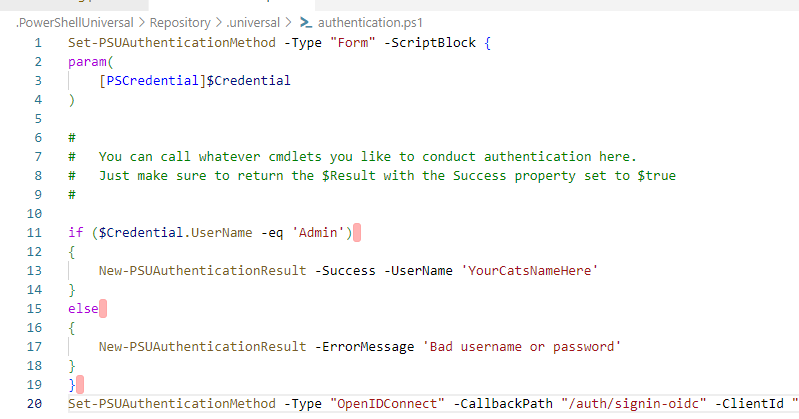
aff1edb782549e53e47bebe8425f5132759e7b61.png
I tried that:
Set-PSUAuthenticationMethod -Type "Form" -ScriptBlock {
param(
    [pscredential]$Credential
)

}
And it still lets me login with local admin.
I even tried:
Set-PSUAuthenticationMethod -Type "Form" -ScriptBlock {
param(
    [pscredential]$Credential
)
    New-PSUAuthenticationResult -ErrorMessage 'Not Allowed'
}
But I can still get in using the login form.
It’s like it’s completely ignoring the authentication.ps1 code despite it being listed in the GUI that the config is reading from that file for form auth, and if I edit the authentication in PSU rather directly in file it even shows the correct code in the GUI/code editor.
For your homebrew project, do you need multiple admins? If not and if you’re using a layer 7 traffic manager like App Gateway, you should be able to send a 404 response to anyone else trying to hit /admin.
Only need one PSU admin, but will have a login area in the app itself for other users to manage their recipes and submitting new ones, voting etc
I did write a bunch in this comment but realised that now I’ve figured out how to get the login script working (see below) I can just check the $RemoteIpAddress and disallow anyone from a non local ip address to login to the admin console, with the admin account, which i’ll be the only one using.
I just need to work out the mechanism of login for users now, so that I can get at a username/email address and provide components relevant to them. Ideally facebook since thats where our group is hosted currently so I know all the members have logins, I’ll do my research on azure app registrations and using facebook but i have a feeling it might not be possible with PSU currently unless i use another layer on top (see the following comment), in which case I might not be able to get to the username/email of users.
Actually think I may have found a potential solution here:
Pomerium
It can be run in docker and integrated with the facebook identity provider I want to use + support the syno reverse proxy / nginx, and it’s free for individuals
It’s interesting how when you removed the code and it still worked. Once you reboot there should be nothing to load.
One option would be to use characters ot on the keyboard (all those wierd wingdings, foreign characters etc) and see if that works
Ahhhhh what you just said made me realise I was doing something stupid!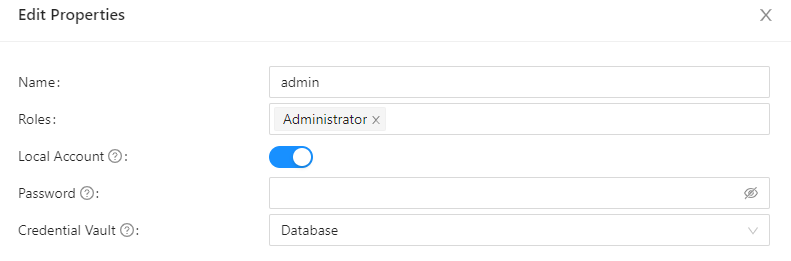
Once I disabled the ‘local account’ on the admin user it didn’t take the password from the database, it’s now running the authentication script code: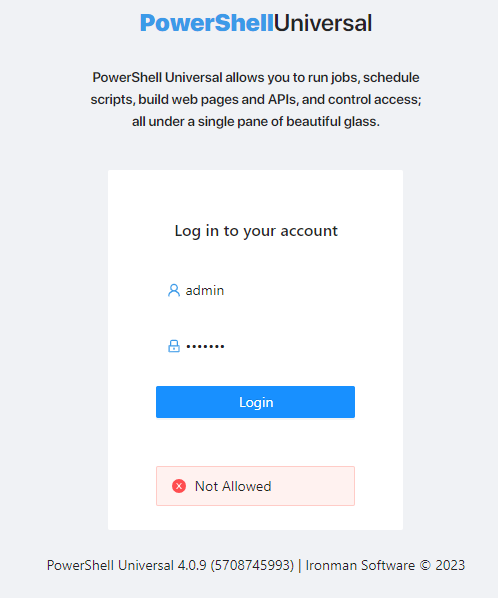
Thanks for that
4125efbbddde3ec91cbdd8bdf8b4992f138257d2.png
d7cb6b940e2f6d9147694404c9f9e2621c003780.png
Yep same here… i’ve just queried the ltedb5 db and done the exact same thing on a burner contianer noticeing it does not generate a file anymore.
May be worth taking a backup of database.db before turning that off just in case.
I suspect the only way to get back in will be to remove the database.db file and let it regenerate the file on startup.
Saying that… That may be a workaround to the entire password authentication mechanism
I’ll shut up now.
I dont really use the db for anything to be honest, everything is in the .universal ps1 files, the admin password was the only configurable.
I register an azure keyvault for my secrets and I’ve got an azure sql database for everything else.
My app is running in azure, and I’ve got OIDC configured with a app registration & env vars so shouldnt have an issue getting in even if I rebuild (it’s all terraformed too), that can easily be switched off and storage account file updated to remove the code block for the local admin account access again.
hmm, coming back to this actually, I have noticed every time I ‘switch off’ the admin account from being database configured, it just reverts back, and I’ve subsequently been able to login via the form auth again, bypassing the script/code block I put in place. I ended up just deleting the admin account entirely and that seems to have done the job.
Seems like this is a no go too, when the web app reboots, admin is recreated with default and lets any password in.
@Adam Driscoll - I’m stuck on this one, any ideas?
The TL;DR version is: I just cant figure out a way of blocking local admin user login or disabling form login all together, the reason is due to this being a publicly accessible cloud hosted site and form + admin auth is brute forceable and therefore insecure. Ideally it should be OIDC/MFA only.
For now I’ve just set the admin pw to a absurdly long string but it would be nice to disable it or form auth all together.
Just as a quick update on some of the things mentioned in this thread if anyone was following.
I was still battling with facebook oidc/ .well-known config, and in the end gave up trying to get it to work, I’ve read a lot of articles saying that it’s in a non standard proprietary structure so maybe that’s why altho most of the articles are pretty old.
I switched instead to a google oidc app, and while I initially had some struggles, I did end up managing to get it working with the following env settings:
Authentication__OIDC__Authority https://accounts.google.com
Authentication__OIDC__CallbackPath /auth/signin-oidc
Authentication__OIDC__ClientID <clientid>
Authentication__OIDC__ClientSecret <clientsecret>
Authentication__OIDC__ResponseType code
Authentication__OIDC__Enabled true
Authentication__OIDC__Scope openid
I’m happy with that for now but would still like to be able to disable local admin/form based auth, as there’s been no updates on this thread from the team I’ll log a feature request in github for it.
Happy that I’ve got a path forwards tho!
I’ve added a comment to: Block /login from external locations · Issue #2617 · ironmansoftware/issues · GitHub
It’s not exactly the same feature request, but in a similar vein and would be suitable in this instance either way.
One issue I have been experiencing with google OIDC is the logout functionality doesn’t seem to do anything
This is one of the issues we’re currently facing, too. The PSU admin portal is publicly accessible, so with local authentication still being enabled, and with seemingly no real way to turn it off, we’re left with 2 options:
Option 1: Put the PSU server behind a load-balancer and perform header inspections to simply block the /login sub-path.
Option 2: Abandon PSU in lieu of something similarly capable, such as Pipedream, in which there is no such concern with local authentication.
Not sure if this has always been the case or not, but you can actually remove the administrator role from the local admin account - thus rendering it useless (even if you can’t remove it entirely).
This was my approach (along with a very long/secure pw), all other accounts we have are OIDC based with MFA. If I needed a break glass I can just interact with the filesystem/config, re-add the role and restart the service.
That could potentially work, as long as the role doesn’t get added back after the service restarts, or anything like that. Taking into account some of the other issues with PSU, such as the random service crashes due to coreclr.dll having an “unhandled exception”, the somewhat instability of the Git functionality, and a couple of other things, the other services (such as Pipedream) are looking better and better the more time I spend with PSU, but we already paid for PSU so we’ll probably give some leniency for a bit.
I’ve never had a single service crash since I started using PSU years back, I’ve used it for 5 orgs now and personal projects, in very different environments (on-prem, webapps, linux, windows etc). I would say if you are having issues there, it’s likley something that could be troubleshooted and resolved because it doesnt sound normal (I did a quick lookup for corectl.dll on both the forum and github issues and found nothing so I’d recommend raising an issue for it with plenty of detail)
Same with git - I’ve had trouble only when dealing with a proxy server and outbound connectivity but I found that since you can configure git in many different ways, including using internal or external git clients, I’ve found it to be very stable.
For me, there’s simply no substitue to PSU - I think a lot of people misunderstand what it is, what it can do and its limitations - there’s challenges in scaling, but using it within it’s means it’s great. using a service like pipedream wouldnt be a replacement for me, I do find that recommendation interesting but if anything it would be more of an addition that could work in tandem and save on development cost of custom integrations if those already exist in that platform.
Our setup is using the MSI-installed service - is that how yours are set?
So far, all we’re using PSU for is to run some scripts on a schedule or being triggered via API (webhooks). We aren’t using it for anything else (yet).
The Git instability I mentioned are just random errors I see literally every day so far, such as “failed to write chunk header: The server returned an invalid or unrecognized response.”, or 503 errors, etc. Not one day has gone by where there hasn’t been some issue. The repo. we sync with is Azure DevOps (because it’s free with our licensing), if that maybe makes a difference.
And, I meant coreclr.dll not “corectl.dll”
Why do you say using something like Pipedream wouldn’t be an option for you? What are you doing in PSU that couldn’t be replicated in Pipedream?
I’ve previously had it configured in IIS via the zip.
I’ve used docker for an azure webapp too.
But currently I’m running it as a service via the msi.
I’ve got my git sying to azure dev ops currently too, do you use a PAT token to authenticate? I’ve run mine both with internal and external git - managed to get both working, but settled on internal. May be worth also switching and trying yours with external to try and isolate your issues.
On the pipedream comment, I’m really using PSU more for the web apps, not just buidling API’s / scheduled scripts.
I use web apps as both a management layer for the teams I’m building automations for, dashboarding for metrics & documentation, and also end user interaction, for example, a portal for access reviews, server lifecycle management, servicedesk tooling, application onboarding, just to name a few.
As a personal project I’m also using it to build my community homebrew club website!
Yes, our Git sync is using a PAT as well, and the Git repo is external. We don’t have a hybrid setup with a local repo (if that’s what you were saying).
I see. So, yeah, in your case a service like Pipedream wouldn’t really help, but for what we’re doing (at least so far), it likely would fill PSU’s shoes easily.
With one of the changes in the 5.0.0 release’s notes mentioning that the app development feature is going away, I wasn’t sure how that would translate if we started using them and they went away with an update. Maybe I just don’t understand what that change is really doing.
Back to the original topic, real quick: if you remove the role from the local account, how do you add it back via a config file? Isn’t the user account in a database, not a config file?
Actually yeah you’re right… I didnt think that one through did I.
I dont really use the local db for anything other than a single variable which allows me to connect to azure key vault for everything else, so I’d likley just have to delete the local DB so the local admin regenerates as default in a worse case scenario but I’m okay with OIDC only at the moment.
No I wasnt talking about a local repo, under the git settings you can choose to use an external git client instead of the bundled one inside PSU:
Git | v4 | PowerShell Universal
I havent read that about the v5 app development feature but I’d be interested to see, I couldnt find it in the docs/changelog, do you mind linking it? Apps themselves as a whole are an intergral part of PSU and here to stay so they won’t be going anywhere but I’d assume its talking about the GUI side of things, there was efforts to introduce a wizard style drag/drop page creator, I never really used it myself but I imagine it would be hard to maintain for the product owner. Unless of course it’s talking about something entirely different.
I removed the role but I think I’ll likely put it back and go the route I mentioned earlier, with putting the site behind a load balancer so we can do some header inspections and prevent the use of /login altogether if it’s coming from outside of our network.
Ah. I see. So, yeah, we’re using the internal Git “client”. We did have it set up to use the external client at one point, but went back to the internal client - I can’t remember why. Might have just been part of blowing away the settings and redoing them, and just forgot to toggle the option. I suppose we could try it again to see if it resolves any of the issues there.
Sure. This is where I got the info about 5.0: https://imsreleases.blob.core.windows.net/universal-nightly/8196607421/release.md and it’s specifically the line - PowerShell App designer has been removed. I wasn’t sure how to take it, given that the next lines specifically talk about Apps features being added.
Thanks. Yeah it was basically the ‘app designer’ which was the drag and drop designer they added for v4. I think it was supposed to appeal more to the low-code no code crowd, but for me it was really clunky and hard to use in a more tailored way, I think that the real userbase of PSU is predominantly going to be code oriented anyway given the nature of the beast so maybe it didnt work out and they decided to kill it, or maybe it just didnt fit into the roadmap with the new changes coming in for v5.
And thats not a bad shout on your LB config to block traffic to that route, I’l probbaly end up doing something similar eventually at my current org.
Circling back to this, we finished the load-balancer implementation today. So, internally we can still access /login but any external attempts to /login (and any possible sub-path of /login) are denied.
