PowerShell Universal - 4.0.0
PowerShell Universal - 4.0.0
Release Notes
API
- API endpoint documentation now only shows endpoints the user has access to (#363)
- Added Event Hubs
Apps
- Replaced react-tooltip with MUI tooltip
- Added -Sx, -Arrow, -FollowCursor, -EnterDelay, -LeaveDelay to New-UDTooltip
- Removed -Type and -Effect from New-UDTooltip
- Added -Truncate to New-UDTypography
- Added New-UDBreadcrumbs (#2150)
- Added support for validation, help text and display messages to New-UDForm -Script (#2043)
- Added -ShowBackButton to New-UDForm -Script (#2044)
- Added -ShowSearch to New-UDTransferList (#2340)
- Fixed an issue where $EventData -OnEdit in New-UDDataGrid would be a string (#2071, #2070, #1978)
- Removed -PopOut from New-UDExpansionPanelGroup (#2373)
- Fixed -Type Accordion on New-UDExpansionPanelGroup (#2373)
- Removed New-UDCodeEditor -Autoresize and set the default to autoresize (#2146)
- Added -Dense to New-UDAlert (#2214)
- Added New-UDButtonGroup and New-UDButtonGroupItem (#2180)
- Added -HelperText to New-UDTextbox (#2285)
- Added -OnChange to New-UDTextbox (#2287)
- Added -Content and Content parameter set to New-UDIcon (#640)
- Added New-UDHelmet
- Added GitHub-Flavored Markdown to New-UDMarkdown
- Added App Designer
- Added Test-UDConnected
- Added -NoData to New-UDTableTextOption (#2112)
- Added -JustifyContent to New-UDStack (#2189)
- Added the ability to disable session time out (#296)
- Added -Width and -Height to New-UDTransferList (#1452)
- Added New-UDDataGridColumn (#2258)
- Added Out-UDDataGridData (#2266)
- Added New-UDSpeedDial and New-UDSpeedDialAction (#2157)
- Added -Dense to New-UDList (#2300)
- Added -Dense to New-UDAlert (#2214)
- Added New-UDButtonGroup and New-UDButtonGroupItem (#2180)
- Added -HelperText to New-UDTextbox (#2285)
- Added -OnChange to New-UDTextbox (#2287)
- Apps now start asynchronously on server startup
- Fixed issue with New-UDAppBar -Footer (#2176)
- Remove support for Universal Dashboard Marketplace
- Renamed Dashboards to Apps
- Theme is now persisted per app (#2156)
- Fixed an issue where New-UDListItem -Label couldn’t be a number (#2107)
- Added cursor pointer to Nivo charts with onClick handlers
Automation
- Breaking: One Time schedules are no longer written to schedules.ps1
- Added support for SecureString parameters (#1467)
- Added support for markdown in script descriptions (#2128)
- Added -Queue to Invoke-PSUScript
- Added support for IValidateSetValuesGenerator (#472)
- Script page now uses tabs for each section (#551)
Platform
- Added support for nested roles (#2442)
- Added Claim Type and Value autocomplete (#2201)
- Added Roles to secret variables (#2350)
- Added support for setting the Content-Security-Policy header (#2395)
- Added support for wildcard subdomains in CORS (#2408)
- Added --appsettings and --windowTitle to desktop mode
- Added buttons to run, clear and refresh health checks.
- Added -HideRunOn and -HideEnvironment to Set-PSUSetting (#2294)
- Added -Truncate Disables text wrapping and adds ellipsis for overflow (#2332)
- Fixed an issue where docker images would not run properly (#2359)
- Added groom job health check (#1839)
- Added export button for logs (#2318)
- Added Database (LiteDB and SQL), UDP, TCP and HTTP logging targets
- Added log viewer in admin console
- Added PSScriptAnalyzer and forwardWindowsAuthToken health checks
- Added -Reset to Sync-PSUConfiguration
- Added Suspend-PSUFileWatcher and Resume-PSUFileWatcher
- Added -Module, -Command to New-PSUApp
- Added -Module, -Command to New-PSUScript
- Added -Module, -Command to New-PSUEndpoint
- Added support for loading resources from modules.
- Added Health Checks
- Added LastUsed property to AppTokens (#2173)
- Added -LogoutUrl to OIDC (#764)
- Added -Credential to Environments (#1683)
- Added middleware.ps1
- Added logging header (#2286)
- Updated to PowerShell 7.3.1
- Updated to .NET 7.0.102
- Removed PowerShell Protect support.
- Removed templates
Downloads
Adam Driscoll
PowerShell Expert and Software Architect at Devolutions
All Comments (13)

Hi @Adam Driscoll
just tried to upgrade to 4.0.0 and the server won’t start anymore with following error.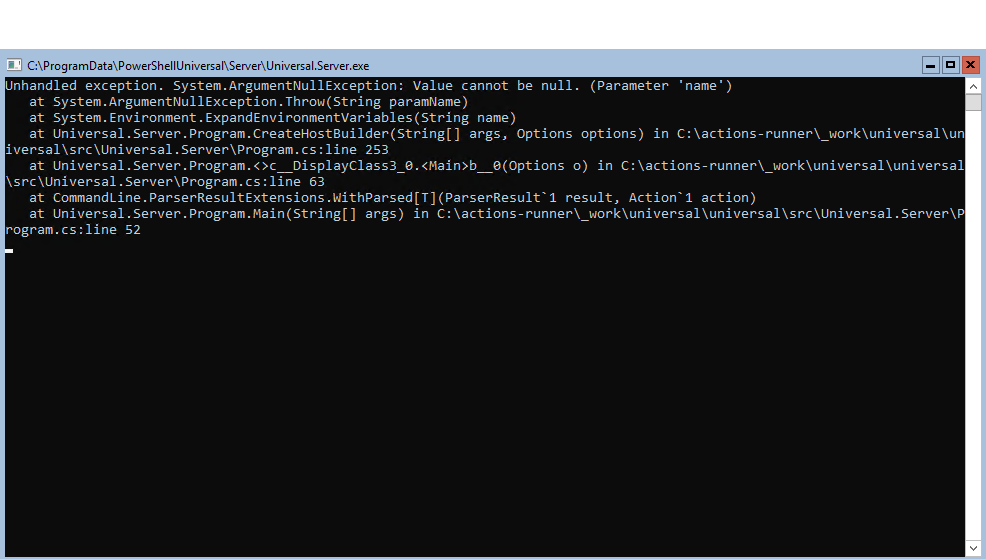
with the default settings it doesn’t have this problem, so I believe I use settings within the appsettings that doesn’t work anymore.
Windows authentication is enabled with authentication.ps1 instead of the appsettings.
Git two-way sync is enabled and saved within the db
{
  "Kestrel": {
    "Endpoints": {
      "HTTP": {
        "Url": "http://*:5000"
      },
      "HTTPS": {
        "Url": "https://*:443",
        "Certificate": {
          "Path": "cert.pfx",
          "Password": "****"
        }
      }
    },
    "RedirectToHttps": "false",
    "UseHttpSys": "false",
    "BasePath": ""
  },
  "ApplicationInsights": {
    "InstrumentationKey": ""
  },
  "Logging": {
    "Path": "%PROGRAMDATA%/PowerShellUniversal/log.txt",
    "RetainedFileCountLimit": 31,
    "LogLevel": {
      "Default": "Information",
      "Microsoft": "Warning",
      "Microsoft.Hosting.Lifetime": "Information",
      "Grpc": "Information"
    }
  },
  "AllowedHosts": "*",
  "CorsHosts": "",
  "Plugins": [
    "UniversalAutomation.LiteDBv5"
  ],
  "Data": {
    "RepositoryPath": "%ProgramData%\\UniversalAutomation\\Repository",
    "ConnectionString": "filename=%ProgramData%\\UniversalAutomation\\database.db",
    "GitRemote": "",
    "GitUserName": "",
    "GitPassword": "",
    "GitBranch": "",
    "GitSyncBehavior": "",
    "GitInitializeBehavior": "",
    "GitSyncInterval": "",
    "ConfigurationScript": ""
  },
  "Api": {
    "Url": "",
    "GrpcPort": 0
  },
  "Authentication": {
    "Windows": {
      "Enabled": "false"
    },
    "WSFed": {
      "Enabled": "false",
      "MetadataAddress": "",
      "Wtrealm": "",
      "CallbackPath": "/auth/signin-wsfed",
      "Wreply": "",
      "UseTokenLifetime": true,
      "CorrelationCookieSameSite": ""
    },
    "OIDC": {
      "Enabled": "false",
      "CallbackPath": "/auth/signin-oidc",
      "ClientID": "",
      "ClientSecret": "",
      "Resource": "",
      "Authority": "",
      "ResponseType": "",
      "SaveTokens": "false",
      "CorrelationCookieSameSite": "",
      "UseTokenLifetime": true,
      "Scope": "openid profile groups",
      "GetUserInfo": false
    },
    "ClientCertificate": {
      "Enabled": "false"
    },
    "SessionTimeout": "25"
  },
  "Jwt": {
    "SigningKey": "PleaseUseYourOwnSigningKeyHere",
    "Issuer": "IronmanSoftware",
    "Audience": "PowerShellUniversal"
  },
  "UniversalAutomation": {
    "JobHandshakeTimeout": 5,
    "JobDebugging": false,
    "ContinueJobOnServerStop": false
  },
  "UniversalDashboard": {
    "AssetsFolder": "%ProgramData%\\PowerShellUniversal\\Dashboard",
    "DashboardStartupTimeout": 10
  },
  "Secrets": {
    "SecretStore": {
      "Password": "PSUSecretStore"
    }
  },
  "ShowDevTools": false,
  "HideAdminConsole": false,
  "Profiling": false
}
d0070c49c45665131e2b96a608fcdc8b21d08af8.png
nvm, after reinstalling and checking the original app settings
"Api": {
    "OpenAPI": {
      "Name": "Endpoints",
      "Description": "Endpoints defined within the PowerShell Universal admin console.",
      "Url": "v2",
      "Version": "v2"
    },
    "Url": "",
    "GrpcPort": 0
  }
was added between 3.9.4 and 4.0.0 without me realizing
After got the server running, one problem remains, Windows authentication won’t work anymore.
EDIT:
After several tries, I got it working.
Update-PSUServer did not work, so I had to remove it first and install it fresh, which also removed the Windows service and I forgot the service had to use the gms account in order that the windows auth works.
Also, the server will take a few minutes to boot up, and I wasn’t patient enough the first tries.
Is that really the full change log? Should there be more, or should we read through all the beta change logs? There also doesn’t seem to have been a beta change log since beta 3 on 5/9. Have there been more changes?
I agree that there should be a total changelog, and that the changes are missing from the changelog page.
You can find changelogs on all of the beta’s on the release page here
Fixed.
Adam Driscoll
PowerShell Expert and Software Architect at Devolutions
2176
Hi @Adam Driscoll
I am about to test however I wish to check if I run 4.0.0 does this make any changes to my SQL Database if there are problems which requirement to downgrade to PSU3 until a later date in my dev environment?
The VSCode plugin seems to be partially broken. When i try to view Dashboards (now apps) and frameworks It errors out with these messages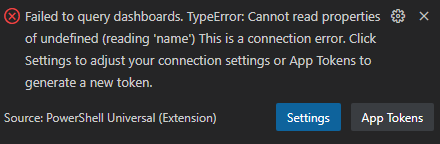
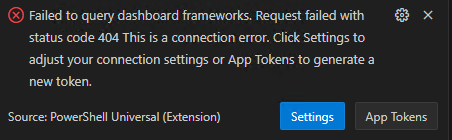
The API and Automation dropdowns work correctly.
The configuration dropdown seems to be broken as well It’s treating each ps1 like a folder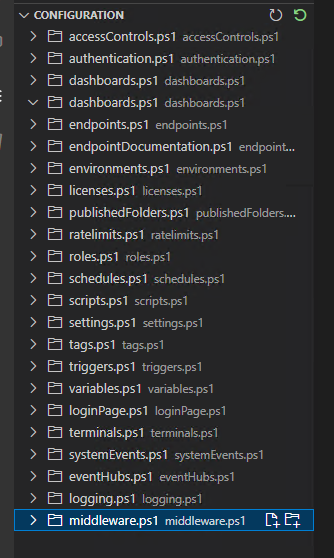
Plugin version is 3.1.0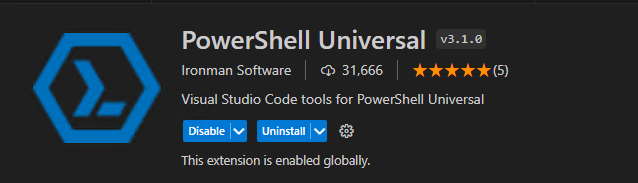
Looking at the logs page to see if there are any errors there, and it seems like it has all events set to whatever time it was when the page is loaded/refreshed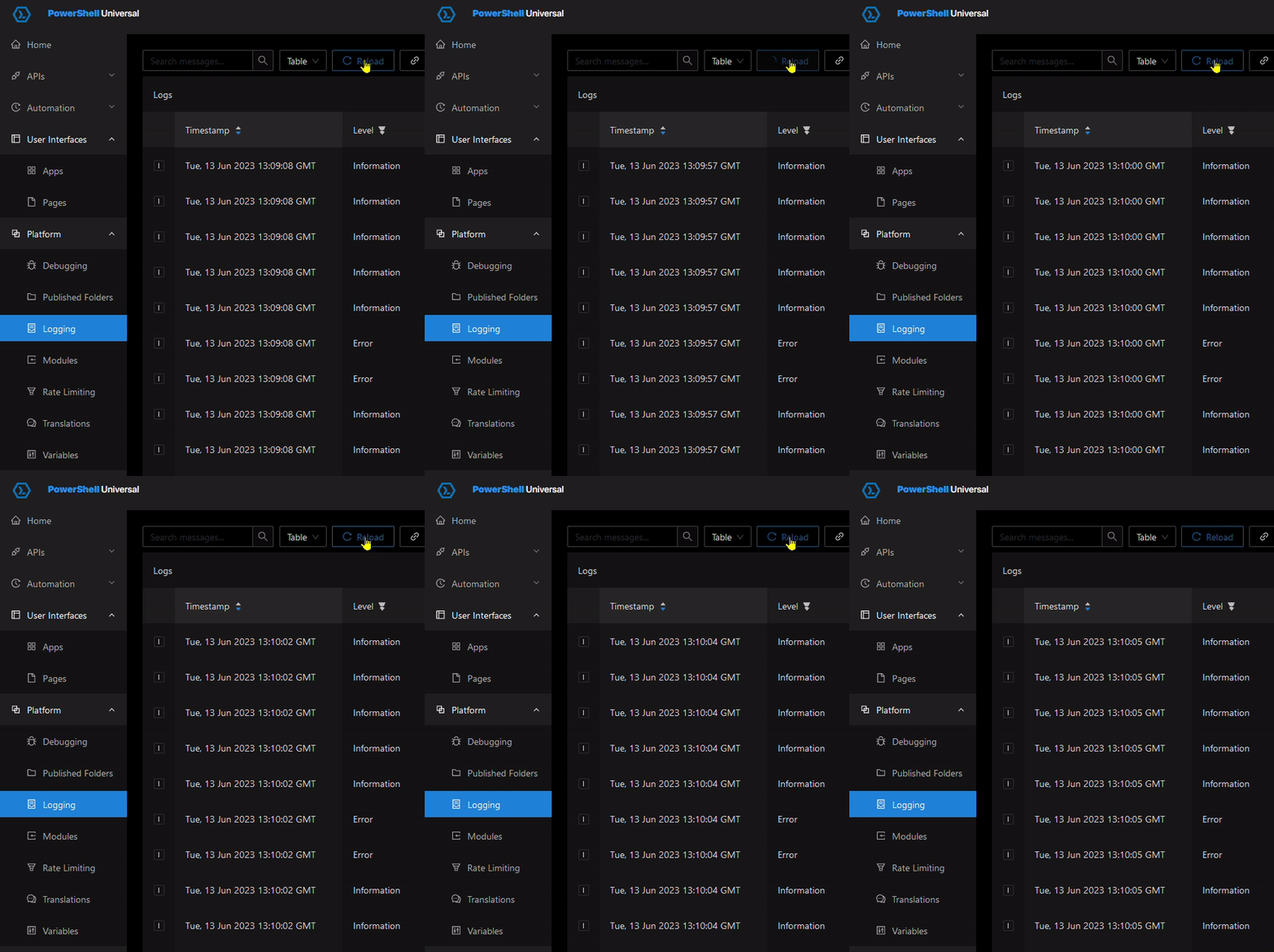
EDIT:
Seems like my apps aren’t loading now. I just get a blank white page. No errors in the app log or playform/logging though. They are listed in the stopped state and I can’t start them. I’m rolling back my snapshot to a working condition
EDIT2:
My git sync is broken now. I do one way and didn’t disable it before upgrading and it is erroring about changes made in the repo that are not available locally. Tip, disable git sync before upgrading! haha
12666a3e348dd4a81579809251bc4d54aeb73ef5.png
c4f785576636f1c0cdf46d0365434b5e20131512.png
fd5aeac88ec39b14bcdb5c49d8c6d38a03f6cbe8.png
7da545298e704a8544f66501ae36dbab96a131e0.gif
b82c0119f83eb0f054abf374568996195ff5b0c6.png
bbc5fcf509c23d7a46aa167ae24d5ba4f3cbf428.png
Cloned my Universal server and tested the upgrade again outside of prod. Still having issues with the VSCode Plugin not working correctly. Recreated the app token and still get the same error.
Can you try upgrading to the 4.0 VS Code plugin and let me know if that still happens?
Adam Driscoll
PowerShell Expert and Software Architect at Devolutions
Is there a different place to get the 4.0 version other than through the extensions inside of VSCode?
I see there is a 4.0 changelog, but I guess it isn’t available on the marketplace yet
docs.powershelluniversal.com
marketplace.visualstudio.com
20 min later and it showed up. The Apps section is working correctly now.
The configuration section still seems to be treating each ps1 as a folder instead of a file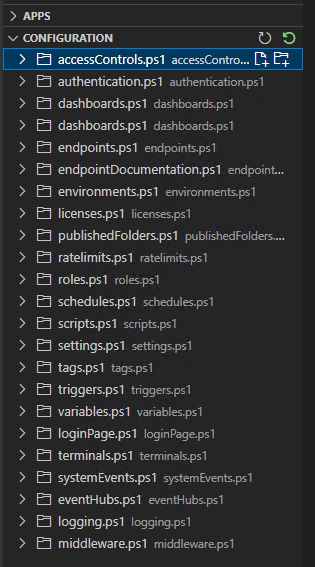
0f0dec31a54072a0520bf0d50dcc9066f97cd3a8.png
Ok. I opened and issue to track that: Configuration files do nto show up properly in the VS Code extension · Issue #2467 · ironmansoftware/issues · GitHub
Adam Driscoll
PowerShell Expert and Software Architect at Devolutions