Installing Certificate - while hosting PSU as a service?

Product: PowerShell Universal
Version: 3.0.0
Is it possible to install a certificate while running PowerShell Universal as a service, or do you need to configure PSU to run using IIS in order to have the ability to use the SSL certificate when browsing to the dashboard URL?
Recommended Answer
For some reason I thought we had certain traffic restricted in the space that the dashboard server sits in. Nevertheless, 443 is working like a champ! I’m now able to access the dashboard using https and using the CNAME in the URL.
Helpful notes:
- CNames were created to point to the hostname of the server hosting PSU.
- My certificate had multiple subjects so that users can use multiple cnames to access the dashboard. When I attempted to use all three as the subject in the appsettings.json, I was unable to access the admin page and any dashboards. Event viewer was throwinga .NET Runtime error (ID 1026) stating that the requested certificate could not be found.
- After changing the subject in the appsettings.json to one of the subjects (See code below) and restarted the PSU service, https started working.
Final view of appsettings.json:
"Kestrel": {
    "Endpoints": {
      "HTTPS": {
         "Url": "https://*:443",
           "Certificate": {
             "Subject": "SubjectName",
             "Store": "My",
             "Location": "LocalMachine",
             "AllowInvalid": "true"
         }
      }
   }
All Comments (19)
Yes it is possible. You need to edit your appsettings.json with the correct values. Here is the documentation for it.
docs.powershelluniversal.com
Here is a sanitized version of mine. Note that the path to the certificate needs double slashes. You can also use the certificate store like the documentation shows.
{
  "Kestrel": {
    "Endpoints": {
      "HTTP": {
        "Url": "http://*:80"
      },
      "Https": {
        "Url": "https://*:443",
        "Certificate": {
          "Path": "PATH\\TO\\CERTIFICATE",
          "Password": "CERTIFICATE PASSWORD",
          "AllowInvalid": "true"
        }
      }
    },
    "RedirectToHttps": "true"
},@jomalin88 so I have the JSON configured. When I browse to the URL in a web browser, I get the default Windows Server IIS page. Is there some configuration I’m missing in IIS to redirect the user to the PowerShell Universal dashboard page?
If you’re hosting in IIS, you need to configure the certificate there and not in appsettings for PSU.
SSL Certificate Knowledgebase | SSLs.com – 9 Jul 19
Adam Driscoll
PowerShell Expert and Software Architect at Devolutions
Do you want it in IIS, or do you want it as a service? I don’t have it IIS installed at all on the server I run mine on.
What port do you have it listening on?
I’d like it configured as a service if that is possible. The dashboard is running on port 10002.
Do I need to do any configuration in IIS if I’m running PSU as a server and want to use a certificate with dashboard running on port 10002?
Do you need IIS on that server?
If you configured your cert correctly, and the JSON correctly you should be able to go to
https://PSU_IP_OR_FQDN:10002
and get to the admin console
I don’t really need IIS at all. I only installed it because I wasn’t sure if it was required in order to use the cert (I was running into issues trying to use while running PSU as a service).
I’ve uninstalled IIS and am now troubleshooting the appsettings.json. I’ve modified the JSON but I think I might be missing something. I’m trying to follow the format at Hosting - PowerShell Universal using the local certificate store:
What I have currently is as follows:
"Kestrel": {
    "Endpoints": {
      "HTTPS": {
         "Url": "https://*:10002",
           "Certificate": {
             "Subject": "CN1, CN2, CN3",
             "Store": "My",
             "Location": "LocalMachine",
             "AllowInvalid": "true"
           }
      }
}What’s your experience with this configuration? Is there an error during startup?
Adam Driscoll
PowerShell Expert and Software Architect at Devolutions
If I use the default appsettings.json file, everything works fine. I’m only running into issues when I try to modify the appsettings.json to include and use the certificate. The page doesn’t load properly.
Making some progress here!
So in my certificate, I’m using three DNS names, and therefore there were three items listed in the subject field of the certificate. I ended up figuring out that if I use only the last object in the subject (removed the “CN =”), that the website works with the installed certificate. I’m not sure why I had to use the last item in the subject but that’s working for me.
I now can access the dashboard by navigating to https://AnyOfTheThreeDNSnames:10003
- While running PSU as a service, how can accomplish the following:Automatically forward the user to port 10003 so that they don’t have to type that in the URL
- Automatically forward the user’s request to https so they only have to type in the DNS name in the URL
- You won’t be able to do this automatically since it’s a non-default port. If you set it to 443, they won’t need to put in the port.
- You can use the RedirectToHttps setting to do this.
  "Kestrel": {
    "Endpoints": {
      "HTTP": {
        "Url": "http://*:5000"
      }
    },
    "RedirectToHttps": "true"
  },
Adam Driscoll
PowerShell Expert and Software Architect at Devolutions
For some reason I thought we had certain traffic restricted in the space that the dashboard server sits in. Nevertheless, 443 is working like a champ! I’m now able to access the dashboard using https and using the CNAME in the URL.
Helpful notes:
- CNames were created to point to the hostname of the server hosting PSU.
- My certificate had multiple subjects so that users can use multiple cnames to access the dashboard. When I attempted to use all three as the subject in the appsettings.json, I was unable to access the admin page and any dashboards. Event viewer was throwinga .NET Runtime error (ID 1026) stating that the requested certificate could not be found.
- After changing the subject in the appsettings.json to one of the subjects (See code below) and restarted the PSU service, https started working.
Final view of appsettings.json:
"Kestrel": {
    "Endpoints": {
      "HTTPS": {
         "Url": "https://*:443",
           "Certificate": {
             "Subject": "SubjectName",
             "Store": "My",
             "Location": "LocalMachine",
             "AllowInvalid": "true"
         }
      }
}Glad you got it working and thanks for sharing the solution!
Adam Driscoll
PowerShell Expert and Software Architect at Devolutions
@Adam Driscoll , the configuration above is working, but when I use the DNS CNAME by it self in a web browser, it is pointing me (and users) to the login page. Is there a way I can point that CNAME to a specific dashboard url? I can use the CNAME and add the path to the desired dashboard, but I’m wanting to tie this specific CNAME to a specific dashboard to shorten the url.
Is this possible when running PSU as a service without needing to install IIS to add a redirect?
If you set the dashboard URL to just a slash, that will become the home page.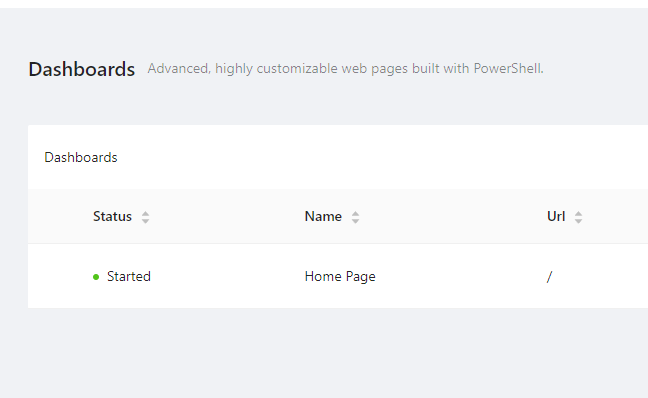
Adam Driscoll
PowerShell Expert and Software Architect at Devolutions
108ab9edf965ec0da782f59bc56dfa7951fb480f.png
@Adam Driscoll ok, cool. That definitely gets me where I’m trying to accomplish.
As far as multiple dashboard go, I see you can just append the name of the desired dashboard such as “CNAME/dash1” or “CNAME/dash2”. I could make that work, but as far as “binding” CNAME1 to dash1 and CNAME2 to dash2 etc., I’m assuming there’s no way to do that outside of IIS?
Correct. You could create a redirection dashboard that checks the CNAME that was used.
New-UDDashboard -Content {
    if ($Headers["host"] -eq 'myhost.com')
    {
        Invoke-UDRedirect "http://www.myhost.com/prettyAwesome"
    }

  if ($Headers["host"] -eq 'myhost2.com')
    {
        Invoke-UDRedirect "http://www.myhost2.com/superCool"
    }
}
Adam Driscoll
PowerShell Expert and Software Architect at Devolutions
Excellent. I might mess around with that a little bit. Thanks as always!
Greetings!
I normally don’t like to resurrect old threads, but this one is pretty close to the issue I am seeing. We recently had to renew the cert for the server, so I went through that process and installed the new cert on the machine (we use a third-party to manage and sign our certs). New cert was setup the same as the old cert. However, when I got to the web interface for the platform, it tells me that the site doesn’t have a cert. Some environment details:
PSU is set up to run as a service, no IIS.
Subject for cert is the same as the previous one.
Cert reports ok all the way up the chain.
I will say that I came into this environment with it already set up. We are running 2.9.2 but plan to upgrade shortly. My appsettings looks like this:
{
    "Kestrel": {
      "EndpointDefaults": {
        "Protocols": "Http1"
      },
      "Endpoints": {
        "HTTP": {
          "Url": "http://*:5000"
    	  },
        "HttpsInlineCertStore": {
           "Url": "https://*:443",
             "Certificate": {
               "Subject": "<My CN Here>",
               "Store": "My",
               "Location": "LocalMachine",
               "AllowInvalid": "true"
             }
        }
     }
  }
This differs slightly from the documentation, but is a valid option for Kestrel, so I’m not sure if it is a problem, or just another way to do it. I have limited experience here. Thoughts?