Fancy new control, UDCalendar

Evening lads,
So for some reason i wanted to create a calendar-control for universal dashboard.
Simple enough, eh? The timezone troubleshooting was terrible, and reminded me once again why i hate dealing with time.
Anywhomst, the stuff works and is published to the powershell gallery.
Give it a go with
Install-module UniversalDashboard.UD-Calendar
See
GitHub
For more info.
Examble usage:
github.com
Fancy photo: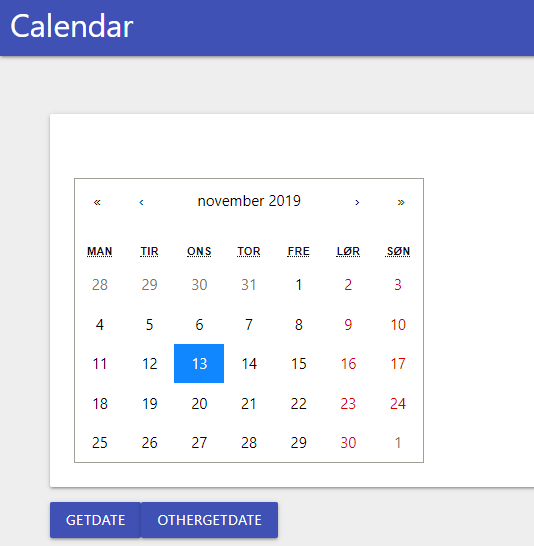
Also added two more functions to simplify the handling of time, check the example script for usage of “Out-UDCalDate” and “Get-UDCalElement”.
43cc72d22436ec69e2db2a9172afa994179804d2.png
All Comments (57)
Clean, simple, easy to use, great examples… Perfect!
Nice @AnonymousUser great work…I was doing a calendar TO and FROM picker…but have issues doing the binding bit to UD to use the element result. So parked that for the moment.
Thanks @AnonymousUser,
can not recommend to go down that rabbit’s hole. I overcomplicated everything, and spent hours on the formatting in order to get the damn timezones to function correctly.
In the end, i had the events working fine, but the get-udelement functionality returned without timezones. Tried for a couple of more hours on the powershell side to force timezones etc, when it turned out to be a simple js function needed.
Anywhomst: this calendar should be able to have time-ranges, and show icons for events etc. Feel free to play with it and throw in a PR if you make anything fancy.
I’ll probably add more functionality to it, if i ever forget the pain of timezones.
You cool to post jsx file. My problem is reading the value from the state of the control. Would like to see how you achieved this. Please and thank you
Bro, @AnonymousUser, i cheated, real bad.
Did a dirty.
The this.state.date is only the initial date. And if you want to reference the active date, you need to use this.state.value.
Changed the state-change command to also update the this.state.date thingy, in the onchange event.
this.setState( { value: e, date: e } )
worked like a charm.
github.com
Not very technical on the JS lingo, but the thingy works… I’m not a fan of JS.
Thanks @AnonymousUser for sharing…I did have an attempt 11 days ago here:-
https://github.com/psDevUK/UD-DatePicker/tree/master/UniversalDashboard.DayPicker
But as mentioned cannot read the values back that have been selected…so although it looks nice, it is pretty useless at the moment until I can read the state value. Will look to see if I can fudge how you done it, or use the hook method Alon is now using. Just need to create a few more hours in the day now to make time for this
Dude, don’t be a tease @AnonymousUser
Show me the un-compiled good stuff!
I tried Alon’s solution, however it seemed overly complicated for a single component. (and i couldn’t get it working)
Sorry @AnonymousUser I do my development on my personal laptop and still stuck at work for another 1 hr and 19 minutes not that I am counting So I will upload you my JSX file, was mainly a big copy and paste of :- http://react-day-picker.js.org/examples/selected-range
Like I mentioned it works beautifully in UD, but I cannot read the selected dates…need to set some learning time aside for binding this to UD properly.
@AnonymousUser feelbadman in uk time
Hit me up
The hook make your component simple you dont need to deal with all the events from , get set sync add remove udelement , i try to make like a tutorial on the hook
You can take a look on the feedback component that @AnonymousUser created its used the hook
I’ll give it another go on my next control
@AnonymousUser’s github is ususally my goto for inspiration
Boom @AnonymousUser you got me inspired this time…now work settled down took some time to revisit the component I was working on as felt a bit by your comment…tried to live up to the hype 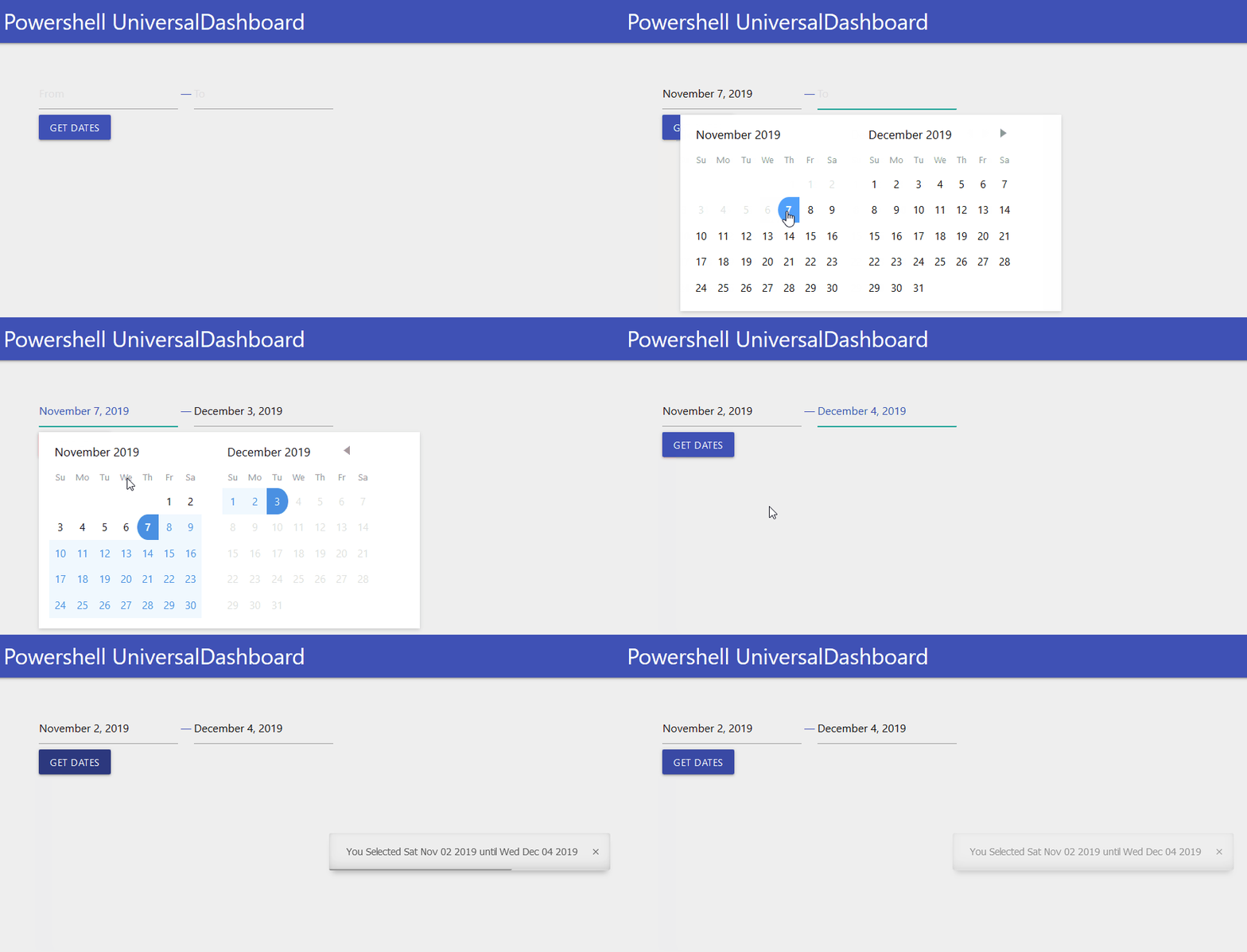
798b9184adba85f8760c3aa387ab6c073d3a7e25.gif
Lookin’ good bro!
Keep it flowing
GitHub
bit spooky we were both doing a calendar component without actually speaking to one another
Lookin good, i’ll give it a go tomorrow!
Should’ave discussed this in the lounge my dude
Hey Guys,
this is a small favor but will be very helpful if it can be implemented with UD, will any of you be able to build the following react component
npm
above one has a feature to select time as well which is very helpful in creating windows scheduled tasks based on date and time so it will be similar to the one you guys created but has the ability to pick a time as well.
Thanks in advance.
Hey @AnonymousUser damn there is a lot of sub-dependencies on this…but your looking for a single date picker with a time as well?
I will look into this but working on some personal development at the moment
@AnonymousUser
you are right, am looking for not only a date pick but a time as well, this way you can use UD to create a windows task schedule with date a time to run Vs. relying on default time (12.00) that currently UDCalendar has.
@AnonymousUser@AnonymousUser
Is there any update about the “select time” feature as I think this is one of the top components for an admin center (what should be one of the main outcomes of UD in my opinion). For example get windows event logs by start and end timestamp (date + time) and do some visualization.
Hey @AnonymousUser was feeling blessed last night, I got to actually speak with @AnonymousUser which was super cool.
Not forgotten about this, I did look into it…but the requested component had a lot of dependencies…which I do not know a quick way to download and download all dependencies without doing it manually.
However I was looking at a clock component, then to build that in with @AnonymousUser calendar component…but instead of re-inventing the wheel I didn’t know UD already has a clock component built in… https://poshud.com/New-UDInput the second example has a date/time picker…don’t get me wrong would be nice to have in one component, but there is already components built in to do this. Peace
@AnonymousUser
havent ever seen the time picker, thanks for that hint.
I just wanted to not this down and get an update, thanks for that
One site note: I do not work with UDInput in order of a feature leak to format the components.
Looking forward to see what you @AnonymousUser and @AnonymousUser are planning to do.
Hey everyone - did we ever get a component created for this?
I know we have the date type for UDInput but i dont want the “submit” button for UDInput, plus it looks weird with my other components on the page.
Would like to see a “Select Date” with the caledar popup, select then use a Get-UDElement ‘dateid’ to pull in that value that was selected.
@AnonymousUser
Sounds like a job for the team?
Yeah for sure man…just mail me a date when you free to discuss in person…thanks…I mean I seen this http://projects.wojtekmaj.pl/react-datetime-picker/ but doesn’t look like a UD component as style is a tad bit different…but it is a one-hit solution
https://www.npmjs.com/package/react-date-time-group
or
https://www.npmjs.com/package/react-kronos
What about something like this? https://reactdatepicker.com/
Just looking for something really simple where you click select the date and return the value via UDElement so it’s just as easy to use and integrate like the other components (UDSelect, Textbox, etc…)
I also found this - https://react-day-picker.js.org/ which comes with some additional controls.
Hey @AnonymousUser do you know an easy way to download all dependencies? Without having to individually install each one? Just the dependency list for this seems to go on and on and on when you actually drill down to each dependency…would save so much time
Yo @AnonymousUser so I have downloaded the dependencies and managed to build this…binding it though is where I need to still accomplish the goal…just so you know I am on the case if you want to link up to get this finished let me know…
Hey @AnonymousUser - Easy way… no idea. I am actually starting to learn how to build my own components. Find its worth while in learning the skill so I can contribute more to the community.
Im struggling with the new/updated custom components template with Plaster. So i’m in the middle of copying the old (non-Platser) template so I can use the documentation and Adam’s video to get something working.
Happy to write a blog post here:- https://psdevuk.github.io/ud-flix/ although a lot of my blogs do cover building a custom component…happy to add the steps I use with the plaster template, as I use that one to build them…anyways here is a work in progress on the component so far:-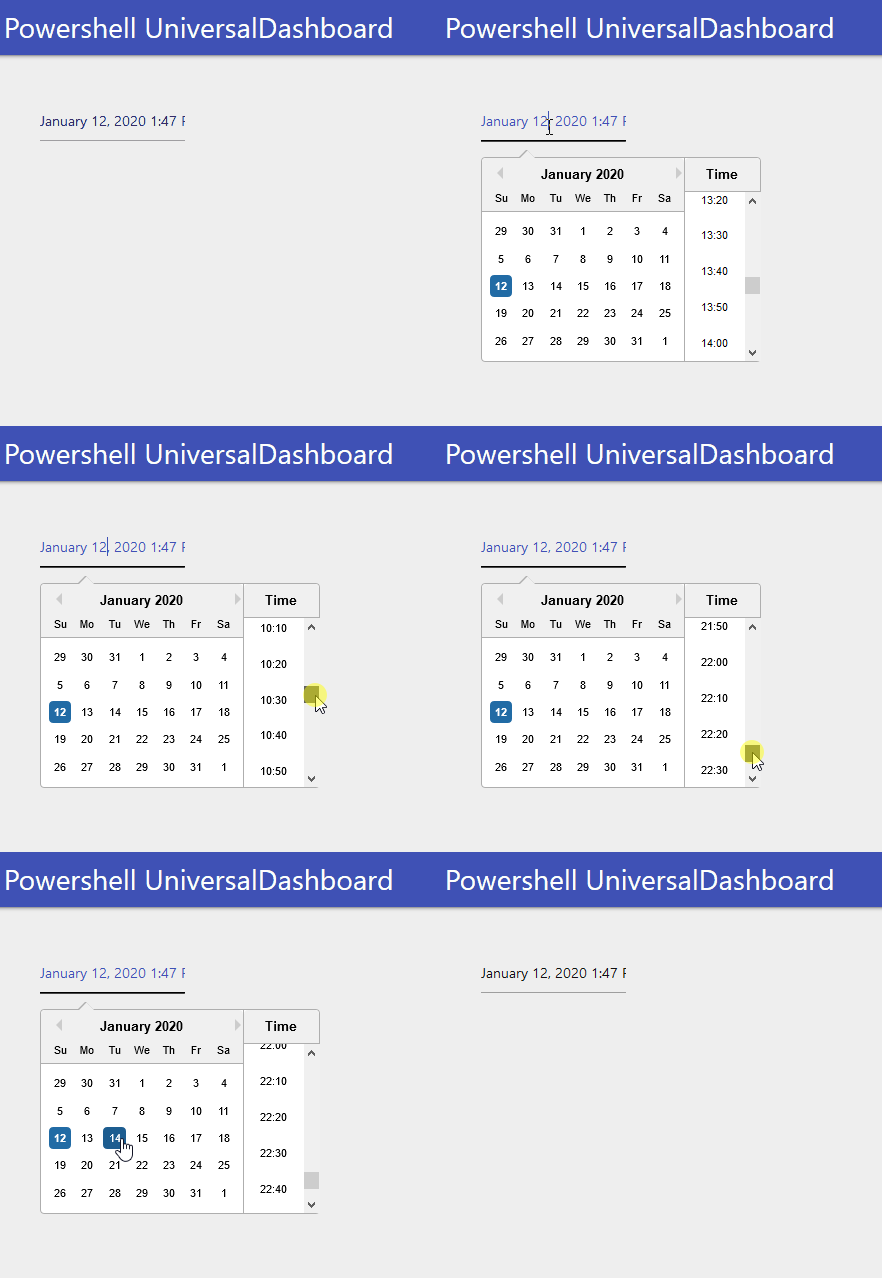
As you see you get to select a date and a time…although its not fully working yet…
f430ecc52b81f2ca5ef5696bdb7e2e90e157285a.gif
That’s amazing!! you will be on your 100th component by the time I figure this out. Trying to follow Adam’s video but error after error… what a pain.
Can’t wait to try out your daypicker calendar module
It might be worth while opening another category in this form for Component Development - someone requests a component and who ever wants to take on that project can do so.
I spent the last 2 days trying to get something to work with no luck, so at this point I would rather just submit component requests
Yeah I watched the youtube video numerous times, before I had a go at doing a component…I selected simple components to begin with, and not done everything on my own, I have had some help along the way…last night I was cursing your name as this component lists 4 dependencies, but in actual fact there was loads and loads, almost gave up downloading it, as each dendency had like another 10 dependencies, which then had another 7 then another 11 and so on…I was like you serious that is the bummer about doing fancier components as its more dependencies, sometimes I forget where I am or other dependencies list dependencies you already downloaded…Like that gauge control component, I swear it took me about 2 hours to manually download each and every required dependency. Then if the thing don’t work after you spent all that time it can make you not the best person to be around
Hence I put the question out there, is there an easy way to download all dependencies of a component listed…I looked at the npm docs and tried a few commands but it didn’t work…for me this would be the biggest time saver…I only use my crappy x86 laptop to do all my development work on, so the initial builds do take a while to do.
But there is the development section on this forum, so if you do get stuck building a component then give a shout out in that section of the forum for help. Peace
I think I might have to go the route of trying to build a development PC/VM - Everytime I try and build I get some other error - webpack, react… 400 vulnerabilities found… I took the basic sample with the hello world and get a module cannot be found… It shouldn’t be this difficult. I even tried to download and build the UDMap sample and that blows up too.
But it could be my main PC as this install of Windows 10 has been around for 3years with a million customizations, apps and modules all over the place… no idea…
When I have some more free time I’ll see what I can do.
But I’m looking forward to your new daypicker module… I have a placeholder for it already in my UD
Not going to tell any lies and say this was an easy process to get my head-around. But after 100+ builds I finally nailed it, and certain things clicked.
I mean I can’t say my way is the way to do it, but it works for me, and converts the react component to be integrated with UD and powershell parameters I pass.
I got 4 kids so had to do baths, dinner and lunches for tomorrow, but before I did that I made some amendments to the JSX file, having re-looked at my date picker component I already did. Well it looks like those changes paid off, as the value is now being updated on a change:-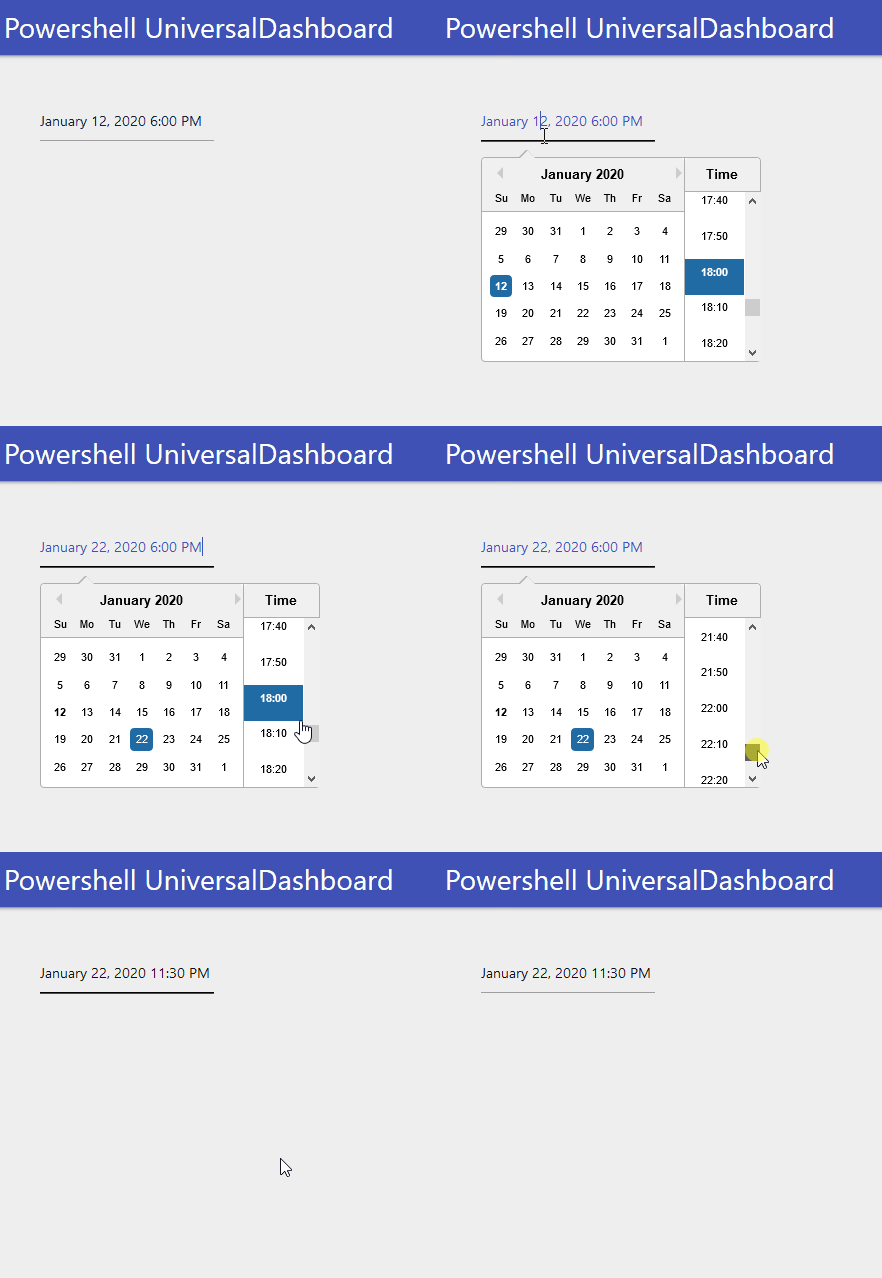
So this component is pretty much good to go…I will look more into the documentation and work out if I need to add any additional props, but was going to name this New-UDSelectDateTime I know it’s a mouthful but as this will be the 3rd custom calendar component out there it needs to be distinct in what it does.
ba8b6bf323a737fd20dcb365409b8eba77210b8a.gif
nearly 2 months later…and it’s here
@AnonymousUser
the 400 vulnerabilities can be fixed by running 'npm audit fix ’ command and it will take care of those for you.
Note: you might end up with like 3 or 4 not fixed and you can ignore that or ignore any after you run this command.
when you build a component what matters is the pkgs you import in your .jsx file those are the pkgs that needs to be installed using npm for your dependencies to be exists for the import.
always look at the npm pkg you want to build for UD and you will always see an example of the developer .jsx file and pkgs were imported.
Good Job adam its going to be useful for every one to use. Dont forget to list the jsx file so i can modify it if it needs some tweaks to make it better
@AnonymousUser
Am going to write 3 main topics that you can post on your blog that will be very useful for every one covering the following:
1- how to use UD in IIS step by step from ground 0
2- how to create your own custom dashboard and maintain it.
3- how to build and use a dashboard using powershell core .
so stay tuned.
amazing work thanks for getting this out - and with lots of customizations!
Removed the time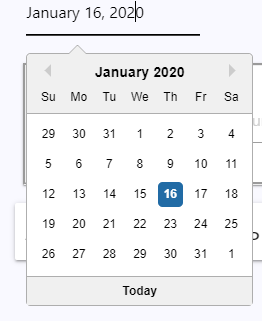
1334b04d04fe0c060953904e4fb954c0456f80ba.png
How did you remove the time if you don’t mind me asking?
Hey @AnonymousUser just woke up having my morning Tea…
the parameter -showTimeSelect set this to $false as inNew-UDSelectDateTime -showTimeSelect $false
To remove the time select
New-UDSelectDateTime -Id "Picker" -dateFormat "MMMM d, yyyy" -WeekNumbers $false -showTimeSelect $false -Clearable $false -Locale "en-US" -OnChange {
     Show-UDToast -Message "Date Changed $eventData" -Position topLeft -Duration 3000
  }
The above code snip is what I used to generate the image I posted above. You can also change how the date/time is displayed using the -dateFormat parameter.
And the -Clearable switch allows for a X clear button to clear out the date - but the positioning and style of that button overlaps with the date (in my UD anyway)
Hey @AnonymousUser for the overlapping thing, you can set the input field to be a bit wider using the following CSS:-
$theme = New-UDTheme -Name "Basic" -Definition @{
    '.react-datepicker__input-container' = @{
        'width' = "140% !important"
    }
} -Parent "Default"
This will show the full time and have the space for the clear button…
I did put some simple documentation here:-
github.com
Hey @AnonymousUser
are you sure that the endpoint you make in the code is uniq for that user?
$OnChange = New-UDEndpoint -Endpoint $OnChange -Id ($Id + “onChange”)
are we sure that the “new-udcalendar” are uniq for each user? (https://github.com/BoSen29/UD-Calendar/blob/master/src/Scripts/New-UDCalendar.ps1)
if not they will be making changes for each other if they use it as the same time ?
edit: hmm I can see that it’s the same pattern in Standard UD components, so I guess they are
Hi @AnonymousUser!
I did kinda just copy from UD’s code, so yeah should be fine!
Are you having issues with the component, or are you using it as a reference for a new component?
hey @AnonymousUser, ah yeah sorry, no issue with your component
yeah I were looking into you module for the actions/events.
I better not highjack this thread with component questions/wondering
@AnonymousUser
Feel free to post in the UD Development topic, and i’ll happy to give you guidance man!
Should this control have text attribute so the field can be seen on the page? The demo works but the field appears transparent once cleared. Very nice job. Thanks!!!
Hi @AnonymousUser this clears the input when the item is cleared. Not seen this transparent issue yet? Have you tried this in a different browser? This is one of the few components I am not actually using myself, so will have to look into this. I know sometimes when I use FireFox certain input fields like the date selection component I did does not look that visible, as opposed to IE…are you able to post a before and after screenshot? I am guessing this will most likely need some CSS setting tweaked to see the input field as a different colour.
Behavior is the same in FireFox and Chrome.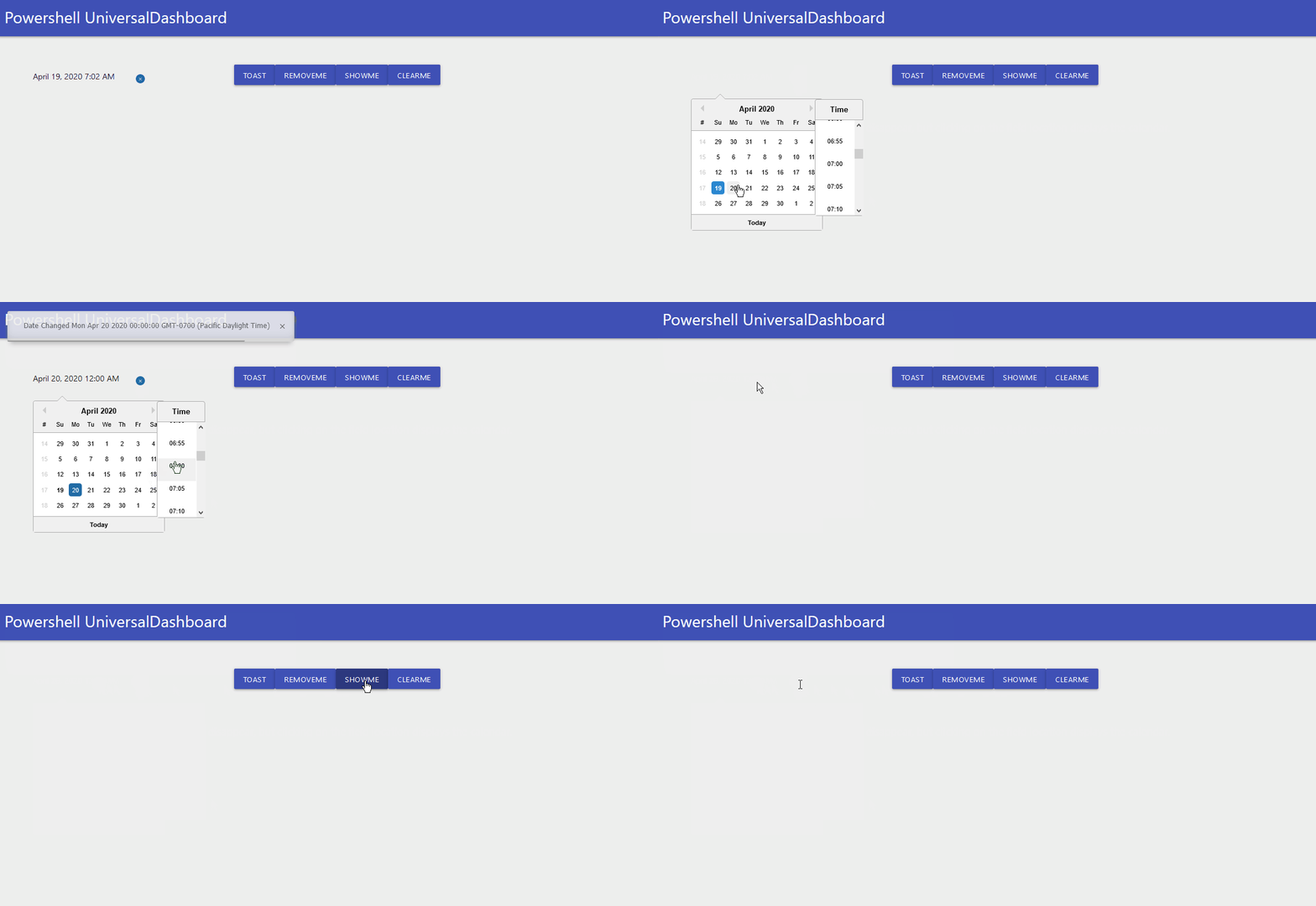
02f46789aabf870f75f6f46dadedf6d7e0564a71.gif
Out of interest is there a way to disable the calendar? I’m looking to include the calendar in a form but the user filling the form in should only be able to select anything if a certain checkbox is checked. I can do this with other fields like text boxes etc but I couldn’t see a way to do it for the calendar.
Hi @AnonymousUser,
Disable - no, hide out of sight from the user? Yes!
Note: remove-udelement does the same thing as “Set-UDELEMENT -attributed @{hidden = $true}”
New-UDButton -Text "RemoveMe" -OnClick {
                    Remove-UDElement -id "Picker"
                }
                New-UDButton -text "ShowME" -OnClick {
                    Set-UDElement -id "Picker" -Attributes @{
                        hidden = $false
}Really liking the new version of this component, some nice new features. I think I might have found a bug though. I wanted to apply some css with New-UDStyle however if I put the picker inside a new-udstyle element then I get this: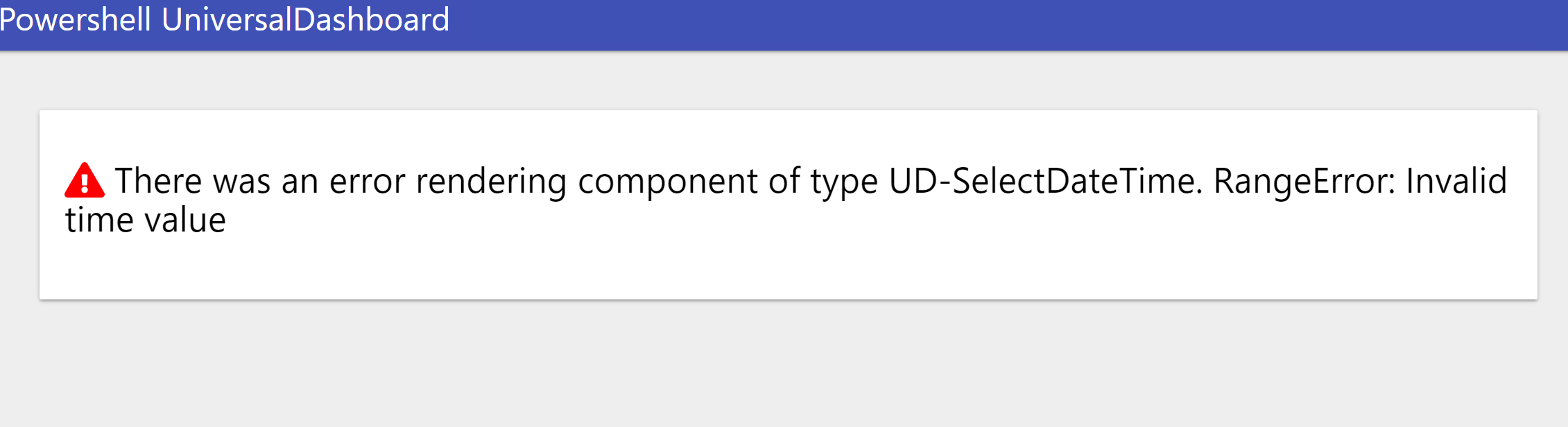
Adding CSS at the theme level does work but there are a couple of bits of CSS that I want to only add to one date picker so ideally I wanted to use new-udstyle.
34a4a7684eb0f44723717893505a7e688a5c6255.png
You cool to post the udstyle bit of code, just going from the screenshot you provided it looks unhappy about the timevalue being entered. Just thought if I could use your example to try and replicate the issue. Thanks
Yeah absolutely. I had a bit of a play around and it seems to do the same regardless of what is in the style however here’s an example dashboard that you should be able to run which shows it in action:
$init = New-UDEndpointInitialization -Module @(‘UniversalDashboard.UDSelectDateTime’)
Get-UDDashboard | Stop-UDDashboard
Start-UDDashboard -Port 10005 -Dashboard (
New-UDDashboard -Title “Powershell UniversalDashboard” -Content {
New-UdColumn -Size 3 -Endpoint {
New-UDParagraph -Text “This date picker works”
New-UDSelectDateTime -Id “Picker1” -TimeIntervals 30 -WeekNumbers $true -Clearable $false -OnChange {
$Session:Picker1Value=$EventData
} -inline $true -showYearDropdown $true -showMonthDropdown $true -fixedHeight $true -showTimeSelect $true -showPreviousMonths $false -CloseOnSelect $true
New-UDParagraph -Text “This date picker doesn’t :(”
New-UDStyle -Style ’
.react-datepicker__time-container–with-today-button {
right:-90px!important
}’ -Content {
New-UDSelectDateTime -Id “Picker2” -TimeIntervals 30 -WeekNumbers $true -Clearable $false -OnChange {
$Session:Picker2Value=$EventData
} -inline $true -showYearDropdown $true -showMonthDropdown $true -fixedHeight $true -showTimeSelect $true -showPreviousMonths $false -CloseOnSelect $true
}
} -AutoRefresh
} -EndpointInitialization $init
)
This is the result that I get: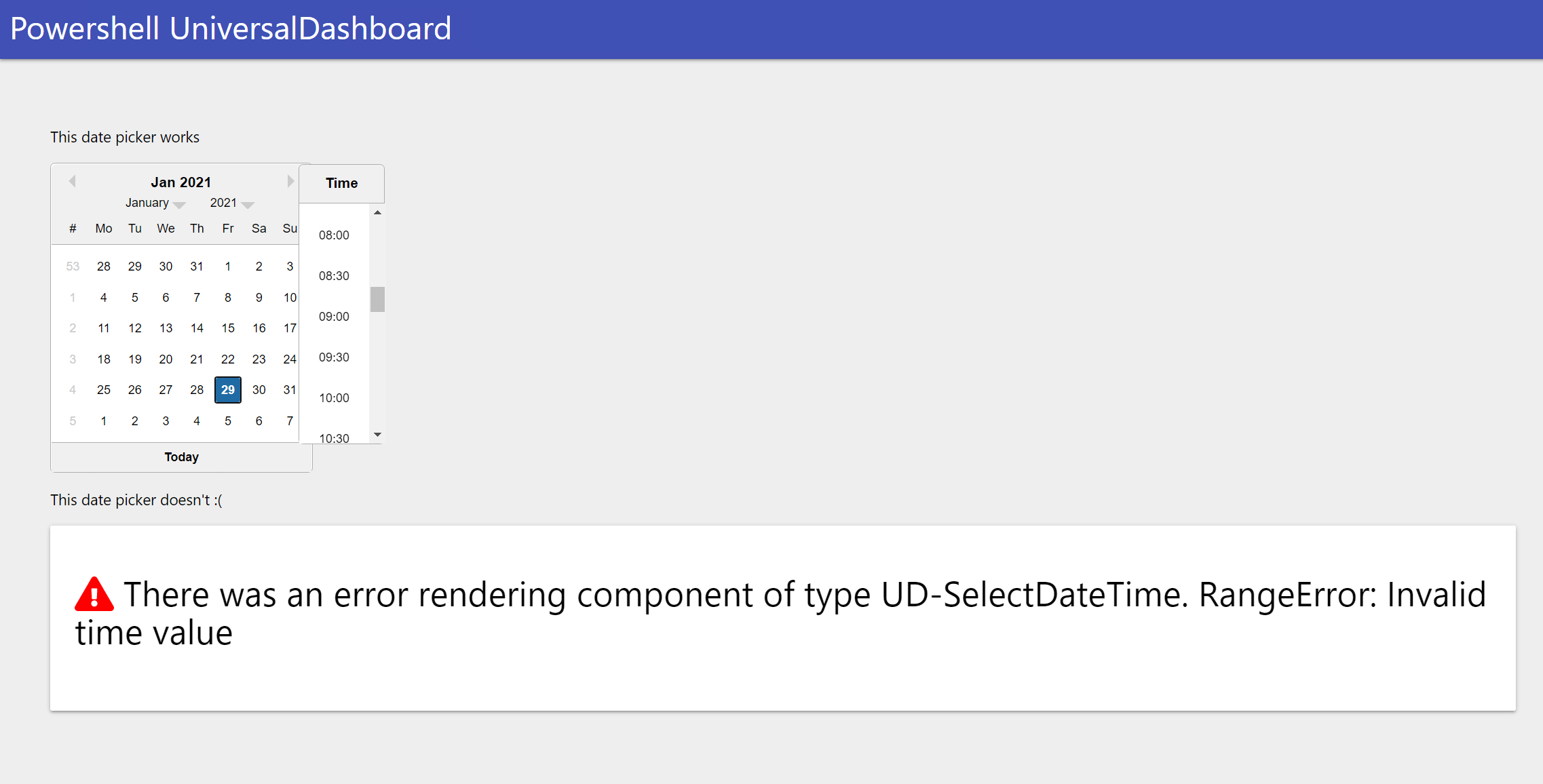
What is really strange is that after a few seconds the whole page disappears and is replaced by this: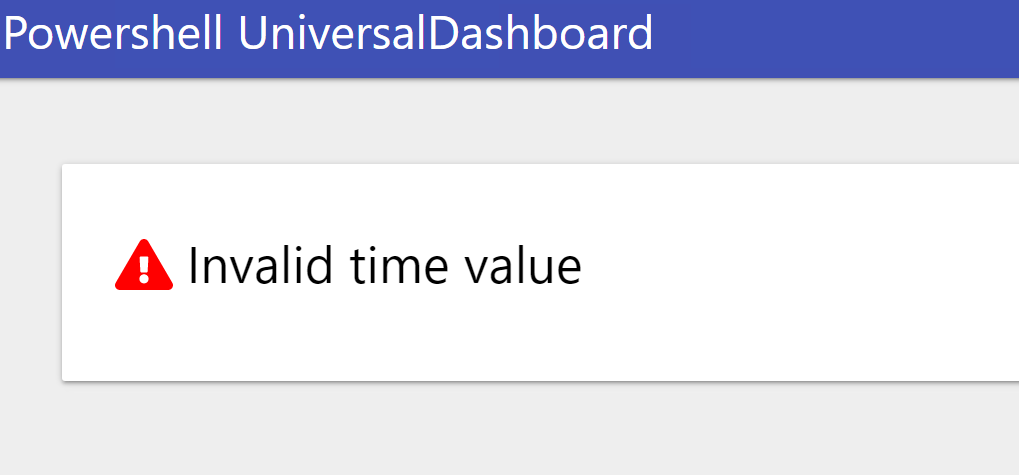
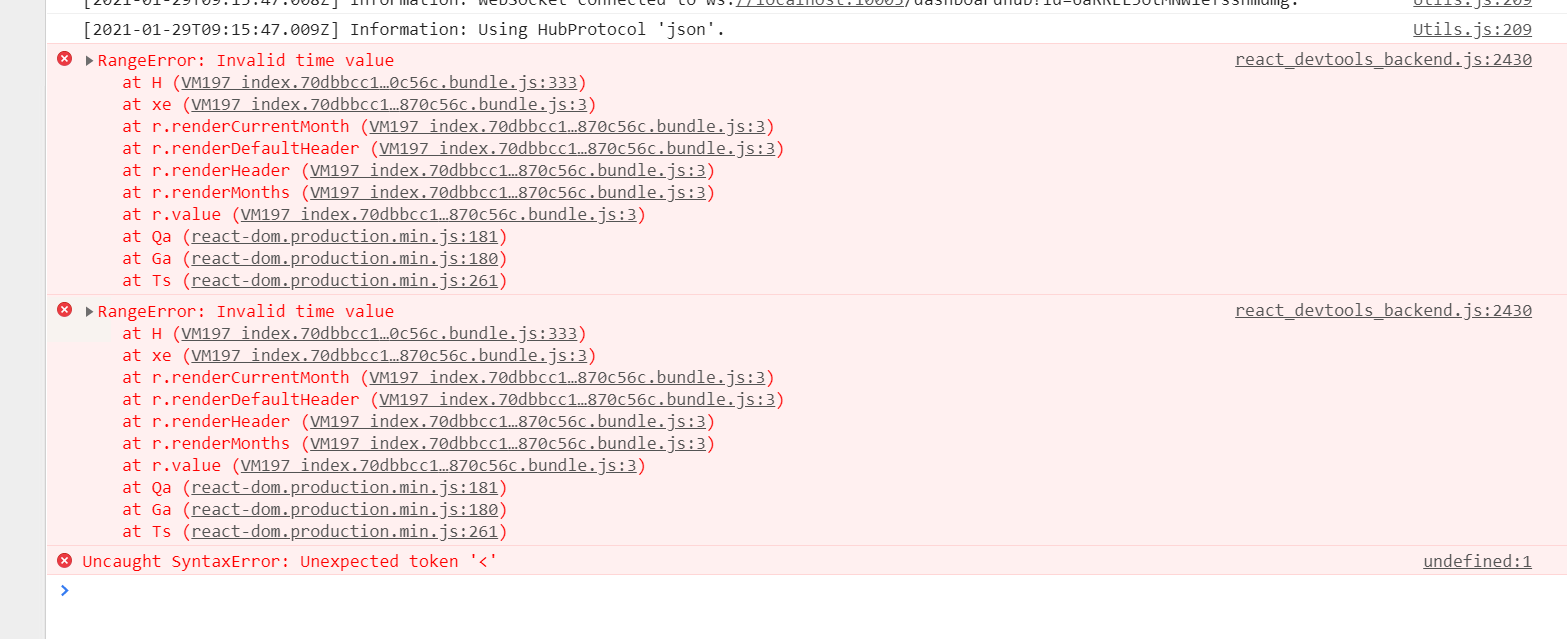
This only happens when the picker inside the UDStyle is on the page page though, if you comment out the second picker then the first one loads fine and stays on the page without any errors.
Strange one!
d15a3343578005959f7798c6929301ad9776a70c.png
2c0763c0f1f0b3ea6a43bd3a9c2219b501fc06c6.png
79a1eb81773a90a4b5945758b9500ffcceb8283a.png
Is this only for picking dates? If so, does anyone know if something exists to allow displaying and interacting with events on a calendar ala outlook?