PuTTY session - alternate host and port

Looks like another poster had a similar issue (http://forum.devolutions.net/topic916-alternate-hosts.aspx), but I can't seem to get this functionality to work with a PuTTY session. I have a device that I SSH to. When I'm inside that network, I can just use the standard port (22). When I'm outside the network, I need to use port 2222. I tried specifying the alternate host as 1.2.3.4:2222, but RDM is not passing that port to the connection (I can tell this because when I try to connect to the alternate host, I get connected to another device that's listening on port 22). Am I doing something wrong?
All Comments (4)
Would you mind to email me your exported session (without the credentials)?
David Hervieux
Sent via PM, as your email address wasn't obvious.
Private message was perfect
David Hervieux
I found the issue and will make the appropriate changes to the app, but until then I have a possible workaround for the issue:
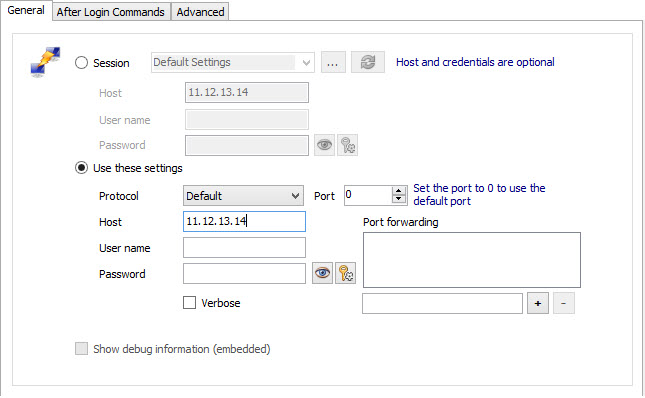
Use the "Use these settings" instead of "Session" to configure our Putty session.
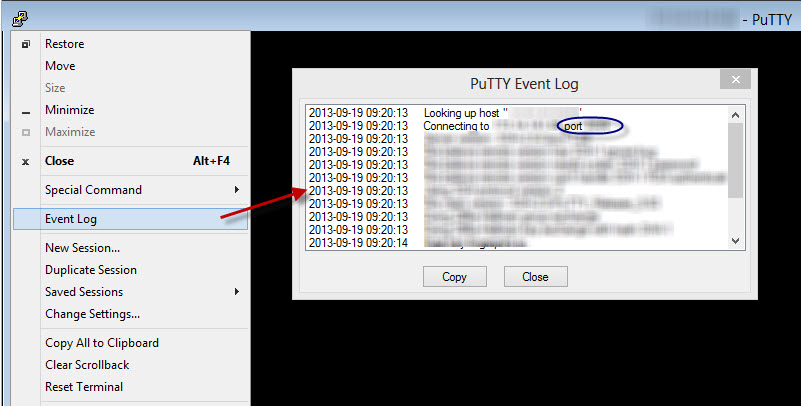
To make sure all is good, open the Event Log, if will show you the port #:
Stéfane Lavergne
9-19-2013 9-14-42 AM.jpg
9-19-2013 9-20-33 AM.jpg