Symlinks not properly managed under SCP

Hello,
i use RDM with no issues, but when i open session using SCP i cannot solve the following issue
symlinks are not properly shown , for example "log" symlink is shown as it is
if i click over it i get the following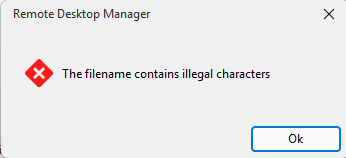
so i need to put manually the path contained under symlink to reach "log" folder
is there a way to fix this ? thanks
32909756-1b1b-405b-905d-34f223060a23.png
a3810b4f-173a-4d99-aaa1-f76e1840af4e.png
All Comments (13)
Hello,
Thank you for reaching out on this matter.
I’ve done some research on symlinks and found that they may not be handled as reliably with the SCP protocol. Could you please try using an SFTP connection instead? It appears that symlinks are better supported with this protocol.
Additionally, could you let me know whether you are able to use symlinks with third-party SCP clients, such as WinSCP or another tool of your choice?
I look forward to your response.
Best regards,
Jacob Lafrenière
Thanks for helping me on this matter. I would like to underline if it's possible changing subject due to a typo
manager --> managed
If i try SFTP, i cannot browse at all inside linux filesystem. If i use Filezilla and add a SFTP profile i can browse till the root of the filesystem and see properly symlinks. So SFTP is worst than SCP.
What i mean is that if i login with SFTP embedded i can see some folders and the classic ".." to go up in directory does not exist
I also tried to put ".." in the browse bar...it seems there are some problems with embedded SFTP as per my experience
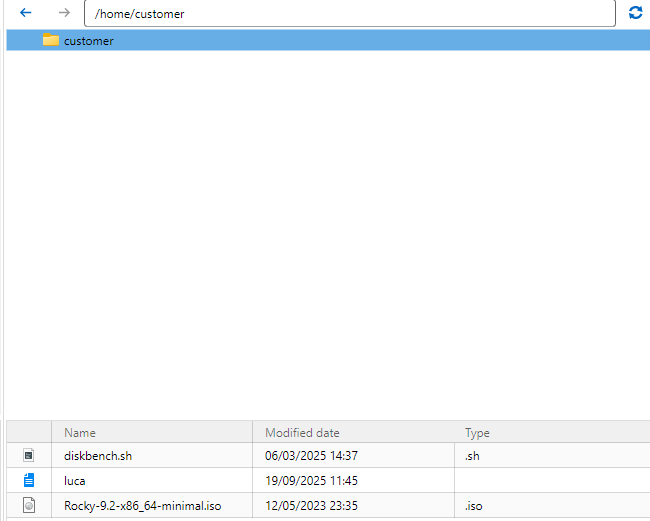
If i use WINSCP tool installed on my pc, i can see properly symlinks.
What's getting puzzled is that it seems that RDM relies on my installed version of Winscp, according to this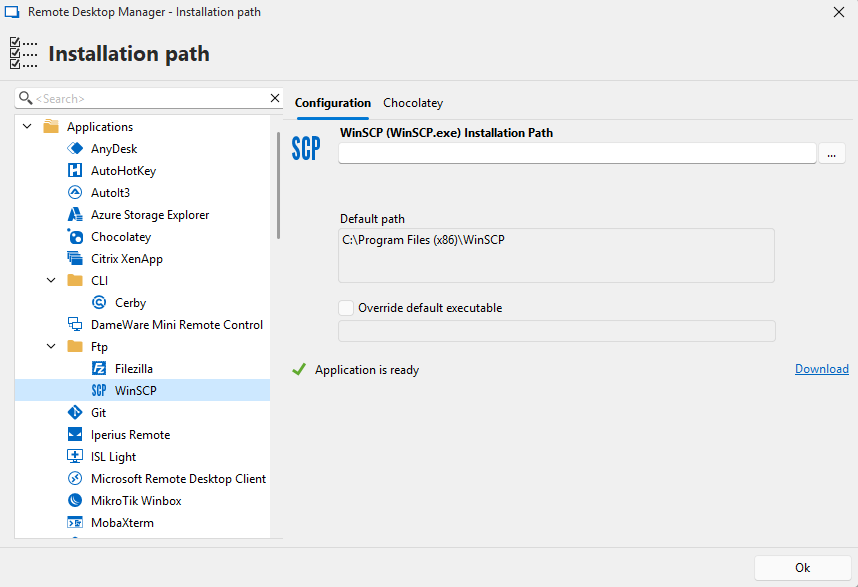
I can add SCP profiles under Winscp installation, but since we have this good features "open with parameters" , i think that it's a pity not using it in the way it meant to be
28d73f0d-aa97-4ffa-ab92-601a43d7b62f.png
0cee4a31-2f5a-40df-b7b9-71842fcc5698.png
657096e2-c418-487a-ba09-f22d81055fc6.png
Hello,
Thank you for the follow-up.
I was able to reproduce the issue you are experiencing with the symlinks. I will report this bug to the development team, and they will begin working on a fix soon.
I will follow up with you as soon as a fix is deployed in a future update.
Best regards,
Jacob Lafrenière
Hello,
Thank you for your patience.
Our development team is currently investigating the issue with symlinks in SCP sessions. In the meantime, they were wondering whether the SFTP method might work as an alternative workaround.
Could you please confirm whether setting the server type to UNIX resolves the issue? You can find this setting under:
SFTP Entry Properties > General > Advanced > Server Type
Please let us know if this helps resolve the symlink issue with the SFTP entry, as it could serve as a useful workaround while the issue is being addressed.
I look forward to your reply.
Best regards,
Jacob Lafrenière
With SFTP i still cannot manage symlinks, as you can see below
Furthermore, i can say that SFTP is "bugged" because i cannot browse inside filesystem as you can see in the picture attached. There's not ".." entry
I can see /var folder because i set this folder here, in order to reproduce the issue
but if i leave it empty i see this
i cannot browser at all, even if i manually put the path under search bar. We're using this version 2025.2.13.1 64-bit (JIT) , if you think there's already a fix for this i can ask to my company to update RDM in the repository
ee61cdcc-da54-40fd-a84c-e385dac2deb2.png
ca2fb050-f84c-44b7-9bf5-0c7b411edcc0.png
be3ddc2f-193c-4bd3-ad2b-789df3eeb059.png
Hello,
Thank you for the follow-up.
Since this is a rather old version (approximately one year old), I would recommend testing the behavior using our latest version, as I’m fairly confident you will see better results. We have released several updates since your version that include fixes and improvements to the SFTP entry, process, and session handling overall.
Without needing to fully upgrade your environment, you may first want to test this using the portable version of RDM. Please refer to the following documentation article for setup instructions. You can then create a quick local data source and configure a test SFTP entry.
https://docs.devolutions.net/rdm/kb/how-to-articles/portable-rdm-installation/
Please let me know if this helps resolve the behavior you are experiencing.
Best regards,
Jacob Lafrenière
Ok with latest build i solved SFTP issues and also symlinks management!
I just have a very minor issue now, after logged with SFTP i cannot use bookmarks (i didn't have this feature with the old build). Selecting the favourite paths seems not working, the only one bookmark that is working is the following "/" , after used "/" i can use all the inserted bookmarks
I attached a video to let you see what i'm talking about (20260508-0724-51.0611738.mp4)
If i use a dedicated SFTP, instead using "embedded SFTP" i can set the home directory to "/" so i can get rid of this, but at the moment we'd like to avoid creating 120 SFTP entries, since the embedded feature is very good for that
I have further questions about "embedded SFTP" : can we set the home directory when using this feature ? I tried to set SFTP home directory under SSH tab, but it seems they are not the settings used for embedded SFTP. I tried with home directory, then with starting location, then we both the fields
d6cc4041-6a39-493b-a01f-a1510c815706.png
20260508-0724-51.0611738.mp4
Another annoying thing is that using SFTP, when i refresh the path, it comes back to home directory everytime!
Hello,
Thank you for the follow-up.
I was able to reproduce the latest behavior you reported regarding the refresh resetting you back to the home directory. However, I am wondering if this may actually be the intended behavior. In this case, submitting a feature request for a different behavior might be the best option.
Regarding the two previous reports, could you please confirm that the account used to launch the SSH session has the appropriate permissions to access those folders? On my side, the bookmarks, home directory, and starting directory are all working as expected.
I look forward to your reply.
Best regards,
Jacob Lafrenière
I will open a request, but refresh should be used for refreshing the folder where you are, because we already have "home directory" button
For the bookmarks, i tested on a VM where i'm owner and i think we have a minor bug there as shown in mp4 attached. If you login and land on home directory, you can browse the home folder with bookmarks but not go up till "/"
if you manually put "/" or via bookmarks, then you can browser and go anywhere you want with bookmarks
20260512-1310-09.1377223.mp4
Hello,
SFTP improvements are coming with the 2026.2 release, which will enable navigation outside of the home directory (unless the user has his access restricted to home).
This will solve multiple navigation issues, including your bookmarks one.
Regards
Jonathan Del Signore
Hello,
We will have a potential fix for the symlinks starting from the upcoming RDM 2026.2.9.0.
Best Regards,
Michaël Beaudin
Hello,
Thank you for being so patient!
I'm pleased to inform you that a new version of RDM (2026.2.9.0) has been released, which includes a potential fix for your issue.
Latest Version: Download RDM
Please let us know if this works or if you encounter any issues.
Best regards,
Maxim Robert