OTP Visibility Issue after Update 2026.1.2

Since updating from version 2026.1.1 to 2026.1.2, One-Time Passwords (OTP) are no longer displayed within the application.
All Comments (4)
Hello Manuel,
Thank you for reaching out!
Can you please confirm the details below so we can investigate further:
- Are you referring to the Workspace Desktop Application?
- Where exactly is the OTP not showing? If possible, a screenshot would be really helpful.
- Do OTP's never display or only in certain scenarios (e.g., inherited OTP or specific entry types)?
- Can you reproduce it consistently or is it intermittent?
Thank you in advance!
Best regards,
Hello Manuel,
Thank you for reaching out!
Can you please confirm the details below so we can investigate further:
- Are you referring to the Workspace Desktop Application?
- Where exactly is the OTP not showing? If possible, a screenshot would be really helpful.
- Do OTP's never display or only in certain scenarios (e.g., inherited OTP or specific entry types)?
- Can you reproduce it consistently or is it intermittent?
Thank you in advance!
Best regards,
@Sam Moynihan
Hi Sam
- Yes
- Screenshot Browser
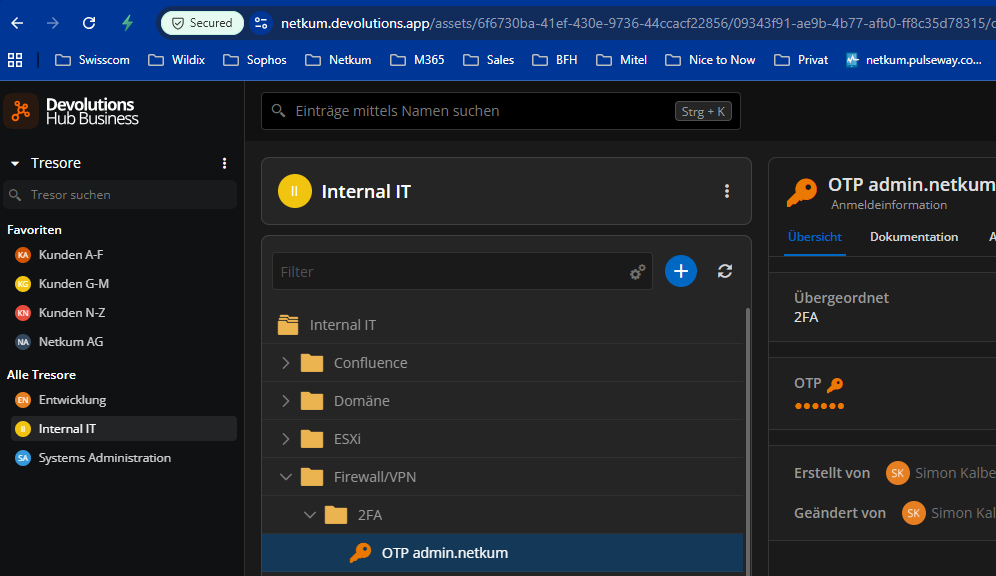 Screenshot Windows Workspace Desktop Application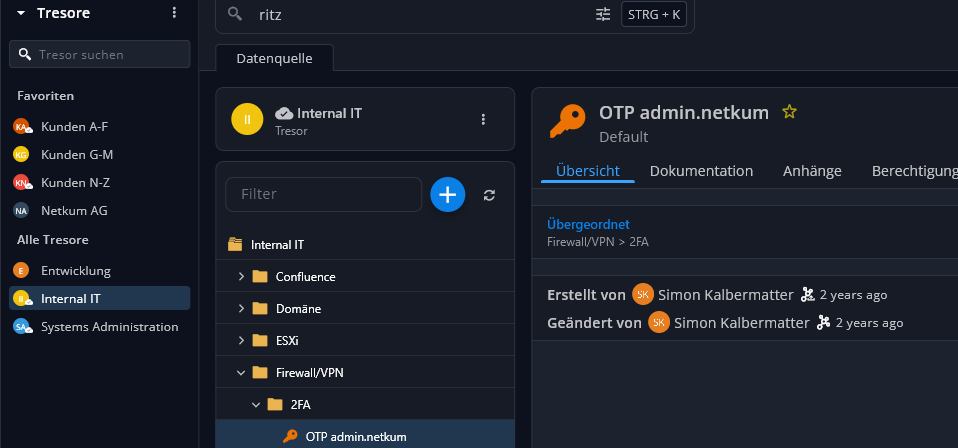
3 I just noticed that it works with one safe but not with most of them
4 When I create a new OTP, it displays correctly, but the existing ones do not
04b1653e-10dd-4aef-aeed-d6851930de5e.png
e2afb5db-8a2d-4882-9919-68115fe463c8.png
Hi,
This issue has already been identified by our team, and a fix will be included in the upcoming release (2026.1.3), which will be deployed soon.
We appreciate you taking the time to report it.
Best regards,
Dany Galarneau
Hello,
We are pleased to inform you that the new version (2026.1.3) is now available which should fix this issue.
Please feel free to reach out if you have any questions.
Best regards,
Dany Galarneau