Unable to go online with last RDM update 2026.1.18.0 64-bit (PreJit)
Unable to go online with last RDM update 2026.1.18.0 64-bit (PreJit)

When my RDM updated to the last version 2026.1.18.0 64-bit (PreJit) I could not connect to the Data Source anymore... this is installed on ubuntu server wit SQL server . chatgpt told me this is because it was installed on a linux host... So I installed SQL server on the windows host server AND moved the database there. When I do a Test host and test database it all works fine: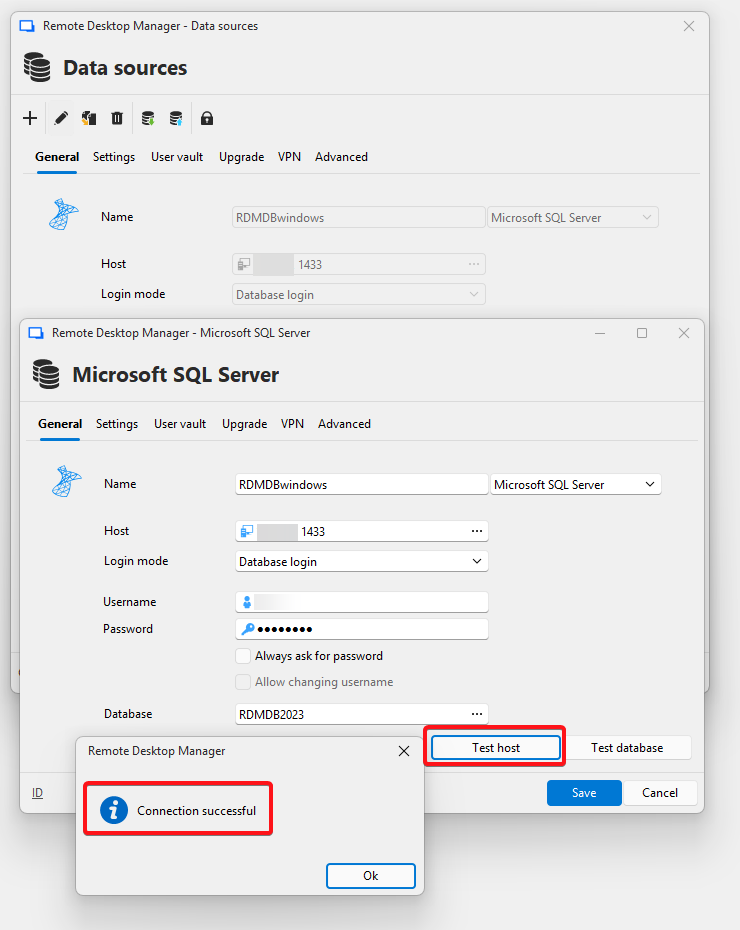
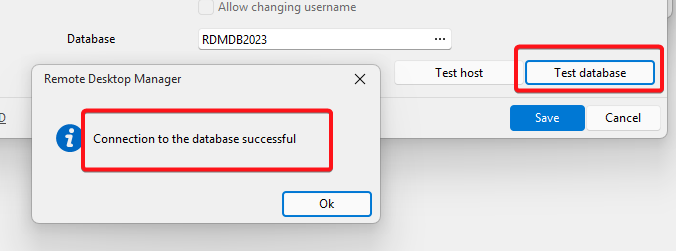
If I save and wait a bit until RDM tries to connect I get this:
Microsoft.Data.SqlClient.SqlException (0x80131904): Connection Timeout Expired. The timeout period elapsed while attempting to consume the pre-login handshake acknowledgement. This could be because the pre-login handshake failed or the server was unable to respond back in time. The duration spent while attempting to connect to this server was - [Pre-Login] initialization=5158; handshake=0;
---> System.ComponentModel.Win32Exception (258): The wait operation timed out.
at Microsoft.Data.SqlClient.SqlInternalConnection.OnError(SqlException exception, Boolean breakConnection, Action`1 wrapCloseInAction)
at Microsoft.Data.SqlClient.TdsParser.ThrowExceptionAndWarning(TdsParserStateObject stateObj, SqlCommand command, Boolean callerHasConnectionLock, Boolean asyncClose)
at Microsoft.Data.SqlClient.TdsParserStateObject.ThrowExceptionAndWarning(Boolean callerHasConnectionLock, Boolean asyncClose)
at Microsoft.Data.SqlClient.TdsParserStateObject.ReadSniError(TdsParserStateObject stateObj, UInt32 error)
at Microsoft.Data.SqlClient.TdsParserStateObject.ReadSniSyncOverAsync()
at Microsoft.Data.SqlClient.TdsParserStateObject.TryReadNetworkPacket()
at Microsoft.Data.SqlClient.TdsParser.ConsumePreLoginHandshake(SqlConnectionEncryptOption encrypt, Boolean trustServerCert, Boolean integratedSecurity, Boolean& marsCapable, Boolean& fedAuthRequired, Boolean tlsFirst, String serverCertificateFilename)
at Microsoft.Data.SqlClient.TdsParser.Connect(ServerInfo serverInfo, SqlInternalConnectionTds connHandler, TimeoutTimer timeout, SqlConnectionString connectionOptions, Boolean withFailover)
at Microsoft.Data.SqlClient.SqlInternalConnectionTds.AttemptOneLogin(ServerInfo serverInfo, String newPassword, SecureString newSecurePassword, TimeoutTimer timeout, Boolean withFailover)
at Microsoft.Data.SqlClient.SqlInternalConnectionTds.LoginNoFailover(ServerInfo serverInfo, String newPassword, SecureString newSecurePassword, Boolean redirectedUserInstance, SqlConnectionString connectionOptions, SqlCredential credential, TimeoutTimer timeout)
at Microsoft.Data.SqlClient.SqlInternalConnectionTds.OpenLoginEnlist(TimeoutTimer timeout, SqlConnectionString connectionOptions, SqlCredential credential, String newPassword, SecureString newSecurePassword, Boolean redirectedUserInstance)
at Microsoft.Data.SqlClient.SqlInternalConnectionTds..ctor(DbConnectionPoolIdentity identity, SqlConnectionString connectionOptions, SqlCredential credential, Object providerInfo, String newPassword, SecureString newSecurePassword, Boolean redirectedUserInstance, SqlConnectionString userConnectionOptions, SessionData reconnectSessionData, Boolean applyTransientFaultHandling, String accessToken, IDbConnectionPool pool, Func`3 accessTokenCallback)
at Microsoft.Data.SqlClient.SqlConnectionFactory.CreateConnection(DbConnectionOptions options, DbConnectionPoolKey poolKey, DbConnectionPoolGroupProviderInfo poolGroupProviderInfo, IDbConnectionPool pool, DbConnection owningConnection, DbConnectionOptions userOptions)
at Microsoft.Data.ProviderBase.DbConnectionFactory.CreatePooledConnection(IDbConnectionPool pool, DbConnection owningObject, DbConnectionOptions options, DbConnectionPoolKey poolKey, DbConnectionOptions userOptions)
at Microsoft.Data.SqlClient.ConnectionPool.WaitHandleDbConnectionPool.CreateObject(DbConnection owningObject, DbConnectionOptions userOptions, DbConnectionInternal oldConnection)
at Microsoft.Data.SqlClient.ConnectionPool.WaitHandleDbConnectionPool.UserCreateRequest(DbConnection owningObject, DbConnectionOptions userOptions, DbConnectionInternal oldConnection)
at Microsoft.Data.SqlClient.ConnectionPool.WaitHandleDbConnectionPool.TryGetConnection(DbConnection owningObject, UInt32 waitForMultipleObjectsTimeout, Boolean allowCreate, Boolean onlyOneCheckConnection, DbConnectionOptions userOptions, DbConnectionInternal& connection)
at Microsoft.Data.ProviderBase.DbConnectionFactory.TryGetConnection(DbConnection owningConnection, TaskCompletionSource`1 retry, DbConnectionOptions userOptions, DbConnectionInternal oldConnection, DbConnectionInternal& connection)
at Microsoft.Data.ProviderBase.DbConnectionInternal.TryOpenConnectionInternal(DbConnection outerConnection, DbConnectionFactory connectionFactory, TaskCompletionSource`1 retry, DbConnectionOptions userOptions)
at Microsoft.Data.SqlClient.SqlConnection.TryOpen(TaskCompletionSource`1 retry, SqlConnectionOverrides overrides)
at Microsoft.Data.SqlClient.SqlConnection.Open(SqlConnectionOverrides overrides)
at Devolutions.RemoteDesktopManager.Business.DataSources.SQLServerConnectionDataSource.CreateDbConnection(String connectionString, Boolean openConnection)
at Devolutions.RemoteDesktopManager.Business.DataSources.SQLServerConnectionDataSource.CreateDbConnection(Boolean master, Nullable`1 connectTimeout)
at Devolutions.RemoteDesktopManager.Business.DataSources.DatabaseConnectionDataSource.ExecuteScalar[T](String sql, IDbDataParameter[] parameters, String methodName)
at Devolutions.RemoteDesktopManager.Business.DataSources.SQLServerConnectionDataSource.ExecuteScalar[T](String sql, IDbDataParameter[] parameters, String methodName)
ClientConnectionId:886ac006-2f10-41e7-9cce-c777c0454418
Error Number:-2,State:0,Class:11
The data source is on a remote location and my computer is connected to openvpn for it to connect to that location.
Any help please?
6047cc5c-4fca-4c2d-8315-c4212029c966.png
91f3bda2-0260-479e-84a8-ec07292ea8fe.png
Recommended Answer
Increasing the Connection timeout to 30s AND setting the TrustCerticifate in Advanced did the trick
thanks
All Comments (2)
Hi Nick,
Good detail that the Test server/Test database buttons succeed so this actually rules out most of the usual suspects (firewall, TLS/encryption mismatch, wrong port, bad credentials). If the pre-login handshake were genuinely broken, those tests would fail too.
Quick diagnosis: does it fail only after the app has been idle for a few minutes, but work right after a cold restart? If yes, we are on the write path.
The fact that only the persistent / auto-reconnect connection fails, at exactly ~5s during pre-login, points to a stale pooled connection issue, made worse by OpenVPN perhaps. The Test buttons open a fresh socket each time therefore they are not affected by the state pool and hence they always works.
- RDM's main session keeps connections in SqlClient's pool. Over OpenVPN, the VPN gateway's NAT state for idle TCP connections expires after a few minutes. The socket still looks open to .NET, but packets silently go nowhere.
- When RDM reuses that dead pooled connection, it sends the pre-login packet, never gets the ack back, and times out at 5s, this matching your stack trace precisely.
Things to try, easiest first:
- In the RDM data source
- increase the Connection timeout to 30s
- disable connection pooling in the advanced settings
- As a sanity check, test from a machine on the same LAN as SQL Server (no VPN), if that runs for hours without issue, the VPN path is confirmed as the cause.
More advanced options (not tested AI suggestions)
- VPN keepalive, in your OpenVPN config add keepalive 10 60 (or lower) so the tunnel/NAT stays warm.
- OS TCP keepalive on the client (Windows): set HKLM\SYSTEM\CurrentControlSet\Services\Tcpip\Parameters\KeepAliveTime to 60000 and reboot.
This isn't really a regression in 2026.1.18.0 itself, we recently updated the SqlClient library version and the new one is stricter about reusing pooled sockets, so the symptom can surface after an update even though the underlying network issue was there before.
Let us know which of the above changes the behavior.
Best regards,
Stéfane Lavergne
Increasing the Connection timeout to 30s AND setting the TrustCerticifate in Advanced did the trick
thanks