Security warning dialog

There used to be a security warning dialog before connecting to a new machine via RDP and it had a checkbox to "don't ask me again", but now it seems like Microsoft removed that option and added some other checkboxes and it looks messed up on screens that are not set on 100% scale (mine is on 125%). And when I try to click the Connect button it displays some overlay from the checkboxes on the right and clicking in the button area actually enables the checkbox instead. 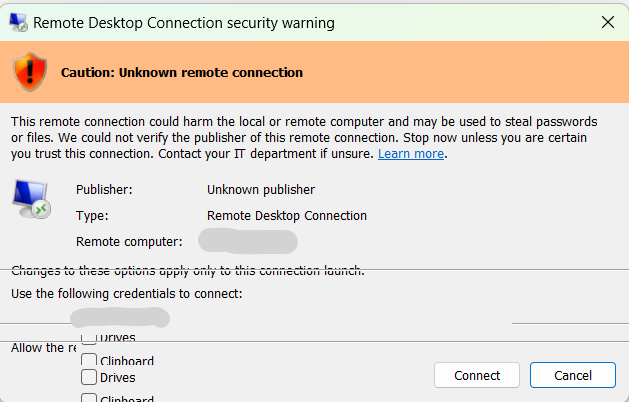 I am able to suppress this dialog with gpedit.msc by enabling the "Configure server authentication" policy under Computer configuration -> Administrative templates -> Windows components -> Remote Desktop Services -> Remote Desktop Connection Client and setting it to connect and don't warn me, but that setting seems to only be working with the standard windows RDP app (mstsc.exe), RDM ignores is and it keeps displaying the dialog (presumably because it uses mstscax.dll or something like that).
Can you make it so your app respects the global policy, or has a checkbox we can enable to suppress this dialog?
And if possible, can you make it display properly when DPI is not set to 100%, or make it possible for us to choose which monitor to display it on? My primary monitor is set to 125% and my secondary is set to 100% and my RDP windows open on the secondary monitor, but this dialog shows on the primary and it shows messed up like on the screenshot I attached.
Screenshot 2026-04-19 135321.png
All Comments (5)
Hello,
Thank you for the detailed report and screenshot. To investigate this further, could you please provide the following information?
1. What version of RDM are you running?
2. What version of Windows are you running?
3. Is your machine domain-joined, or is it a standalone/workgroup setup?
4. Is the Group Policy applied locally via gpedit.msc, or is it pushed through a domain controller?
Best regards,
Carl Marien
RDM 2024.1.32.0 64-bit
Windows 11 Enterprise Version 23H2 OS Build 22631.6936, Windows Feature Experience Pack 1000.22700.1108.0
Domain joined
Locally applied policy by me
Hello,
Thank you for the details. We noticed you are running RDM 2024.1.32.0. Could you please test on the latest version of RDM and let us know if the issue persists?
Best regards,
Carl Marien
Yes! That solved it. And revealed another issue - I was living with the idea that RDM auto updates and I'm always on the latest version. That idea was fed by the fact that I've seen in the past prompts that tell me there is a new version and asking me if I want it and I always click yes. I don't know how this happened, so I am not on the latest version. Now when you mentioned it, I started paying closer attention and noticed that when I click Download - nothing happens. I tried it a few times. Finally, I selected the other option that says download in your browser and installed it manually and that did the trick.
Thank you!
Hello,
Glad to hear updating RDM resolved the security warning dialog issue!
Regarding the auto-update not working, this may already be addressed in a more recent version of RDM. We will go ahead and close this forum post for now. Should the issue reoccur in a future version, please do not hesitate to reach out to us again.
Best regards,
Carl Marien