Significance of Folder Setting in Template

Hello,
As I am starting to play around with templates more, I notice when we create a template from an entry using "save as template", it will retain the "folder path" of the original entry in it. However, I don't know if there's any significance to this? Because templates don't show up in the normal navigation tree so they don't appear in the configured folder anyway.
This is what I'm referring to (value is redacted but the circled field is where it shows the full folder path, just like it would for any regular entry - e.g. FolderA\FolderB\FolderC etc.):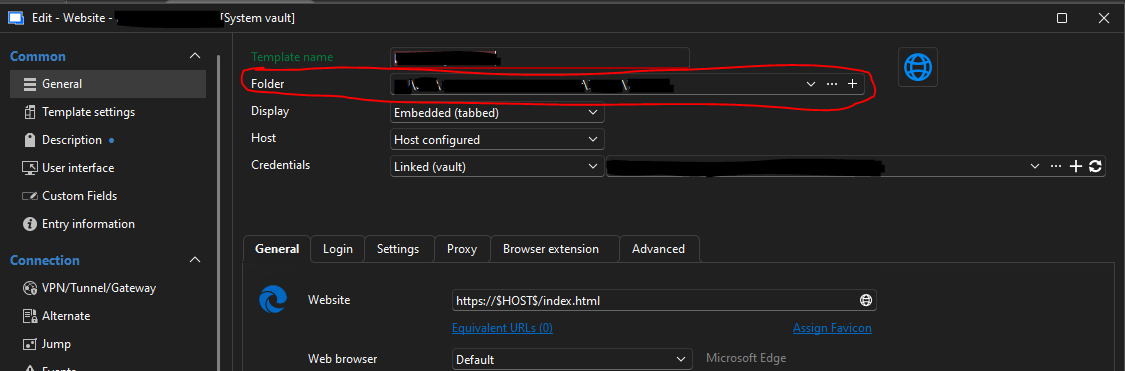
However, I notice on the Template Settings page of the settings, there is a "template folder" we can set: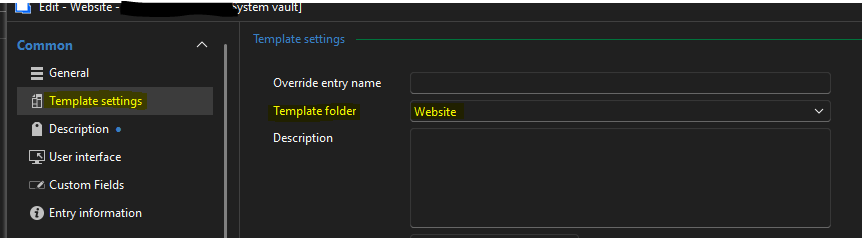
...and the above setting does affect where the template appears on the "Entry Templates" page (since that has its own folder structure). So that part makes sense.
But I'm just trying to understand whether the Folder setting in the General settings page matters at all for templates. The only place I've seen it referenced elsewhere so far is when configuring a host entry, and linking a template to it - when we select a default template, it refers to it by path (again, sorry, I know the path is redacted but the circled box is where it is, and it displays the full path as configured in the template's "Folder" setting):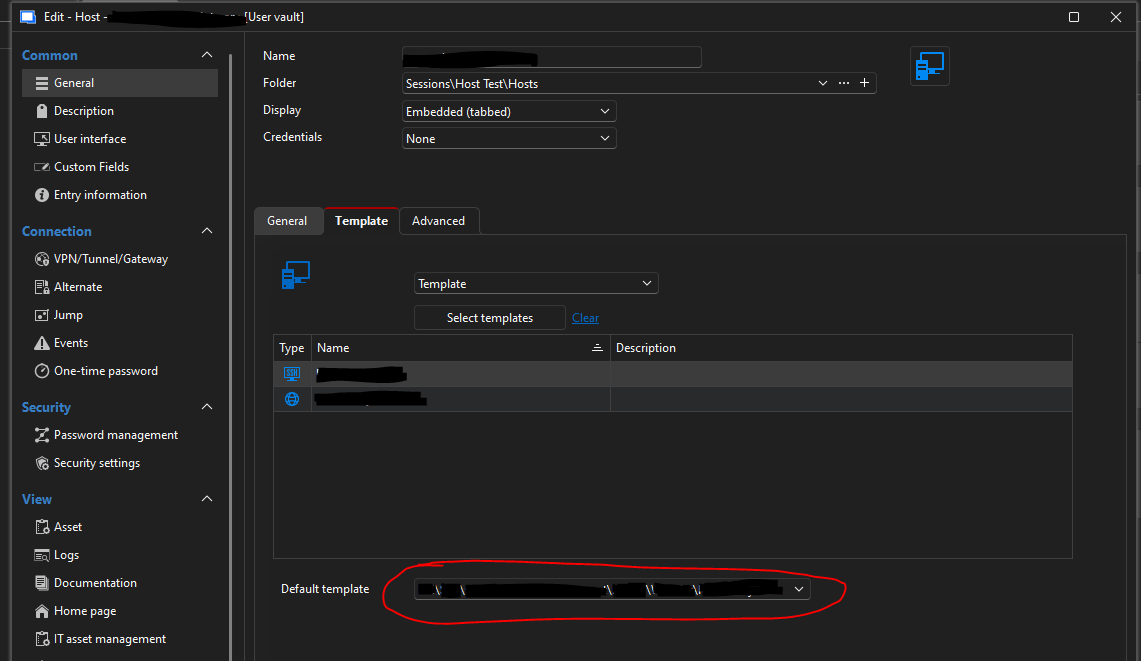
Any help is appreciated, thanks!
Best regards,
David Willis
1d59390f-3a1c-4bd1-94c4-168995768619.png
f451c30c-b56e-4812-b3e0-ff442fef19b7.png
e68981f4-5207-4abf-b790-ed0c922c6964.png
350eb2ca-36f2-4293-ad1d-a3cab1add5f8.png
Recommended Answer
Hi davidwillis,
Yes, that would be a reasonable approach.
If the goal is to make templates easier to identify in the **Default template** dropdown, clearing the **General > Folder** field should help. Since templates created directly from the **Entry Templates** view also have that field blank by default, keeping it empty for saved templates would be consistent and may reduce confusion.
The important field for template organization remains **Template settings > Template folder**.
Best regards,
Eduard Sepulveda Lopez
All Comments (5)
Hi davidwillis,
Thanks for reaching out to us!
This behavior is expected.
When an entry is saved using Save as template, the template retains the original entry’s Folder value. However, for templates, this field does not determine placement in the regular vault navigation tree, since templates are not displayed there as standard entries.
For templates, the relevant organizational field is Template settings > Template folder. This is the setting that determines how the template is organized and displayed in the Entry Templates view.
To clarify the distinction:
- General > Folder: retained from the source entry and may still be used for identification or display purposes in certain areas, such as template selection lists.
- Template settings > Template folder: controls where the template appears within the template structure.
So, from a template management perspective, Template folder is the setting that has practical significance. The Folder field under General primarily retains information from the original entry and does not place the template within the normal vault tree.
This also explains why, when assigning a default template to a Host entry, the template may still be shown with its full stored path in the selector. In that context, the path is being used as a reference/display value rather than as a location in the standard navigation tree.
https://docs.devolutions.net/rdm/concepts/intermediate-concepts/templates/
https://docs.devolutions.net/rdm/commands/file/templates/
I hope this clarifies the difference. If your experience does not match this behavior, please let us know and we will be happy to look into it further.
Best regards,
Eduard Sepulveda Lopez
Hi Eduard,
Thanks very much for the detailed answer! That makes sense. One followup question - to avoid confusion when assigning templates to hosts (since as you mentioned, the "default template" dropdown does use the "full path" of the template i.e. the one carried over from the source entry) - might it be a good idea to just clear the General -> Folder field on a template? I think it makes the templates much easier to identify in the dropdown list when selecting a default. Also I notice new templates created by default (e.g. with the "+" button on the Entry Template screen) have the "Folder" field blank:
Also interesting, even in the folder dropdown for a new template on the above screen, there's no folder to select from (which again makes sense since, as you mentioned, the other folder setting on the Template settings is the relevant one).
I did this (clear the Folder field) on a test template and it seemed to work, there wouldn't be any adverse effect from this would there?
If there's no practical significance for this setting anyway, I might suggest just disabling that field (General -> Folder) for templates entirely, to avoid confusion for users, as a future improvement?
Best regards,
David Willis
707ed3c4-4ab0-4974-8322-0b2360830486.png
Hi davidwillis,
Yes, that would be a reasonable approach.
If the goal is to make templates easier to identify in the **Default template** dropdown, clearing the **General > Folder** field should help. Since templates created directly from the **Entry Templates** view also have that field blank by default, keeping it empty for saved templates would be consistent and may reduce confusion.
The important field for template organization remains **Template settings > Template folder**.
Best regards,
Eduard Sepulveda Lopez
That makes sense, I think I will start doing that - thanks again for the help!
Best regards,
David Willis
Hello, just wanted to add one more note for anyone who is curious - it appears the Folder path on a template, if set, will also specify the default location for a new entry created from the template. For example, if we right-click a folder named FolderB and we click Add Entry: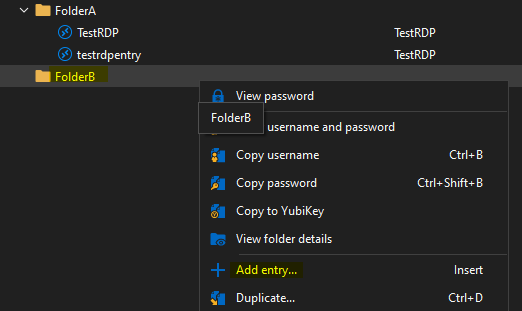
...and choose to add a from a template that has the Folder path populated (on the General tab in the template properties), then the new entry it creates will not have FolderB as its default path - instead, it will inherit the Folder path the template had (which is FolderA in this case):
(we can override if we want to, of course)
But if we do the same to create a new entry from a template that does not have the Folder value populated, then the new entry will have its Folder value pre-filled based on the location where we added the entry (e.g. in the same scenario above, the new entry's Folder path would be populated with FolderB, as we would expect).
For me, I wouldn't want templates setting a default location in the folder tree for entries that are created from it, so I would still prefer to clear the field in my templates. But if someone did want that behavior, they could achieve it by leaving the Folder value populated on a template, which will then become the default location for any entries created from the template.
Best regards,
David Willis
7905cf7e-260b-48e0-834f-0bd145a50443.png
53a8e994-5ec2-4fc4-9d0e-f4d5f5837d5b.png
098bc320-e5bd-46c5-a9ee-bb22937746b7.png