Incorrect Tooltips on Users and User Groups Screens

Hello,
Very minor issue but I noticed there seems to be a bug in the tooltips on the "edit" button on the toolbar on the Users and User Groups tabs. On the Users tab, the one that presumably should say "edit user" actually says "edit user group" (it's true you can change the user's groups from the edit window that appears, but it's far from the only thing you can do, it seems to be a "full edit window" for the user's properties):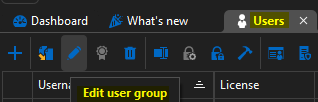
The other similar issue is on the User Groups tab, although I'm not 100% sure - but it says "edit role" (instead of what would presumably be "edit group" or "edit user group" or something):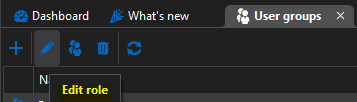
I'm not sure if "role" is being used as a synonym for "group" here, I'm not super-familiar with the RDM permission model as most of our users have admin rights on our data source, so if this is by design please let me know. It just seemed odd since I did not see groups referred to as "roles" on any other screen - my understanding is a role would be more like a permission set.
This is on the newest RDM v2026.1.16.0, using a SQL Server data source.
Best regards,
David Willis
e69eb6ef-33ea-4593-855d-9e43137a54c5.png
b8a59410-4f0b-4eb2-bb87-8ebc0937fcb5.png
All Comments (1)
Hello David,
We're currently reworking these windows, so I will ask our developers to fix these labels at the same time. Thanks for reporting this.
I'm not sure if "role" is being used as a synonym for "group" here
Yes and no, historically we used to call user groups "roles", but we decided to change the terminology as it more closely aligned with other permission systems in the industry. This was changed a while ago, so I'm assuming some of the labels were forgotten, as the term "role" should not be used here.
Regards,
Hubert Mireault