$SITE_XX$ variables do not work
1 vote

I cannot find any scenario where any $SITE_XX$ variables I've tested function.
Based on the documentation below, I would expect an Entry/Folder would be able to reference the values of the Site entry associated with the entry under View > Asset > Location: Site entry
If this is not the intended use-case for the $SITE_XX$ variables, it would be helpful for an explanation of where they can be used, because I can't think of another purpose for them.
Access and manage variables - Devolutions Documentation
All Comments (6)
Hi Austin,
I was wondering whether you had a chance to check if there is a variable defined for the specific site-related value you are trying to use.
From the variables section, you can see what each variable refers to, so I think it would be worth first confirming that the variable you need exists and is mapped to the target you have in mind.
I am attaching a screenshot of the section I am referring to in case it is helpful.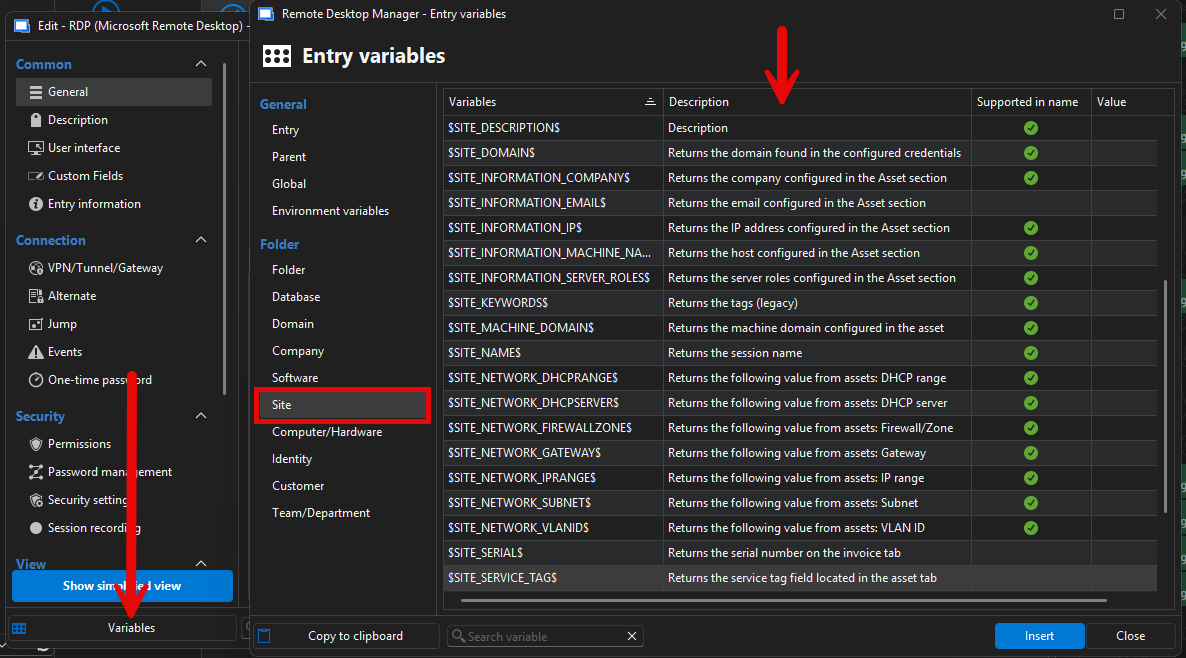
If no variable currently exists for that specific reference, then this would be a feature request.
Best regards,
Alexis Geller Peiro
38f0eb5d-2ecc-4227-be3e-9fc84d533b65.png
Yes, that is the list I am using for reference. I am directly adding the references using Insert to be sure there are no typos.
I am primarily using $SITE_NAME$ for testing since that always exists.
After that failed, I tried setting several other $SITE_XX$ vars and none of them were ever passing values. I am not seeing a similar issue with any other variable types I have used.
I've determined the source of the problem:
RDM supports 2 different types of entries labeled "Site":
- Contact: Site object used for entry Asset > Location associations
- Folder: Site (Folder) object, which appears to just be a Folder object with a different icon
The $SITE_XX$ variables can only be used with the latter "Folder" objects.
Since Contact: Site is a core piece of RDM asset management, it might be useful to have the documentation clarify the "Site" variable refers to Folders, not the actual Site contact used for asset management/locations.
Hi Austin,
Sorry for the delayed response.
I’ve been asking internally about this, and one question came up: could you explain in more detail what you need these variables for, specifically why they need to point to View > Assets?
A detailed explanation of your use case would help us provide the right context to our developers and determine the best possible solution, improvement, or feature.
Best regards,
Alexis Geller Peiro
@Alexis Geller Peiro There are tons of useful values in the View > Asset category that can make templating easier.
- Setting names and descriptions of devices using inherited Asset > Location values
- Inheriting Location values from a parent: Site, Rack, Rack unit, Floor, Room, etc.
RDM has a ton of support for inheritance and variables that streamline templating and making sure objects have consistent values. The View > Asset category just lacks almost any of these features, making it very burdensome to maintain assets using RDM. The asset values for every single object need to be maintained by hand. This makes drift more likely, and RDM less capable to serve as a source of truth for this data.
I hope that response is useful. Broadly my answer would be: The same reason we use variables anywhere. To prevent the need to duplicate data by hand, maintain consistency of data, and allow dynamic usage of data.
Hi Austin,
Thank you for the detailed explanation. That is very useful context.
I shared your response with our developers, and they confirmed that, unfortunately, there are currently no variables that point to the View > Asset sections you mentioned.
For that reason, we will move this post to the Feature Request section so the team can take it into consideration and evaluate the possibility of implementing this in the future.
Best regards,
Alexis Geller Peiro
