Unable to re-install RDM free edition again

Hi,
Iam unable to re-install the latest free version of RDM, after i had uninstalled an old version.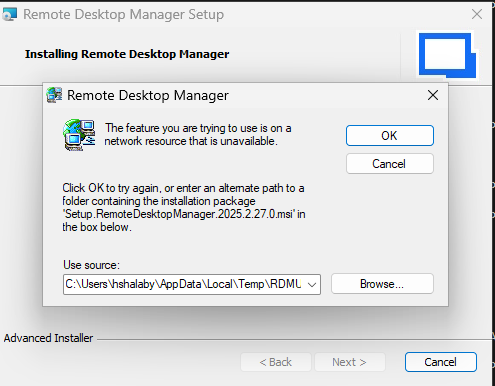
File and folder are not exist.
I also tried to use the following command line but with no luck (same window appear) :
msiexec /i "Setup.RemoteDesktopManager.win-x64.2026.1.16.0.msi" /L*V "C:\log\RdmInstall.log"
Iam using Windows 11
Thank you ...
Hamdy
Screenshot (293).png
Recommended Answer
Hi Hamdy,
Here is the direct link to the exact .msi version shown in the screenshot, so you can use it to fully uninstall that version first:
https://cdn.devolutions.net/download/Setup.RemoteDesktopManager.2025.2.27.0.msi
Once the uninstall is completed, please download the latest version directly from our website and try again:
https://devolutions.net/remote-desktop-manager/download/
Let us know how it goes.
Best regards,
Alexis Geller Peiro
All Comments (2)
Hi Hamdy,
Here is the direct link to the exact .msi version shown in the screenshot, so you can use it to fully uninstall that version first:
https://cdn.devolutions.net/download/Setup.RemoteDesktopManager.2025.2.27.0.msi
Once the uninstall is completed, please download the latest version directly from our website and try again:
https://devolutions.net/remote-desktop-manager/download/
Let us know how it goes.
Best regards,
Alexis Geller Peiro
Hi Alexis,
Issue solved by using the downloaded "msi" file.
Thank you so much.
Hamdy