How to use in DB saved ps script in Before opening event?

I have a PS script which I am able to use only in "Before opening" event when it is saved on the disk selecting "Execute PowerShell" like ($RDM
. "NoMachine\NoMachine.ps1"
GetRemoteIP
WriteNoMachineConfig"). I like to have this script (NoMachine.ps1) in the DB and load it from there. I see "Execute macro/script/tool" which looks fine at the first glance but it is actually useless due to loosing the $RDM object. Perhabs a new PS instance get instanciated not using the one having the actual connection. It is possible to do what I wanna do or it is a missing implementation. It would be more convenient to edit script in one place in the DB as at every location and keep tracking on versioning etc.
All Comments (5)
Hello,
Thank you for reaching out to us regarding this,
Could you please specify the version of RDM you are currently using?
What type of data source are you using?
Additionally, if possible, could you provide us with some screenshots of your current configuration? What are you looking to achieve with this script exactly?
Let me know,
Best regards,
Samuel Dery
Hello,
Thank you for reaching out to us regarding this,
Could you please specify the version of RDM you are currently using?
What type of data source are you using?
Additionally, if possible, could you provide us with some screenshots of your current configuration? What are you looking to achieve with this script exactly?
Let me know,
Best regards,
@Samuel Dery
Hello,
I am testing 2025.2.30.0 on behalf of my customer who like to use something like DRDM at his bussines. He currently using ultraVnc and NoMachines. Since - so far I was able to determine - this is the last version support embaded ultraVnc I kind of "stuck with" this version. NoMachine integration is rudimentary as well but with PS I was able to get it working but since the scripts are kind of big and we need several support stations maintaining the scripts centralized is very much needed. But I was not able to figure out how could I load the scripts from the database without loosing the $RDM object so members like $RDM.Connection.Host is not existing. I my logic in tha attached picture there should be a selection of script from DB but there is none.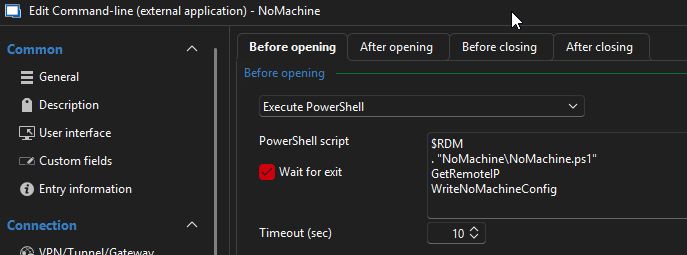
DRDM-NoM.jpg
Hello,
Thank you for your reply,
I see, I'm wondering if perhaps using the "PowerShell Script (Macro/Script/Tool)" entry to store the script inside RDM and then using the "Before Open" -> "Execute Macro/Script/Tool" then selecting the script entry may work better in your case?
Let me know,
Best regards,
Samuel Dery
Yes, that was my first thought too because it seemed somewhat logical but the implementation of this tool is not that great at all. It looks like a new PS enviroment got instanciated so the $RDM object is gone. The only place the $RDM object is preserved is in "Execute PowerShell" but there is missing the implementation to load the script from DB. So my only hope I think is to directly access the DB and load the script in an other script cumbersomely but it almost defy the original purpose of having the script in one place if need modification than I have to meantain the loading script on each computer using DRDM.
Hello,
Thank you for your reply,
Would you be able to provide me with the script in question so that I can have a look and perhaps do some testing?
If it is sensitive, I can provide you a secure way to share it in a private message.
Let me know,
Best regards,
Samuel Dery