Configured Shortcuts Do Not Work Inside RDP Session

Is it a feature or a limitation that I cannot use configured shortcuts inside an RDP session?
I have configured a hotkey for the action “Type Clipboard” and a few others. They don’t seem to work when I’m inside an RDP session; they only work when the main RDCM window is selected as active.
I’m using the latest available RDCM version on macOS Tahoe 26.4.
Thanks.
Recommended Answer
This was my error =) The hotkey is indeed working, but the configured hotkey needs to be a very carefully chosen, exotic key combination that does not interfere with anything in RDM.
All Comments (9)
Hello kniem,
Thanks for reaching out to us!
What you are seeing is usually expected behavior on macOS: RDM’s configured shortcuts are handled by the RDM app itself, and when you click into the embedded RDP session, the RDP view takes keyboard focus and captures keystrokes to send them to the remote machine. In that state, RDM often won’t receive the key event needed to trigger actions like “Type Clipboard”, so the shortcut only works when the main RDM window is the active focus (as you observed), even on the latest available RDCM version.
To confirm whether this is simply a limitation of the embedded session (vs. something we can tweak), could you share a few details?
Session mode
- Is the RDP session running embedded (inside an RDM tab) or opened in a separate/external window?
- If you switch to the other mode, does the hotkey behavior change?
Shortcut scope and combo
- Is the hotkey defined as “global/system-wide” (if that option exists in your build) or only as an RDM shortcut?
- What exact key combination are you using? (Some combos are intercepted by macOS or by the remote OS.)
RDP engine/settings
- Which RDP implementation is RDM using in your setup (if there is a selectable engine/setting)?
- Any “send system shortcuts to remote” / keyboard passthrough-type settings enabled?
Permissions (macOS)
- Does RDM have Accessibility and/or Input Monitoring permissions enabled in macOS Privacy & Security settings? (This mainly matters if you expect global hotkeys while another view/app has focus.)
Thanks in advance!
Best regards,
Eduard Sepulveda Lopez
Thanks. I have tested both the embedded and separate window sessions. What I was trying to get working inside the RDP session was the ability to use RDM’s “Type Clipboard, Type Username, Type Password” hotkeys that I have configured specifically for RDM.
Hello kniem,
Thanks for testing both embedded and separate window sessions.
On macOS, this is generally expected: once you’re focused inside the RDP session, the RDP view captures the keystrokes and forwards them to the remote machine, so RDM can’t “see” your RDM-only shortcuts (Type Clipboard / Type Username / Type Password) to trigger them.
If you share the exact key combinations you assigned, we can also rule out any macOS/remote-side shortcut conflicts.
https://docs.devolutions.net/rdm/kb/how-to-articles/keyboard-shortcuts-customization/?tab=macos
Best regards,
Eduard Sepulveda Lopez
This is what I thought as well. Hotkeys inside the RDP session do not reach RDM. I have verified that these hotkeys are only used by RDM—nowhere else. For some reason, the hotkeys do not seem to work well for these actions, even when I activate the RDM window. Actions work fine when started directly from the menu.
Hi kniem,
Could you please try the following within the RDP session properties:
Local Resources > Keyboard > On the remote computer
This should make the Windows key combinations execute inside the remote session instead of on the host machine.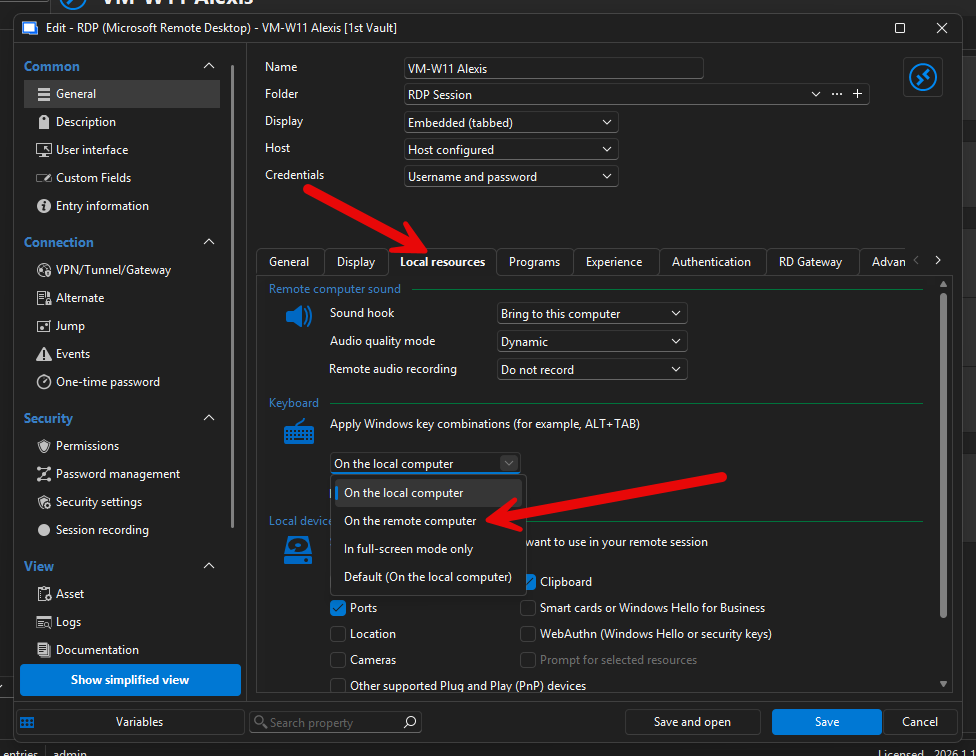
Please let us know if that resolves the issue.
Best regards,
Eduard Sepulveda Lopez
87aa1766-863f-4b8f-90d8-d4d4c56d41c4.png
Hi kniem,
Could you please try the following within the RDP session properties:
Local Resources > Keyboard > On the remote computer
This should make the Windows key combinations execute inside the remote session instead of on the host machine.
Please let us know if that resolves the issue.
Best regards,
@Eduard Sepúlveda López
It seems that you are using the Windows version of RDM while I’m using the macOS version. I cannot get the hotkeys to work regardless of how I configure them. they only work from the menu.
Hi kniem,
We are currently validating this internally with our team and will follow up here once we have a confirmed answer.
Thanks for your understanding.
Best regards,
Eduard Sepulveda Lopez
This was my error =) The hotkey is indeed working, but the configured hotkey needs to be a very carefully chosen, exotic key combination that does not interfere with anything in RDM.
Hi kniem,
Thank you for the update. I have stopped the investigation.
I am glad this is resolved. Please let us know if anything else comes up.
Best regards,
Eduard Sepulveda Lopez