long delay loading sessions 8.9.14.0

there is a very long load time 3-4 minutes when the application starts and if I switch data source. Attached is a screenshot of the message that is displayed while this is occuring. If I go back to the current release version this does not occur. Oh I have about 1200 entries in my session list.
9-10-2013 11-38-50 AM.png
All Comments (9)
What data source type are you using? MSSQL? MySQL?
Could you please do the following:
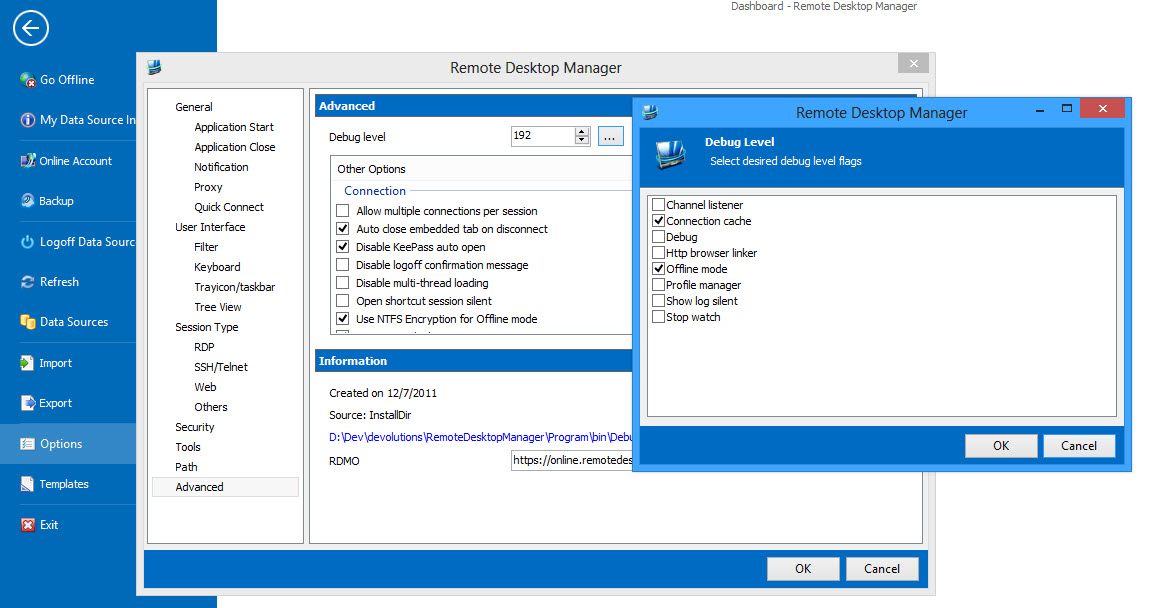
- in RDM set the debug level to 192 (see image). You can type it in or select "Connection cache" & "Offline Mode".
- Close RDM
- start it with /profiler option
- send me post, email (slavergne at devolutions.net) or direct message the content of the Profiler
Thanks,
Stéfane Lavergne
9-10-2013 12-56-18 PM.jpg
I am using an access datasource (.mdb)
LoadConnections [Local Data Source]...
Offline Mode : ReadOnly
Caching Type : IntelligentCaching
OfflineManager.GetDataSourceSettings : 9283 ms
LoadConnectionsFromDataSource...
LoadDataSourceSettingsFromDataSource...
GetDataSourceSettings : 0 ms
LoadDataSourceSettingsFromDataSource : 5 ms
OfflineManager.Save : 496 ms
---------------------------
OfflineManager.OfflineMode : ReadOnly
ConnectionManager.DataSource.OfflineMode : ReadOnly
ConnectionManager.DataSourceSettings.OfflineMode : ReadOnly
SecurityManager.CustomSecurity.OfflineMode : ReadOnly
ConnectionManager.DataSource.SupportOfflineMode : True
---------------------------
GetConnections...
Database.GetConnections...
Reading connections from database : 322 ms
Decrypt (multi-threaded) : 1107 ms
Deserialize (multi-threaded) : 177 ms
Process entries (overhead) : 2 ms
Connection cache version: 0x0000000000000000
Fetched 1357 sessions
Fetched 0 removed sessions
Database.GetConnections : 1686 ms
GetConnections : 1941 ms
DoSetConnections...
OfflineManager.Save : 33 ms
DoSetConnections : 253965 ms
LoadConnectionsFromDataSource : 258464 ms
LoadConnections [Local Data Source] : 270805 ms
TreeView.LoadConnectionList...
GetGroupInfos : 0 ms
BeginUpdate...
ApplyGroupCustomImages : 0 ms
LoadConnectionInTreeNode : 3279 ms
PreCreateGroups : 293 ms
BeginUpdate : 185 ms
TreeView.LoadConnectionList : 3775 ms
LoadTrayiconContextMenu : 70 ms
edited by debell67 on 9/10/2013
My RDM is also starts slower than before:
LoadConnections [AzureSQL]...
Offline Mode : ReadOnly
Caching Type : IntelligentCaching
Current cache version: 0x0000000000000000
OfflineManager.GetDataSourceSettings : 617 ms
OfflineManager.LoadConnections...
LoadConnectionsFromOfflineFile : 527 ms
Preloaded: 285
Offline cache version: 0x0000000000000133
OfflineManager.LoadConnections : 619 ms
LoadConnectionsFromDataSource...
LoadDataSourceSettingsFromDataSource...
GetDataSourceSettings : 1616 ms
LoadDataSourceSettingsFromDataSource : 2738 ms
OfflineManager.Save : 322 ms
---------------------------
OfflineManager.OfflineMode : ReadOnly
ConnectionManager.DataSource.OfflineMode : ReadOnly
ConnectionManager.DataSourceSettings.OfflineMode : ReadOnly
SecurityManager.CustomSecurity.OfflineMode : ReadOnly
ConnectionManager.DataSource.SupportOfflineMode : True
---------------------------
GetConnections...
Database.GetConnections...
Reading connections from database : 0 ms
Decrypt (multi-threaded) : 0 ms
Deserialize (multi-threaded) : 0 ms
Process entries (overhead) : 5 ms
Connection cache version: 0x0000000000000133
Fetched 0 sessions
Fetched 0 removed sessions
Database.GetConnections : 196 ms
GetConnections : 210 ms
PrepareConnectionList : 0 ms
DoMergeConnections : 7 ms
LoadConnectionsFromDataSource : 3980 ms
LoadConnections [AzureSQL] : 5426 ms
TreeView.LoadConnectionList...
GetGroupInfos : 0 ms
BeginUpdate...
ApplyGroupCustomImages : 0 ms
LoadConnectionInTreeNode : 94 ms
PreCreateGroups : 31 ms
BeginUpdate : 40 ms
TreeView.LoadConnectionList : 178 ms
LoadTrayiconContextMenu : 8 ms
@zomby - Please do a full fresh (hold the CTRL key while pressing the refresh icon) and post that trace here.
I suspect the slowdown, in this case, is due to the delay establishing a connection to the SQL Azure database. All our data sources (MSSQL, MySQL, SQLite) use connection pooling, so when you fresh, even a full (CTRL) refresh, you should see faster performance since the connection has already been established.
This should be reflected in the following to trace entries: Their durations should be drastically lower.
GetDataSourceSettings : 1616 ms
LoadDataSourceSettingsFromDataSource : 2738 ms
Stéfane Lavergne
LoadConnections [AzureSQL]...
Offline Mode : ReadOnly
Caching Type : IntelligentCaching
Current cache version: 0x0000000000000000
OfflineManager.GetDataSourceSettings : 872 ms
OfflineManager.LoadConnections...
LoadConnectionsFromOfflineFile : 448 ms
Preloaded: 285
Offline cache version: 0x0000000000000133
OfflineManager.LoadConnections : 542 ms
LoadConnectionsFromDataSource...
LoadDataSourceSettingsFromDataSource...
GetDataSourceSettings : 414 ms
LoadDataSourceSettingsFromDataSource : 1787 ms
OfflineManager.Save : 341 ms
---------------------------
OfflineManager.OfflineMode : ReadOnly
ConnectionManager.DataSource.OfflineMode : ReadOnly
ConnectionManager.DataSourceSettings.OfflineMode : ReadOnly
SecurityManager.CustomSecurity.OfflineMode : ReadOnly
ConnectionManager.DataSource.SupportOfflineMode : True
---------------------------
GetConnections...
Database.GetConnections...
Reading connections from database : 0 ms
Decrypt (multi-threaded) : 0 ms
Deserialize (multi-threaded) : 1 ms
Process entries (overhead) : 8 ms
Connection cache version: 0x0000000000000133
Fetched 0 sessions
Fetched 0 removed sessions
Database.GetConnections : 91 ms
GetConnections : 115 ms
PrepareConnectionList : 0 ms
DoMergeConnections : 10 ms
LoadConnectionsFromDataSource : 2515 ms
LoadConnections [AzureSQL] : 4282 ms
TreeView.LoadConnectionList...
GetGroupInfos : 0 ms
BeginUpdate...
ApplyGroupCustomImages : 0 ms
LoadConnectionInTreeNode : 109 ms
PreCreateGroups : 33 ms
BeginUpdate : 54 ms
TreeView.LoadConnectionList : 215 ms
LoadTrayiconContextMenu : 7 ms
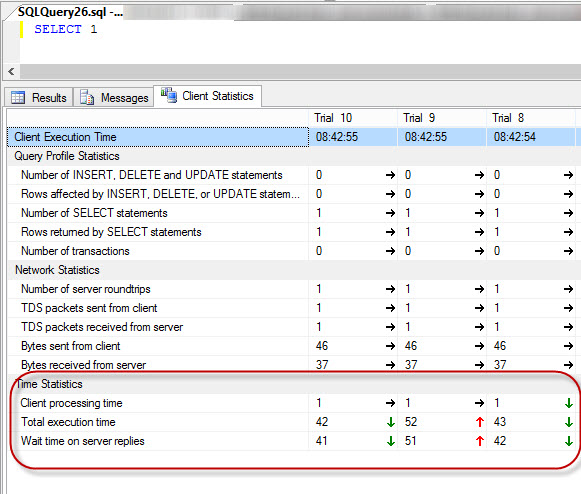
Could you please follow the steps outlined in the link below to test your SQL Azure latency and post the results.
http://blogs.msdn.com/b/sqlazure/archive/2010/05/27/10016392.aspx
Thanks
Stéfane Lavergne
9-11-2013 8-43-17 AM.jpg
Stéfane I assume those requested action were directed to zomby and not me since I am using an MDB data source? Just checkin :)
The new beta version 8.9.15.0 seemed to greatly reduce the load time of the session. Just for detail here is the new profile
LoadConnections [Microsoft Access : L2 Clinical Team datasource]...
OfflineManager.GetDataSourceSettings : 593 ms
Offline Mode : ReadOnly
Caching Type : IntelligentCaching
LoadConnectionsFromDataSource...
LoadDataSourceSettingsFromDataSource...
GetDataSourceSettings : 0 ms
LoadDataSourceSettingsFromDataSource : 1 ms
OfflineManager.Save : 126 ms
OfflineManager.OfflineMode : ReadOnly
ConnectionManager.DataSource.OfflineMode : ReadOnly
ConnectionManager.DataSourceSettings.OfflineMode : ReadOnly
SecurityManager.CustomSecurity.OfflineMode : ReadOnly
GetConnections...
Database.GetConnections...
Reading connections from database : 3693 ms
Decrypt (multi-threaded) : 630 ms
Deserialize (multi-threaded) : 113 ms
Process entries (overhead) : 5 ms
Connection cache version: 0x0000000000000000
Fetched 1385 sessions
Fetched 0 removed sessions
Database.GetConnections : 4534 ms
GetConnections : 4569 ms
DoSetConnections...
OfflineManager.Save : 9 ms
DoSetConnections : 203 ms
LoadConnectionsFromDataSource : 5062 ms
LoadConnections [Microsoft Access : L2 Clinical Team datasource] : 6450 ms
TreeView.LoadConnectionList...
GetGroupInfos : 0 ms
BeginUpdate...
ApplyGroupCustomImages : 0 ms
LoadConnectionInTreeNode : 816 ms
PreCreateGroups : 153 ms
BeginUpdate : 24 ms
TreeView.LoadConnectionList : 1001 ms
LoadTrayiconContextMenu : 25 ms
Row Count: 15
ThreadQueue.AddRow : 3895 ms
Row Count: 512
ThreadQueue.AddRow : 2804 ms
Row Count: 512
ThreadQueue.AddRow : 2617 ms
Row Count: 346
ThreadQueue.AddRow : 1771 ms
Correct
Stéfane Lavergne